The camera doesn’t have time stamp when coming
with default. If you want time stamp, or change the
time, please download the tool in our official website.
It is easy to set up with tool.
https://boblov.com/download/
Step 1:Go to our official website
"http://boblov.com/download/" to download the tool
Step 2: Connection the computer with camera,
recognize the sd card. Download the tool and copy
it in W1 SD disk
4.Time/Date Setting
The W1 is on Power off status to connect.
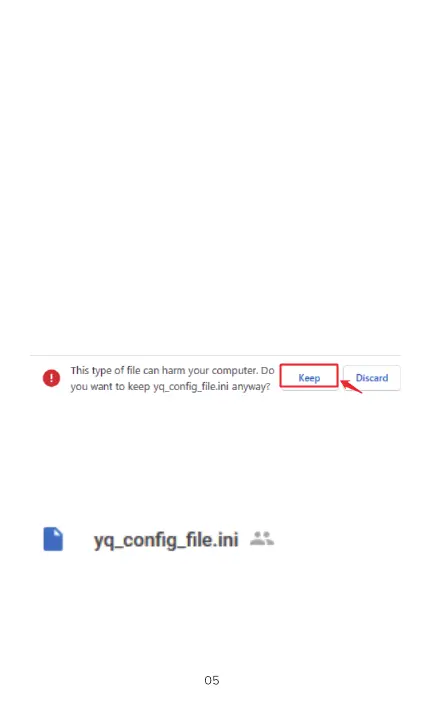
If your computer prompt such as "virus software
detected high-risk files"/ "may do harm to your
computer" when you download it on your Google
Chrome, please just click the "Keep" option and
finish the download process.
Don't worry, it's just a TXT tool to help you set the
Time/Date Stamp. Won't do harm to the computer.
4.Time/Date Setting
The camera doesn't have time stamp when coming
with default. If you want time stamp, or change the
time, please download the tool in our official website.
It is easy to set up with tool.
https://boblov.com/download/
Step I : Go to our official website
"http://boblov.com/download/" to download the tool
If your computer prompt such as "virus software
detected high-risk files"/ "may do harm to your
computer" when you download it on your Google
Chrome, please just click the "Keep" option and
finish the download process.
This Wpe of file can harm your computer. Do
o
you want to keep arvway?
Don't worry, it's just a TXT tool to help you set the
Time/Date Stamp. Won't do harm to the computer.
Step 2: Connection the computer with camera,
recognize the sd card. Download the tool and copy
it in WI SD disk
yq-config_file.ini —
The WI is on Power off status to connect.


 To Next Page
 Loading...


