
 Need help?
Do you have a question about the BOBOVR Z6 and is the answer not in the manual?
Identifies and describes the main physical components, controls, and ports of the VR headset, including lenses, adjustments, buttons, and the charging port.
Instructions on connecting the VR glasses to a smartphone and starting a VR application from Google Play or the App Store.
Guidance on wearing the VR glasses comfortably and adjusting for clear vision, including specific recommendations for myopia and hyperopia users.
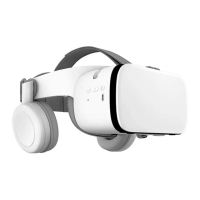
The BoboVR Z6 is a pair of foldable Bluetooth Virtual Reality (VR) glasses designed to provide an immersive audio and video experience for users. These VR glasses are engineered with a focus on user comfort, portability, and high-quality performance, making them suitable for a wide range of VR applications, from gaming to cinematic viewing. The device integrates several features that enhance the overall VR experience, including advanced optical components, integrated audio, and ergonomic adjustments.
At its core, the BoboVR Z6 functions as a display and audio output device for smartphones, transforming a standard smartphone into a powerful VR platform. The glasses are compatible with smartphones ranging in size from 4.7 inches to 6.3 inches, offering broad compatibility across various popular phone models. To use the device, users simply turn on the BoboVR Z6 and connect it to their smartphone via Bluetooth. Once connected, users can download and launch any VR application from their respective app stores, such as Google Play for Android devices or the App Store for iOS devices. The smartphone is then placed inside the VR glasses by opening the front cover, aligning the phone's center line with the VR glasses' center line, and securing it in place. This straightforward setup process ensures that users can quickly transition into their virtual worlds.
One of the key usage features of the BoboVR Z6 is its foldable design. This design significantly enhances the portability of the VR glasses, allowing them to be easily packed and carried, whether for travel or simply moving between different locations within a home or office. The ability to fold the device makes it more compact, protecting the lenses and other components during transport. This feature is particularly beneficial for users who wish to enjoy VR experiences on the go without the bulk of traditional VR headsets.
The audio experience is a crucial component of immersion, and the BoboVR Z6 addresses this with integrated earphones. These earphones provide HD audio, ensuring that users receive clear and rich sound that complements the visual experience. The inclusion of built-in earphones eliminates the need for external headphones, simplifying the setup and reducing clutter. Furthermore, the device incorporates a built-in microphone, which is essential for interactive VR applications, multiplayer games, or any scenario requiring voice communication within the virtual environment. This integrated audio solution contributes to a more seamless and immersive user experience.
Visually, the BoboVR Z6 boasts high-quality lenses and an ultra-wide Field of View (FOV). The improved aspheric lenses are designed to minimize distortion and provide a clear, expansive view of the virtual world. A wide FOV is critical for immersion, as it helps to fill the user's peripheral vision, making the virtual environment feel more realistic and less like looking through a window. The quality of the lenses ensures that the visual output from the smartphone is rendered effectively, providing sharp and vibrant images.
Ergonomics and comfort are paramount for extended VR sessions, and the BoboVR Z6 incorporates several adjustment features to cater to individual user needs. The headband is adjustable, allowing users to find the most comfortable and secure fit on their head. Similarly, the earphones can be adjusted to align perfectly with the user's ears. These adjustments are crucial for distributing the weight of the device evenly and preventing discomfort during prolonged use.
A notable feature for users with varying vision needs is the pupillary distance adjustment. This allows users to fine-tune the distance between the lenses to match their interpupillary distance, ensuring that both eyes are perfectly aligned with the optical sweet spot, which is essential for clear vision and preventing eye strain. Additionally, the BoboVR Z6 supports vision correction for myopia (nearsightedness) and hyperopia (farsightedness). Users with myopia up to 400 degrees and hyperopia up to 200 degrees can adjust the wheels on the right side of the glasses to achieve a clear focus without needing to wear their prescription glasses underneath the VR headset. This integrated vision adjustment significantly enhances accessibility and comfort for a broader range of users.
The device also includes a mobile phone bracket adjustment, which helps to securely hold different smartphone sizes in place, ensuring stability and proper alignment during use. This flexibility in phone size accommodation, combined with the precise alignment mechanism, ensures optimal visual performance regardless of the specific smartphone model being used.
Power management is another practical aspect of the BoboVR Z6. The device is equipped with a long battery life, which is a significant advantage for users who wish to enjoy extended VR sessions without frequent recharging. The charging is facilitated via a MicroUSB port, a common and convenient charging interface. An indicator light provides visual feedback on the device's status, likely indicating power on/off, charging status, or Bluetooth connection status.
In terms of controls, the BoboVR Z6 features intuitive buttons for essential functions. These include a power button for turning the device on and off, and dedicated volume up and volume down buttons for adjusting the audio output. These physical controls are easily accessible, allowing users to manage their experience without needing to interact directly with their smartphone once it's secured within the headset.
Maintenance features for the BoboVR Z6 are primarily focused on ease of use and durability. The robust construction and foldable design contribute to its longevity by protecting internal components. While specific cleaning instructions are not detailed, the design suggests that the lenses would require regular cleaning with appropriate lens cleaning materials to maintain optimal visual clarity. The ergonomic design not only enhances comfort but also contributes to the overall durability by ensuring that the device can withstand regular handling and adjustments without undue stress on its components. The use of standard charging ports like MicroUSB simplifies power management and ensures compatibility with widely available charging accessories.
In summary, the BoboVR Z6 foldable Bluetooth VR glasses are a comprehensive solution for immersive virtual reality experiences. Its blend of high-quality audio and video, ergonomic design, portability, and user-friendly adjustments makes it an attractive option for anyone looking to delve into the world of VR using their smartphone. The thoughtful integration of features like vision correction, adjustable components, and a long-lasting battery underscores its design philosophy of maximizing user pleasure and convenience.
 General
| Display Type | LCD |
|---|---|
| Field of View | 110 degrees |
| Weight | 350g |
| Type | Mobile VR headset |
| IPD Adjustment | Yes |
| Head Strap | Adjustable head strap |
| Focus Adjustment | Yes |
| Audio | 3.5mm headphone jack |
| Resolution | Depends on smartphone |
| Refresh Rate | Depends on smartphone |

 To Next Page