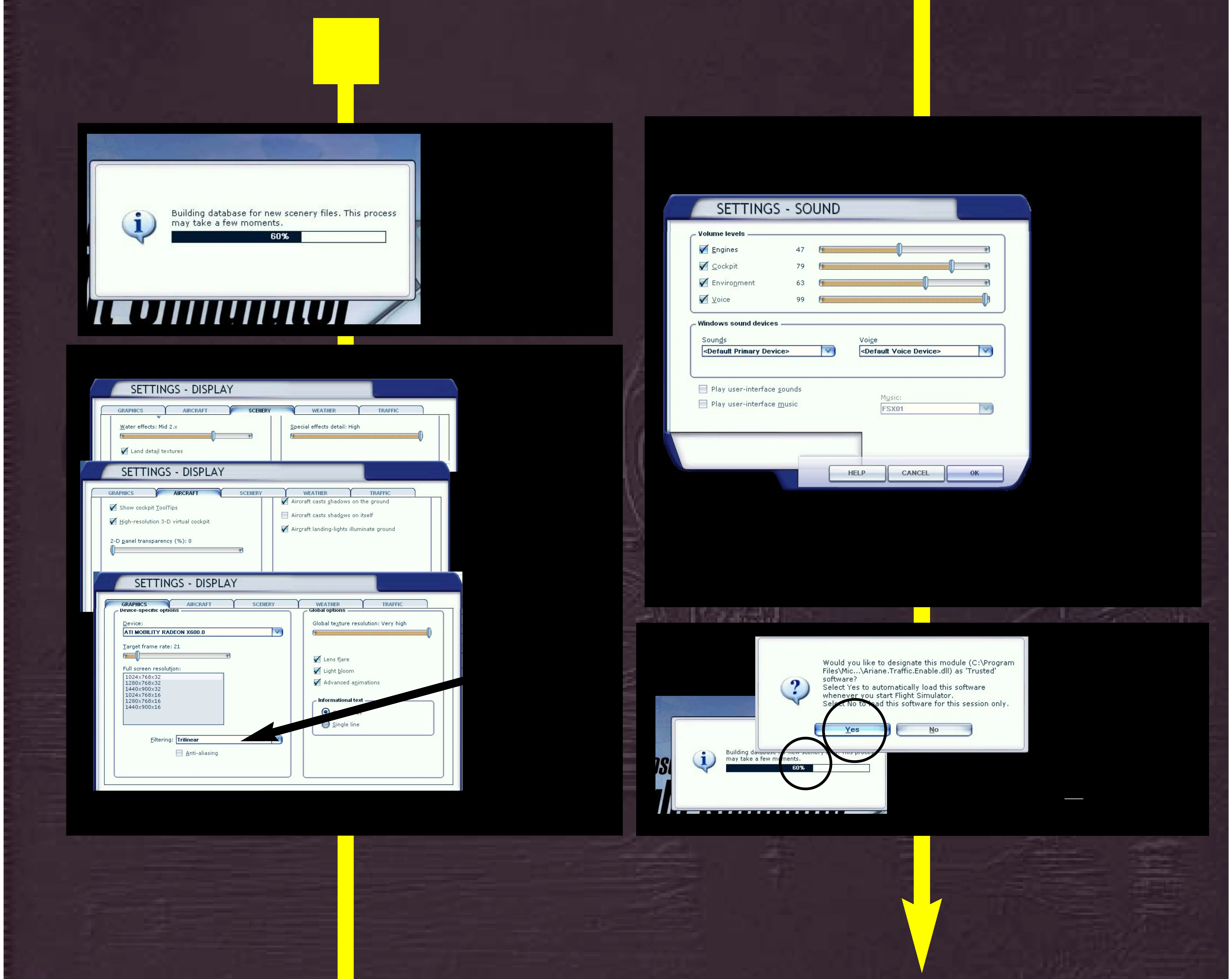
Allow FSX to build
the database.
During this time
please continue
to read the manual.
Note. At some point
FSX will ask you if you
wish to allow files.
Ignore any messages.
Click Run and Yes.
Note : No files will harm your security.
Our files have been tested and can be trusted.
2
Open
SETTINGS-DISPLAY
menu
Set the settings
shown left as the
minimum.
ONLY set higher if
your PC can handle
fast processing.
For best FPS
(frame
rates per second)
use
the settings shown.
High End PC User?
For best texture
definition and detail
change setting from
Trilinear Filtering to
Anisotropic and turn
anti-aliasing ON.
Open
SETTINGS-SOUND
menu
Set the settings
shown left as the
minimum.
!!! IMPORTANT !!!
Set sound as shown ...
‘Engines’ must be set
lower than cockpit
sound so buttons,
knobs and switches
can be heard at upper
louder flight levels.
Synchresis II has a VERY
sensitive logic and has
been tested at many levels.
The levels shown offer the
best mix.
Users using own settings
then exp. problems cannot
be supported unless sound
settings are as shown.
We regret that we cannot
support the use of other
sound programs installed
and possibly conflicting
with Synchresis II.



 To Next Page