The provided document describes the configuration of a Bogen PCM-TIM Overhead Paging System for use with 8x8 services. This device acts as an adapter, allowing an 8x8 adapter to connect to a Tel Line or 90v NGT RNG port to facilitate overhead paging. The document highlights two main versions or hardware revisions of the Bogen PCM-TIM, each with specific configuration requirements.
Function Description
The Bogen PCM-TIM is an overhead paging system designed to integrate with telecommunication services, specifically 8x8 services in this context. Its primary function is to enable paging announcements through an existing overhead paging infrastructure. The system operates in FXS Mode Only, meaning it emulates a foreign exchange station, typically connecting to a telephone line or a similar interface provided by a communication system. This allows the 8x8 adapter to "dial" into the paging system, triggering announcements.
The system supports different Bogen PCM models and various version releases, indicating a degree of backward compatibility or evolution in its design. The core functionality revolves around receiving an input signal from a connected communication device (like an 8x8 adapter) and translating that into an audio output suitable for an overhead paging system.
Important Technical Specifications
While specific detailed technical specifications like power consumption, frequency response, or output wattage are not explicitly listed, the document provides crucial operational and connectivity details:
- Connectivity: The Bogen PCM-TIM connects to an 8x8 adapter via either a "Tel Line" port (for Version 1) or a "90v NGT RNG" port (for Version 2). This indicates the type of electrical interface it expects from the communication system. The "Tel Line" port suggests a standard analog telephone line interface, while "90v NGT RNG" implies a ringing voltage input, typically found in older or specialized telephony systems.
- Operating Mode: The system is explicitly stated to operate in "FXS Mode Only." This is a critical specification, as it defines the electrical and signaling characteristics of the interface it presents to the 8x8 adapter.
- DIP Switch Configuration:
- Version 1: Requires DIP Switch 6 to be ON. This switch likely controls a specific operational parameter or feature relevant to Version 1's functionality or compatibility.
- Version 2: Requires the "DIP Switch" (presumably a specific one, though not numbered) to be set to "Station." This setting likely configures the device to behave as a station-side device in a telephony network, ready to receive calls or signals.
- Input Ports:
- Version 1: Features a "Tel Line" port for connection. It also includes "Night Ring" and "Over Ride" inputs, suggesting capabilities for night-time paging modes or priority override functions.
- Version 2: Features a "90v NGT RNG" port for connection. It also includes "Over Ride" and "NGT RNG" (Night Ring) inputs, similar to Version 1, indicating consistent feature sets across revisions for these functions.
- Output Ports: Both versions include a "PAGE PORT" and "TRUNK" output, which are likely connections to the actual paging amplifier or other components of the overhead paging system.
- Controls: Both versions feature "TONE VOLUME" and "BGM SRC VOLUME" controls, indicating the ability to adjust the volume of paging tones and background music sources, respectively. A "POWER" indicator is also present.
- Relay Outputs: Both versions show "RLY" (Relay) outputs with "NC" (Normally Closed), "COM" (Common), and "NO" (Normally Open) terminals. These relays can be used to control external devices, such as muting background music systems during a page or activating other equipment.
Usage Features
The Bogen PCM-TIM offers several features that enhance its usability within an overhead paging environment:
- Integration with 8x8 Services: The primary usage feature is its ability to seamlessly integrate with 8x8 communication services, allowing users to initiate pages directly from their 8x8 phone system.
- Volume Control: Independent volume controls for "TONE VOLUME" and "BGM SRC VOLUME" allow administrators to fine-tune the audio output for clarity and comfort. This is crucial for environments where background music is present and needs to be managed during announcements.
- Night Ring Functionality: The "Night Ring" input (and associated "NGT RNG" port on Version 2) suggests a feature to handle paging during off-hours or specific operational modes, potentially with different alert tones or routing.
- Override Capability: The "Over Ride" input allows for priority paging, where an urgent announcement can interrupt ongoing background music or other audio.
- Relay Control: The integrated relay outputs provide flexibility for system automation. For example, when a page is active, the relay could automatically mute a background music system, ensuring the announcement is heard clearly.
- Multiple Input Options: The presence of "PAGE PORT" and "TRUNK" inputs/outputs suggests the system can handle different types of audio sources or connect to various parts of a paging infrastructure.
- Hardware Revisions: The existence of two distinct hardware revisions (Version 1 and Version 2) indicates that the device has evolved, potentially offering improved performance, different connectivity options, or updated internal components. Users need to identify their specific version to ensure correct configuration.
Maintenance Features
While the document doesn't explicitly detail maintenance procedures, several aspects can be inferred:
- DIP Switch Accessibility: The DIP switches are externally accessible, allowing for easy configuration changes without disassembling the unit. This simplifies initial setup and any future adjustments.
- Clear Labeling: The ports, switches, and controls are clearly labeled ("Tel Line," "90v NGT RNG," "DIP Switch 6," "Station," "TONE VOLUME," etc.), which aids in correct installation, troubleshooting, and maintenance.
- Modular Design (Implied): The presence of distinct input/output ports and internal components (like relays) suggests a somewhat modular design, which could simplify troubleshooting or component replacement if necessary, although this is not explicitly stated.
- Documentation: The document itself serves as a crucial maintenance tool, providing step-by-step configuration instructions and references to external manuals ("Bogen Installation manuals here"). This ensures that users have the necessary information to set up and maintain the system correctly.
- Firmware/Software Updates (Implied by "Version Releases"): The mention of "differing version releases" for Bogen PCM models could imply that there are firmware or software updates available for the device, which might address bugs, improve performance, or add new features. However, the document does not provide details on how to perform such updates.
- Troubleshooting Information: The instruction to "Refer to the images below step 3 to identify the revision being configured" is a direct aid to troubleshooting, ensuring that the correct configuration steps are followed for the specific hardware in use.
In summary, the Bogen PCM-TIM is a specialized adapter designed to bridge 8x8 communication systems with overhead paging infrastructure. Its key features include FXS mode operation, specific DIP switch configurations for different hardware versions, and various audio and control inputs/outputs for flexible integration and management of paging announcements. The clear documentation and accessible controls contribute to its ease of use and maintenance.

 Need help?
 General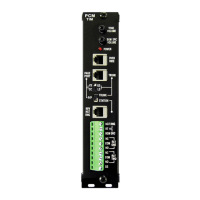

 To Next Page