English
- 4 -
- 5 -
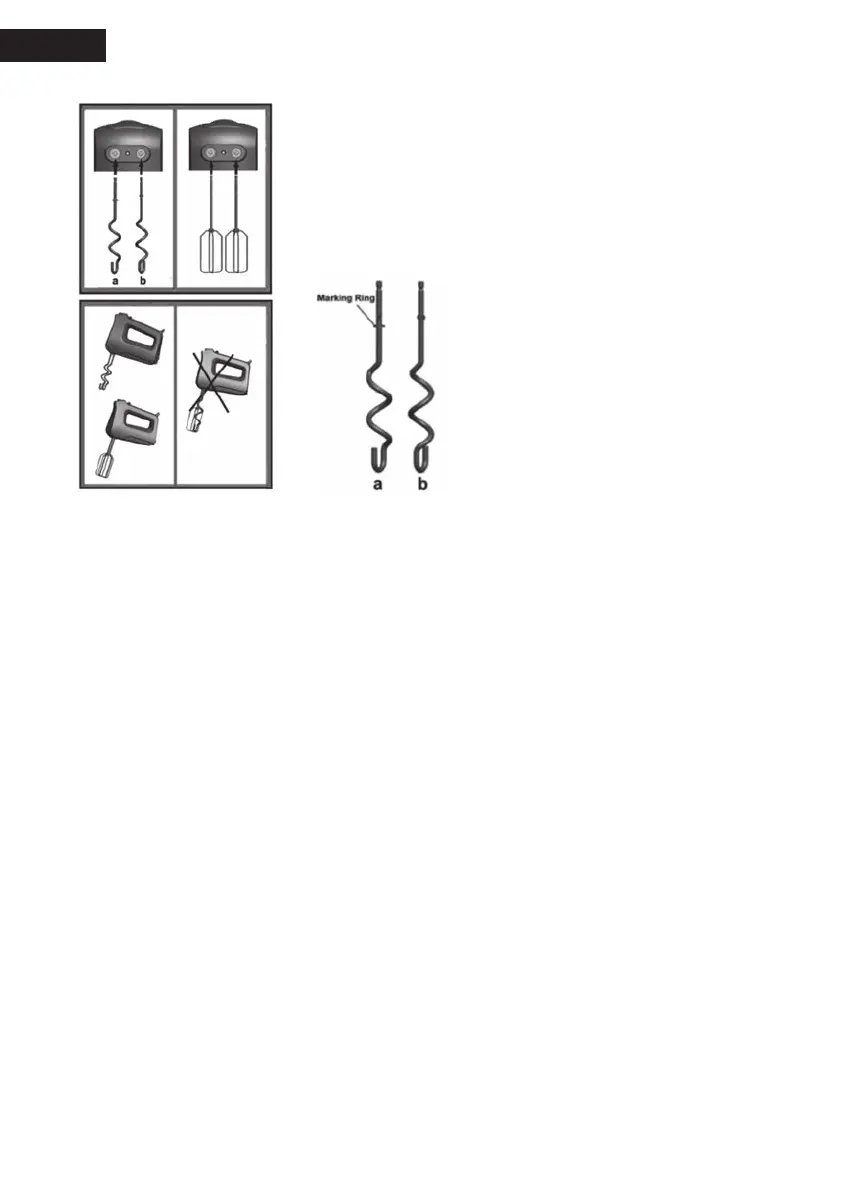
How to install dough hooks/double beaters/whisk:
Dough hooks:
1. Insert hook (a) into the bigger hole at the bottom of the hand
mixer.
2. And then insert hook (b) into the smaller hole at the bottom of
the hand held mixer. Be sure to make the hook (a) and (b) locked
in place. (See above gure)
Caution:
1. Only hook (a) has a marking ring. Don’t
install the hooks wrongly!
2. It is suitable for kneading the dough,
such as the dough for making dumpling,
noodles.
3. To remove dough hooks:
Firstly slice the speed switch (A) back to “0”,
secondly press “Eject key”.
Double beaters:
Insert the double beaters into the holes at the bottom of the hand held mixer. Be sure to make the
double beaters locked in place. (See above gure)
Caution:
1. It is suitable for beating egg white, cream and mayonnaise.
2. To remove the double beaters: Firstly slice the speed switch (A) back to “0”, secondly press
“Eject key”.
Whisk:
Insert whisk into one hole at the bottom of the hand held mixer. Be sure to make whisk locked in
place. (See above gure)
Caution:
1. It is suitable for beating egg white, cream and mayonnaise.
2. To remove whisk: Firstly slice the speed switch (A) back to “0”, secondly press “Eject key”.
How to use hand mixer:
1. Install the accessory (dough hooks, double beaters or blender stick) you need on the hand
mixer.
2. Add the food in the container.
3. Plug in.
4. Select the speed (M, 1, 2, 3, 4) you need, then appliance starts to process the food.
5. After the food is well processed, remove the hand mixer from the container.
6. Slice the speed switch (A) back to “0”, and then draw out the power cord from the main socket.
7. Take out the food from the container.


 To Next Page