English
- 12 -
- 13 -
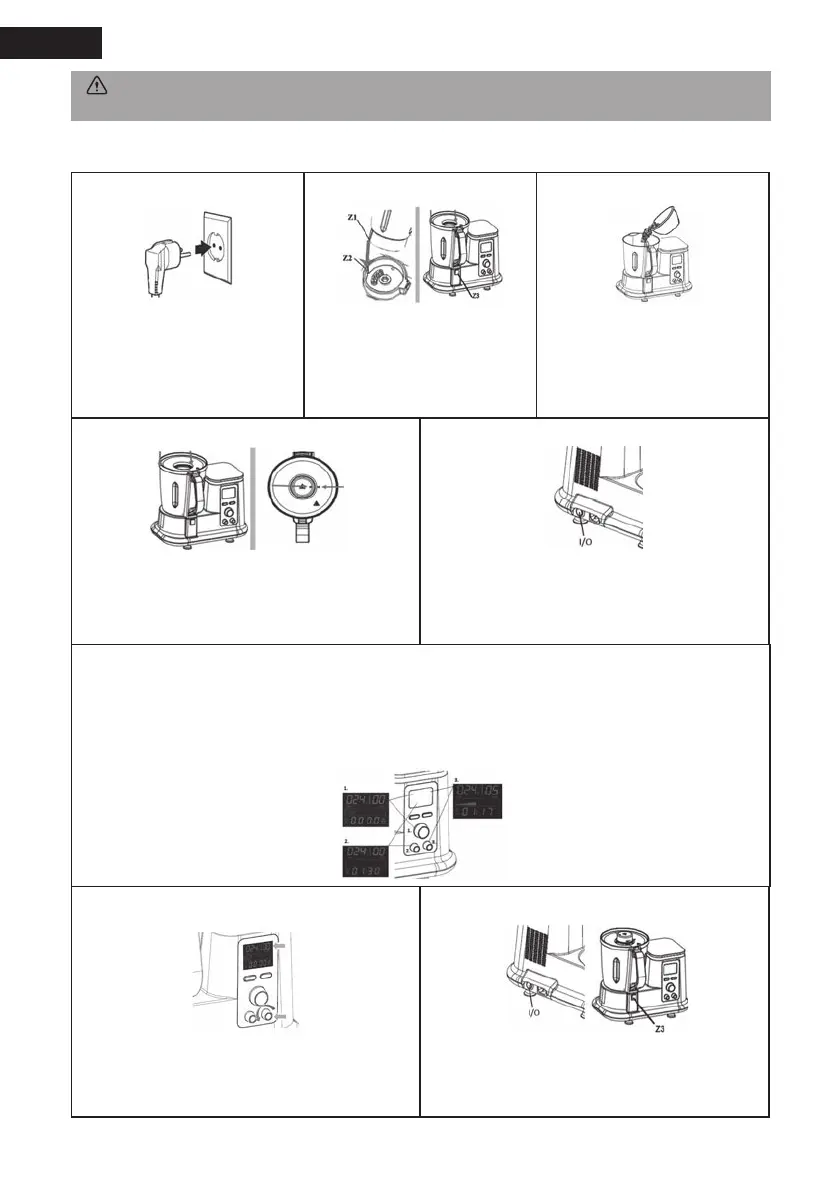
4. Using the cooking and mixing mode
Step 4 Step 5
Place the cover lid on the bowl by turning it clockwise
until its locking position then insert the measuring
cup onto the cover lid and turn it clockwise until the
marking on the cup matches with the marking on the
cover lid.
Press the I/O (ON/OFF) button to I (ON) to switch on
the appliance, you will hear a “beep” sound indicating
the machine is on. Please note for safety reason, the
appliance can only work if the cover lid is well locked
into the bowl.
Step 6
1) Turn clockwise the temperature button to set up your desired cooking temperature (1).
2) Turn clockwise the time button to set up your cooking time (2).
3) Turn clockwise the speed button to set up your speed level (3) to start the cooking and mixing program.
Please note the maximal speed level for the cooking mode is set to level 4 only.
Step 1 Step 2 Step 3
Plug the appliance into an earthed
grounded outlet.
Insert the bowl without the cover
lid onto its base with the handle at
the front facing you, make sure it
locks into place with the Z1 part
into the Z2 part and push it gently
into position.
Add the ingredients onto the bowl.
Step 7 Step 8
At the end of the program, the LCD display will ash
to indicate it is nished, turn anti-clockwise the
speed button to 00 to stop.
Press the I/O (ON/OFF) button to O (OFF) to switch
off the appliance. To remove the bowl, press on
the release button (Z3) and ensure to use the bowl
handle to remove it.
WARNING: For dough preparation, DO NOT exceed the maximum of 500gr of our to avoid overloading!
Do not exceed the speed 4. Do not take out the dough by hand, use the spatula!


 To Next Page
 Loading...