3
EN
© Copyright LOTRONIC 2019
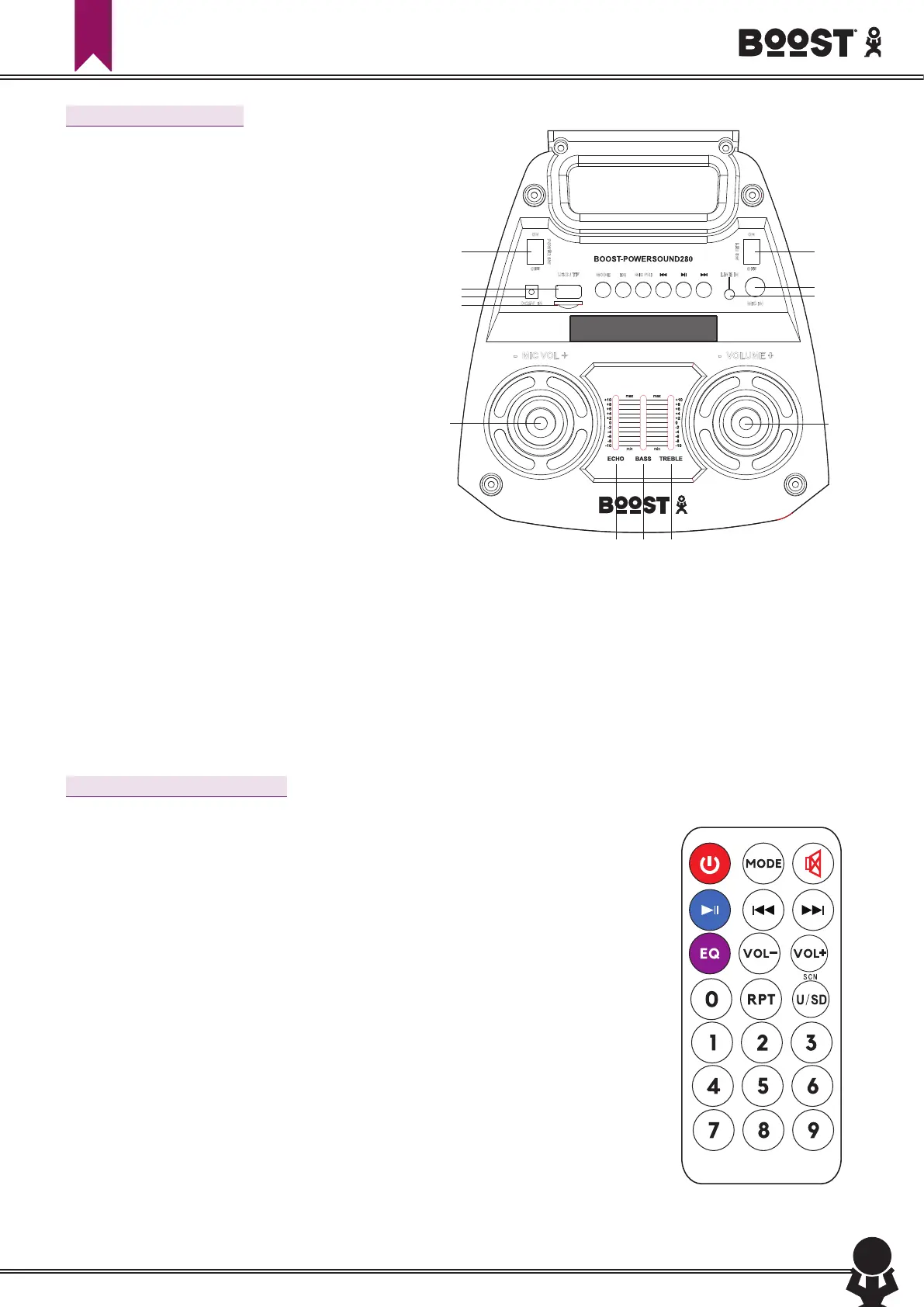
Description of Top Panel
1. 5Vdc input to charge the speaker
ON
OFF
PO
W
ER S
W
ON
OFF
L
ED
S
W
- VOLUME +- MIC VOL +
MODE MIC PRI LINE IN
MIC IN
USB / TF
DC5V IN
EQ
1
5
6
9 10 13
14
7 8 11
2
4
3
18
2. LINE input
3. TF card input
4. MIC input
5. USB input
6. ON/OFF switch when speaker in standby mode,
press power key shortly to wake up the speaker
7. : In BT/USB/TF mode: press shortly =Pre
-
vious song
In AUX mode, this button has no function
In FM mode: Back to previous radio station
8. Play/pause: In USB/TF/BT mode this but
-
ton has the Play/Pause function
In AUX mode, this button has no function
In FM mode: The speaker will start scanning
and store automatically found radio stations
9. MODE switch to select among FM tuner/LINE/
BT/USB/TF mode. Keep the button pressed for
a few seconds to switch off the speaker illumi
-
nation.
10. EQ: Choose between Jazz, Rock, Bass, Normal
and Classic mode
11. : In BT/USB/TF mode: press shortly = Next song;
In LINE mode: no function
In FM mode: Skip to next radio station
12. Volume control
13. MIC priority: press to reduce the music level when you talk into the microphone
14. Switches the LED illumination on and off
15. Echo control of the microphone
16. Reduces/increases the low frequencies
17. Reduces/increases the high frequencies
18. Mic volume control
Description of Remote Control
POWER key: This button is used to power on/off the speaker.
In FM mode: Keep pressed to browse upwards through the radio band
MODE key: Use this button to toggle between radio mode/AUX mode/BT/USB/TF mode.
In FM mode: Keep pressed to skip to the next stored radio station
MUTE key: mutes the sound. Press again to restore the sound
In FM mode: Keep pressed to skip to the previous stored radio station
Play/pause
In FM mode: Keep pressed to browse downwards through the radio band
: In Mp3 mode, short press to play the previous track and long press for fast
backwards.
: In Mp3 mode short press to play the next track; long press to fast forward. In radio
mode, short press to save the channel, long press to search FM channels.
VOL- key: This button is to reduce the volume.
VOL+ key: this button is to increase the volume.
In MP3 mode: Press to browse through the folders
EQ key: Helps you to choose between Jazz, Rock, Bass, Normal and Classic mode.
SCN key: This button is to choose between USB or TF card.


 To Next Page
 Loading...