4
www.BormannTools.com
CHARGING MODES
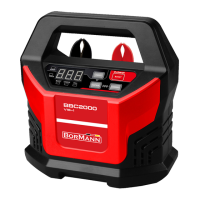
The BBC2000 charger has seven (7) modes: STANDBY, 12V /2A, 12V /6A, 12V/10A, 12V/15A, BOOST and SUPPLY. Do not
operate the charger until you confirm the appropriate charge mode for your battery.
Mode DISPLAY
Explanation
STANDBY ---------- Blink
Not charging or providing any
power. If you want charging to
pause, press ON/OFF button and it
will enter STANDBY mode.
12V/2A 02A Keep on
Connected to battery, it can turn
into 2A by pressing CURRENT
button. This mode is
recommended for 2-60AH
12V/6A 06A Keep on
Connected to battery, it can turn
into 6A by pressing CURRENT
button. This mode is
recommended for 14-230AH
12V/10A 10A Keep on
Connected to battery, it can turn
into 10A by pressing CURRENT
button. This mode is
recommended for 25-300AH
12V/15A 15A Keep on
Connected to battery, it can turn
into 15A by pressing CURRENT
button. This mode is
recommended for 30-400AH
BOOST FAS Keep on Keep on
Connected to battery, it can enter
BOOST mode by pressing BOOST
button. It takes 5 minutes to
charge.
SUPPLY P12 Keep on
connected with battery, it
automatically enter SUPPLY mode.
If you want to switch Supply to
Charge, connect the charger with
a battery and press ON/OFF
BOOST and SUPPLY modes are advanced charging modes that require your full attention before selecting.
Using 12V BOOST
To operate BOOST, the charger must be connected to a 12V lead-acid battery with the battery clamps connected. For optimal
results, allow boost to complete its 5-minute charge. After 300-second boost, digital tube will show “000”, and your are ready
to start your vehicle (whether FULL light is illuminated or not). If unsuccessful when starting your vehicle, let the battery rest
for 15 minutes and try boost again. Most vehicles will start with one (1) boost. Do not use boost more than two (2) times
within a 24-hour period. If two (2) boosts cannot successfully start your vehicle, have your battery replaced or evaluated by a
local battery store.
Using 13.6V SUPPLY
If not connected with the battery, the charger is in the power supply mode by default after starting up. 13.6V SUPPLY mode
provides a current of 7A (constant voltage and constant current). Prior to use, read your 12VDC device manual to determine
if it is suitable for use with this mode. As a power supply, it can also be used to retain a vehicle’s on-board computer settings
during battery repair or replacement. Both spark proof and reverse polarity protection are still able to function normally in
this mode. If positive and negative battery clamp touched or connected to each other, the charger will not generate sparks.


 To Next Page
 Loading...