19
Language (model dependent)
To change the language of the display following these instructions.
1 Open the door and press the [On/Off] button.
2 Hold down the “A” button (see page 17) and press [Start] until the
display indicates “d:00”.
3 Release both buttons. Press the “A” button until the display shows “L:01”.
4 Press the “C” button until the display corresponds with your
requirements.
L:01 = English
L:03 = French
L:07 = Spanish
5 Press [Start] to save and close the door.
InfoLight® (model dependent)
A LED illuminates the floor to indicate the unit is running. If the appli-
ance is installed at eye-level, the LED is not visible.
To change the setting:
1 Open the door and press the [On/Off] button.
2 Hold down the “A” button (see page 17) and press [Start] until the
display indicates “d:00”. Release both buttons.
3 Press the “A” button until the display shows “1:01”.
4 Press the “C” button to switch between “1:01” = ON and “1:00”
=OFF, press [Start] to save, and close the door.
Time Light® (model dependent)
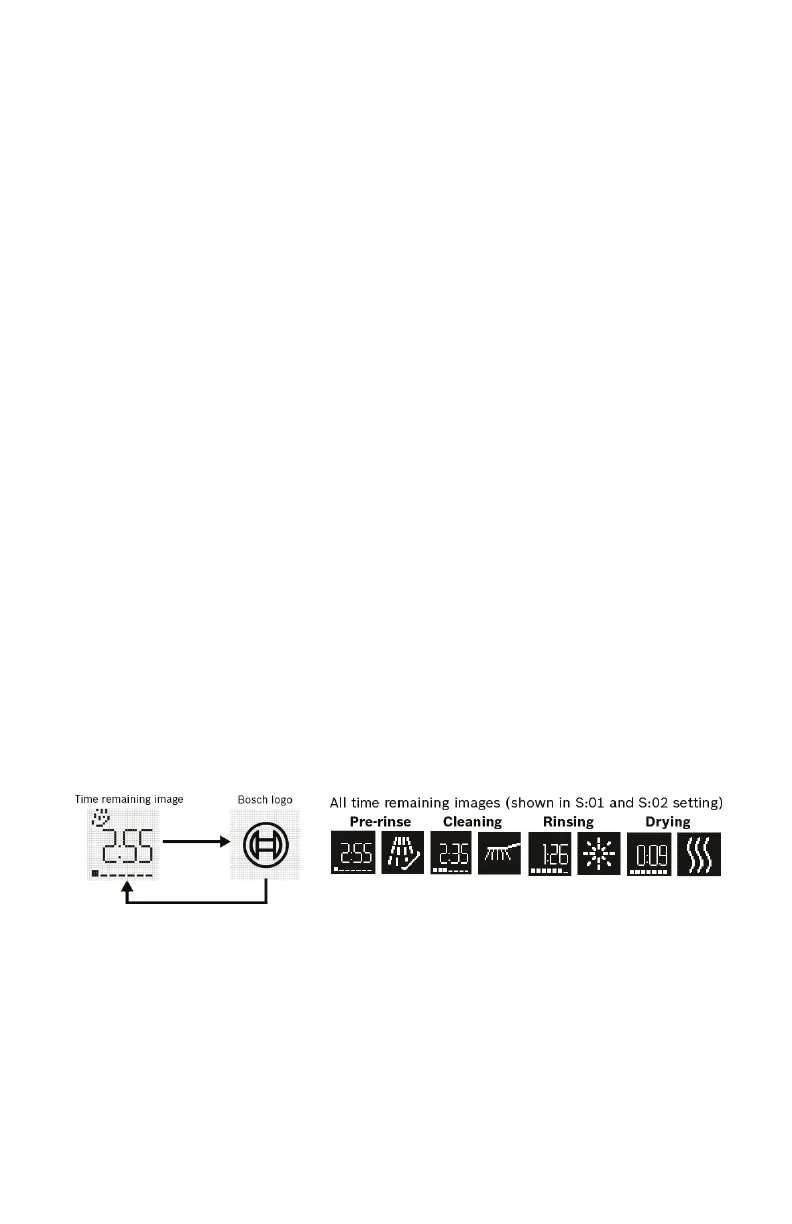
Our dishwashers offer a convenient time remaining indicator
light that
projects cycle status and time remaining on the kitchen floor.
Note: If the appliance is installed at eye-level, the time remaining informa-
tion is not visible.
In the default setting (S:01) the time remaining shows on the floor
alternating with the Bosch® logo (about 5 seconds per image).
To change setting:
1 Press the [On/Off] button.
2 Hold down the “A” button (see page 17) and press [Start] until the
display indicates “d:00”.
3 Release both buttons. Press the “A” button until the display shows “S:01”.
4 Press the “C” button to switch between “S:00” = OFF, “S:01” and
“S:02” = Time Light ON
5 Press [Start] to save the setting.



 To Next Page