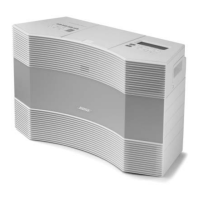
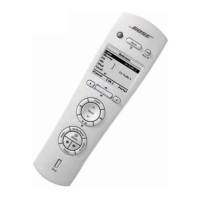
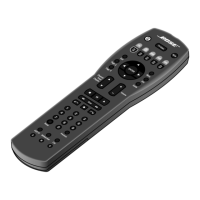
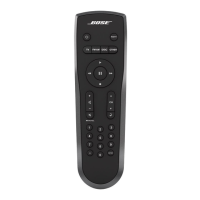
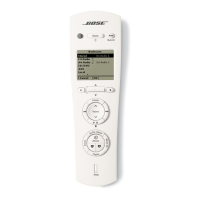
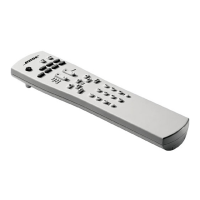
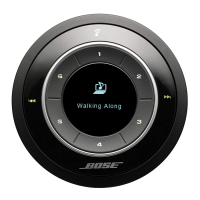
The Bose Wave Music System Premium Backlit Remote is designed to enhance the user experience with the Bose Wave music system, offering convenient control and a backlit interface for ease of use in various lighting conditions.
Function Description
The remote serves as a comprehensive control unit for the Bose Wave music system, allowing users to manage various audio sources and system settings. It supports FM/AM radio, CD playback, and auxiliary input. Key functions include:
- Power Control: The "On/Off" button turns the system power on or off and can also stop a sounding alarm.
- Mute Function: A dedicated "Mute" button allows for quick silencing and restoration of audio.
- Volume Adjustment: "Volume" buttons (up and down) provide precise control over the audio output level.
- Source Selection: Buttons for "FM/AM," "CD," and "AUX" enable users to switch between different audio sources. The "FM/AM" button also toggles between FM and AM radio bands.
- Radio Control:
- "Seek/Track" buttons are used to find the next/previous strong radio station. Holding these buttons allows for rapid movement through radio stations.
- "Tune/MP3" buttons skip to the next/previous radio frequency. Holding these buttons enables rapid scanning through radio stations.
- "Presets" buttons (1-6) allow users to recall stored radio stations. Pressing and holding these buttons stores the current radio station as a preset.
- CD Playback Control:
- "Seek/Track" buttons navigate between tracks on a CD. Holding these buttons allows for rapid movement through CD tracks.
- "Tune/MP3" buttons navigate between MP3 CD folders. Holding these buttons allows for scanning through CD tracks.
- "Play/Pause" initiates or pauses CD playback.
- "Stop/Eject" stops a playing CD and ejects a stopped CD.
- "Play Mode" selects shuffle and repeat CD play modes.
- Alarm and Timer Functions:
- "Sleep" sets the unit to automatically shut off after a specified time.
- "Alarm On/Off" turns the alarm function on or off.
- "Wake To" allows users to set a radio station or CD as the alarm sound by pressing and holding the button.
- "Alarm Time" is used to enter Alarm Set mode to configure the alarm time. Pressing and holding this button enters the Setup Menu.
- "Snooze" temporarily silences a sounding alarm.
- Time Setting: The "Time" button sets the clock time. In Alarm Set mode, it sets the alarm time.
Usage Features
The remote is designed for intuitive and convenient operation, incorporating several features to enhance usability:
- Backlit Buttons: The remote features backlight buttons that illuminate the entire remote for five seconds when pressed. This is particularly useful in low-light conditions, making it easy to identify and operate the controls. Pressing any button during the five-second illumination period extends the lighting for an additional five seconds.
- Ergonomic Design: The remote has a sleek, curved design that fits comfortably in the hand. The buttons are logically arranged, with frequently used controls easily accessible.
- Remote Stand: The remote comes with a stand that securely holds it upright. This allows the remote to be operated while in the stand, eliminating the need to point it directly at the Wave music system for basic functions.
- Clear Labeling: All buttons are clearly labeled with icons and text, ensuring that users can quickly understand their functions.
- MP3 CD Compatibility: The "Tune/MP3" buttons specifically cater to navigating folders on MP3 CDs, providing enhanced control for digital music libraries.
- Talk Radio Mode: The "Play Mode" button also allows users to turn AM or FM TALK RADIO mode on or off, optimizing audio for spoken content.
Maintenance Features
Maintaining the Bose Wave Music System Premium Backlit Remote primarily involves battery management and proper disposal:
- Battery Installation: The remote requires two AAA (LR03) alkaline batteries. The battery compartment is easily accessible by lifting a latch. Clear polarity markings (+ and -) are provided within the compartment to guide correct battery installation.
- Battery Disposal: Users are instructed to dispose of used batteries properly, following local regulations, and to avoid incineration. This emphasizes environmental responsibility.
- Durability: While not explicitly detailed, the construction of Bose products typically implies a certain level of durability for everyday use.
- Cleaning: Although not mentioned in the provided text, general maintenance for electronic remotes usually involves wiping the surface with a soft, dry cloth to keep it clean and free of dust.
The remote is a crucial component of the Bose Wave music system, designed to offer a seamless and user-friendly control experience with its thoughtful layout, backlight functionality, and ergonomic design.

 Need help?
 General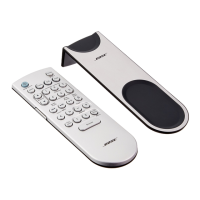

 To Next Page