Need help?
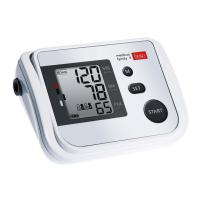
Do you have a question about the boso medicus family 4 and is the answer not in the manual?
 General
| Brand | boso |
|---|---|
| Model | medicus family 4 |
| Category | Blood Pressure Monitor |
| Language | English |
Step-by-step instructions for inserting batteries into the monitor.
Guide on how to configure the device's date and time settings.
Information on selecting the correct cuff size based on arm circumference.
Instructions on how to properly attach the blood pressure cuff to the arm.
Steps to select or assign a user profile for storing measurements.
How to initiate a blood pressure measurement using the start button.
Procedure to stop an ongoing measurement.
Explanation of how measurements are handled when not assigned to a user.
How to access previously recorded blood pressure measurements.
Method to choose a specific user's data from memory.
How to view specific measurement entries stored in the memory.
Procedure to delete stored measurement data for a user.
Guidelines for connecting and using the device with a mains power adapter.
Solutions for common error codes and issues encountered during measurement.
Instructions for cleaning the main unit of the blood pressure monitor.
Recommended procedures for disinfecting the blood pressure cuff.
Steps to follow for making a warranty claim, including contact information.
Details for contacting customer support and sending the device for repairs.
Guidelines for proper disposal of the monitor and batteries.
Details on measurement principle, range, and cuff pressure.
Environmental parameters for device operation and storage.
Information on the device's power source requirements and options.
Identifies the authorized personnel or bodies responsible for calibration.
Steps for verifying the monitor's operational functionality.
How to test the integrity of the pressure circuit and display accuracy.
Detailed sequence of actions for performing the calibration test.
 To Next Page