EasyManua.ls Logo

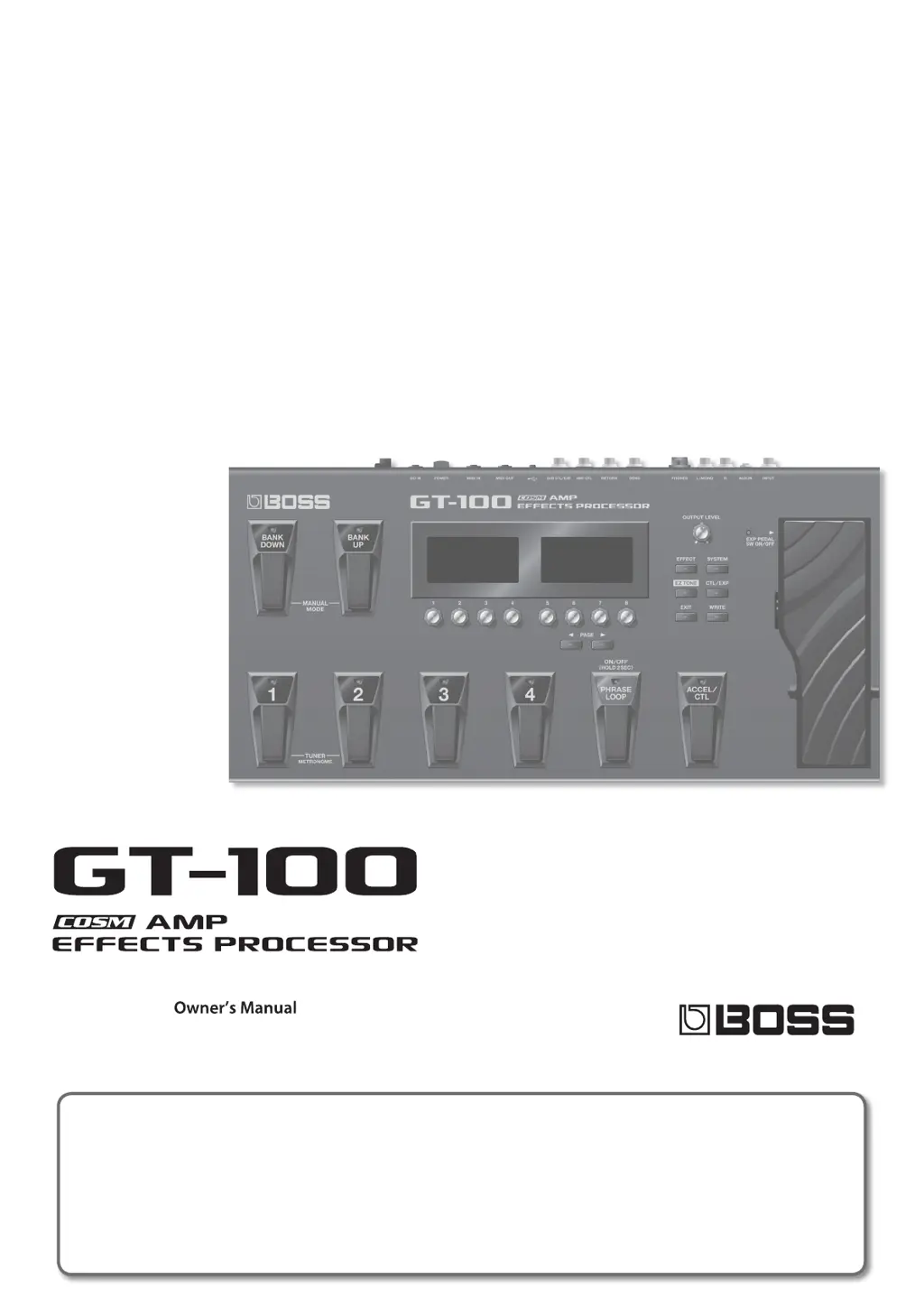
Boss Audio Systems GT-100 - User Manual

Boss Audio Systems GT-100
68 pages
Print Icon
To Next Page IconTo Next Page
Loading...
How to obtain a PDF of the owners manual
PDF les of the owner’s manual and supplementary material for this product can be obtained from the Roland website.
GT-100 Owner’s Manual (this document)
GT-100 Parameter Guide *
*These are not included with the product; you may download them as necessary.
Visit the following URL, choose owners manuals, and search for the model name “GT-100.
http://www.roland.com/support/en/

Table of Contents

Other manuals for Boss Audio Systems GT-100

Questions and Answers

  • C
    Cheyenne BeckAug 16, 2025
    What to do if parameters specified with Assign can't be controlled on Boss Audio Systems GT-100?
    • A
      April ParkerAug 16, 2025
      If parameters specified with Assign on your Boss Audio Systems Music Pedal aren't being controlled, ensure the effect containing the parameter you want to control is switched on. If the pedal function “PREFERENCE” is set to “SYSTEM,” the patch assignment will be ignored, so change the preference for the corresponding parameter to “PATCH”. Also, verify that the MIDI channel and controller number settings of both devices match. Finally, the expression pedal may need adjustment.
  • A
    Alexis StewartAug 20, 2025
    Why oscillating sound occurs when using Boss Audio Systems GT-100?
    • M
      Mrs. Kara BaldwinAug 20, 2025
      If you're experiencing an oscillating sound with your Boss Audio Systems Music Pedal, it might be due to a gain- or volume-related effects parameter being set too high; try lowering these values. Also, if the “USB IN-OUT MODE” is set to “REAMP,” audio signals may be looping. To prevent this, stop playback and set Soft Thru to Off, switch the software’s audio input off, or set USB IN-OUT MODE to something other than “REAMP.”
  • F
    Francisco GordonAug 25, 2025
    Why is there no change in preamp tone even after switching patches on my Boss Audio Systems Music Pedal?
    • N
      Natasha TuckerAug 25, 2025
      If you notice no change in preamp tone after switching patches on your Boss Audio Systems Music Pedal, the preamp “PREFERENCE” might be set to “SYSTEM 1–3.” If you want individual preamp settings for each patch, set this to “PATCH.”
  • A
    Andrew GarciaAug 27, 2025
    How to fix the inability to change parameters with the knobs on Boss Audio Systems Music Pedal?
    • G
      Gary LongAug 28, 2025
      If you can't change parameters with the knobs on your Boss Audio Systems Music Pedal, it could be because “INT PEDAL” or “WAVE PEDAL” is set as the Assign Source in Assign. This causes the effect parameter to change automatically. To manually adjust parameters with the knobs, switch off Assign to deactivate the Internal Pedal System. Also, if “INPUT LEVEL” is set as the Assign Source, the effect parameter changes automatically based on the input level from the guitar. To manually change parameters, switch off Assign.
  • C
    Caleb CervantesAug 31, 2025
    What to do if sound from devices connected to the INPUT jack is not heard in the headphones when using Boss Audio Systems GT-100?
    • G
      goodmanjoyceAug 31, 2025
      If you are not hearing sound from devices connected to the INPUT jack in your headphones when using the Boss Audio Systems Music Pedal, check if the “DIR.MONITOR” is set to OFF and set it to ON. Also, ensure the “USB IN-OUT MODE” is not set to “REAMP”; choose a different setting.
  • A
    Allen WhitneySep 4, 2025
    Why patch does not change on Boss Audio Systems GT-100 Music Pedal?
    • R
      Ronald CervantesSep 4, 2025
      If the patch does not change on your GT-100 Boss Audio Systems Music Pedal, it may be because something other than the Play screen is currently shown in the display. Patches can only be selected when the Play screen is displayed, so press [EXIT] to return to the Play screen.
  • B
    Bryan RichardsSep 7, 2025
    Why is the volume level too low for instruments connected to INPUT, AUX IN, and RETURN jacks on Boss Audio Systems Music Pedal?
    • J
      jeffrey71Sep 8, 2025
      If the volume level of the instrument connected to the INPUT, AUX IN, and RETURN jacks is too low on your Boss Audio Systems Music Pedal, you might be using a connection cable that contains a resistor. Try using a connection cable that does not contain a resistor.
  • K
    Kendra HallNov 11, 2025
    How to troubleshoot no sound or low volume on Boss Audio Systems GT-100?
    • W
      Wayne VelazquezNov 12, 2025
      If you're not getting any sound or the volume is too low on your Boss Audio Systems Music Pedal, there are several things to check: * Ensure that your connection cables are not broken by trying a different set. * Verify that the GT-100 is correctly connected to other devices. * Check if your connected amp/mixer is turned off or if the volume is lowered, and adjust accordingly. * Make sure the [OUTPUT LEVEL] knobs are appropriately adjusted. * Confirm that the Tuner is not set to On with the OUTPUT set to “MUTE.” * Review the settings of each effect. * Adjust the “USB/OUTPUT LEVEL” if it's set too low. * If “FOOT VOLUME: LEVEL” or “MASTER: PATCH LEVEL” is assigned, move the assigned controller (pedal). * Check the settings and power of any external device connected to the...

Summary

Using the Unit Safely

Essential Safety Precautions

Lists critical safety rules for operation, environment, and handling to prevent harm.

Using the Unit Safely: Handling and Electrical Precautions

Safe Operation and Environmental Guidelines

Safe operating environment, handling, and preventing damage from external factors.

Electrical Safety and Connection Guidelines

Precautions for AC adaptor, power cord, and wet hand connections.

Quick Guide: Getting Ready

Initial Setup: Connecting and Powering Up

Steps for connecting guitar/amp, powering on the unit, and adjusting volume.

Quick Guide: Amp Setup

Specifying Connected Amp Type for Output

Guides on selecting the correct amp type for optimal sound output.

Quick Guide: Editing Basics

Basic Editing Workflow

Step-by-step guide for editing effects, system, or EZ TONE settings.

Quick Guide: Saving Patches

Saving Edited Patches to User Memory

Step-by-step guide on how to save edited patches to user memory.

Quick Guide: Editing Effects

Modifying Effect Parameters

Guide on how to select and edit parameters for individual effects.

Quick Guide: Advanced Phrase Loop

Phrase Loop Operation and Modes

Details on recording, playback, overdubbing, and stopping phrase loops.

Panel Descriptions: Rear Panel Connections

Rear Panel Input;Output and Control Jacks

Describes the various input/output and control jacks on the rear panel.

Outputting Sounds: Basic Operations

Power On;Off and Output Level Adjustment

Turning the unit on/off and adjusting the main output volume.

Output Device Selection and Guitar Tuning

Setting the output device and using the built-in guitar tuner.

Outputting Sounds: Patch Management

Patch Structure and Bank Organization

Explains patch structure, user banks, and preset banks for tone selection.

Outputting Sounds: Patch Selection

Selecting Patches via Pedals and Knobs

Instructions for selecting patches using bank pedals and selection knobs.

Creating Sounds: Effects and Modes

Setting Effects and Divider;Mixer Modes

Guides on setting effects and specifying divider/mixer modes for sound routing.

Saving and Managing Tones

Saving, Exchanging, and Initializing Patches

Procedures for saving, swapping, and resetting user patches.

Phrase Loop Playback and Settings

Pedal Settings: Assigning Control Functions

Assigning ACCEL;CTL and Other Pedal Functions

Guides on assigning functions to ACCEL/CTL and external pedals.

Pedal Settings: EXP and SUB EXP Pedal Assignment

Pedal Settings: Adjusting the EXP Pedal

Pedal Settings: Assigning Functions to Individual Patches

Patch-Specific Pedal Assignments (Assign)

Details on setting up pedal functions for individual patches using Assign.

Pedal Settings: Controller Behavior and Virtual Pedals

Global Settings: Performance and Display Options

Global Settings: USB Audio Configuration

Global Settings: MIDI Communication Setup

Global Settings: MIDI Messaging and Control

MIDI Device Integration

MIDI Operations and Remote Control

Explains MIDI capabilities, remote control, and patch switching via MIDI.

MIDI Data Transfer and Connections

USB Computer Connectivity

USB Driver Installation and MIDI Exchange via USB

Covers USB driver installation and MIDI message exchange via USB.

Factory Reset and System Restoration

Performing a Factory Reset Procedure

Step-by-step guide to restore the GT-100 to its original factory settings.

Signal Flow Diagram

Troubleshooting Guide

Sound and Volume Related Troubleshooting

Solutions for problems related to no sound, low volume, and oscillating sound.

Patch, Parameter, and Loop Saving Troubleshooting

Solutions for patch changes, parameter control, and loop saving issues.

Error Messages and Troubleshooting

Understanding and Resolving Error Messages

Explains common error messages and their corresponding solutions.

Boss Audio Systems GT-100 Specifications

General IconGeneral
Amp ModelingYes
Number of Effects100+
LooperYes
USBYes
Power Supply9V DC
TypeGuitar Effects Processor
Effects TypesChorus, Delay, Distortion, Flanger, Overdrive, Reverb
Inputs1 x 1/4" (instrument)
Outputs1 x 1/4" (L/R)
Power Source9V DC
EffectsMultiple

Related product manuals