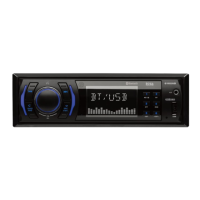
This document describes the BOSS 822UA MP3-Compatible Double-Din In-Dash CD AM/FM Receiver with USB and SD Memory Card Ports and a Front Panel AUX Input. It serves as a user's manual, providing instructions for installation, basic operations, audio functions, radio operations, CD operations, and USB/SD card usage, along with troubleshooting and specifications.
Function Description:
The BOSS 822UA is a versatile in-dash car audio receiver designed to play various media formats. Its primary functions include:
- CD Playback: Supports MP3/CDR/RW playback from compact discs.
- AM/FM Radio: Allows tuning into AM and FM radio stations with features like auto search, manual search, preset memory, and local/distant (DX) tuning modes.
- USB Device Playback: Features a front-panel USB socket for playing MP3 files from USB flash drives.
- SD/MMC Card Playback: Includes an SD/MMC card slot on the front panel for playing MP3 files from compatible memory cards.
- Front Panel AUX Input: A 3.5mm earphone jack allows connection of external audio sources.
- Audio Control: Offers adjustable volume, bass, treble, balance, and fader settings.
- Digital Sound Processor (DSP): Provides preset EQ settings (FLAT, CLASSICS, POP M, ROCK M) and a DSP OFF mode for custom bass/treble control.
- Loudness Function: Enhances bass and treble at low volumes.
- Mute Function: Temporarily silences audio output.
- Display: Features an LCD display that shows clock, track information, ID3 tags, and radio frequencies.
- Detachable Control Panel (D.C.P.): The front control panel can be removed for security.
Important Technical Specifications:
CD PLAYER:
- System: Compact disc audio system
- Usable disc: Compact disc, CD-R, CD-RW (AUDIO/MP3 format)
- Sampling frequency: 44.1KHz
- No of quantization bits: 1 bit
- Frequency: 5-20,000Hz
- Number of channels: 2 stereo
- S/N Ration: 70dB
RADIO SECTION (FM):
- Frequency Range: 87.5 - 107.9 Mhz (USA), 87.5 - 108 Mhz (Europe)
- Intermediate Frequency: 10.7 MHz
- Usable Sensitivity: Better than 15dB at S/N 30 dB
- Stereo Separation: 25 dB at 1KHz
- S/N Ratio: 50 dB
RADIO SECTION (AM (MW)):
- Frequency Range: 530 - 1710 Khz (USA), 522 - 1620 Khz (Europe)
- Intermediate Frequency: 450KHz
- Usable Sensitivity: Better than 45dB
- S/N Ratio: 40 dB
GENERAL:
- Power Supply: DC 11-14V
- Polarity: Negative Ground
- Speaker impedance: 4 ohms
- Power Output: 80W x 4
USB SPECIFICATION:
- Support Max: 1G USB FLASH MEMORY
- Support Max: 255 SONGS
- USB 1.1 DEVICE SUPPORT
- USB 2.0 DEVICE SUPPORT (TRANSFER SPEED SAME AS VER 1.1)
- FILE MANAGER: FAT12/FAT16/FAT32
- CURRENT SUPPLY: MAX 500mA
SD/MMC SPECIFICATION:
- Support Max: 1G SD/MMC CARD
- Support Max: 255 SONGS
Usage Features:
Installation:
- DIN Front/Rear-Mount: Can be installed using either conventional DIN Front-mount or DIN Rear-mount methods.
- Panel Release Button: Used to remove the control panel.
- Wiring: Requires proper electrical connection to a 12-volt negative ground system. Incorrect wiring can void the warranty.
- Support Strap: Recommended for securing the back of the unit.
- Trim Plate: Must be fitted before installing the front panel.
- Transport Screws: Two screws must be removed from the CD mechanism before use to prevent damage.
Basic Operations:
- Power Button: Turns the unit on/off.
- Display Button: Briefly shows the clock or toggles ID3 tag information. Long press allows clock adjustment.
- Mode Button: Cycles through Tuner, CDP/MP3, USB, SD/MMC, and AUX modes. Automatically switches to USB/SD/MMC mode upon insertion of a device/card.
- Encoder Volume Knob: Adjusts volume and various audio functions (Bass, Treble, Balance, Fader).
- Function Select Button: Cycles through audio functions for adjustment.
- Mute Button: Toggles audio mute.
- DSP Button: Selects preset EQ settings.
- Band/Loudness Button: Short press changes radio bands (FM1, FM2, FM3); long press toggles loudness on/off.
- Scan Button: Initiates radio station scan or CD track scan.
- Local/DX Button: Switches between local and distant radio tuning modes.
- FM Mono/Stereo Button: Selects mono or stereo reception for FM.
- Tuning/Seek Up/Down Buttons: Short press for auto search, long press for manual search.
- Station Preset Buttons (M1-M6): Short press recalls stored stations; long press stores current station.
- AMS (Auto Memory Store/Preset Scan) Button: Briefly scans preset stations; long press automatically stores strongest stations.
- CD Pause Button: Pauses/resumes CD playback.
- CD Repeat Button: Repeats the current track.
- CD Shuffle Button: Plays CD tracks in random order.
- Eject Button: Ejects the CD and switches to radio mode.
- Track Up/Down Buttons: Skips tracks; long press for fast forward/reverse.
- Programmable Optionals (Beep Sound): Allows configuration of beep sounds (BEEPS 2ND, BEEP ALL, BEEP OFF).
- ID3 Tag Display: Shows song title, artist, and album title for MP3 files with ID3 tags.
USB/SD Card Operations:
- Insertion: USB devices plug into the front socket; SD/MMC cards insert into the slot on top of the front panel.
- Automatic Mode Switching: Unit automatically switches to USB/SD/MMC mode upon insertion.
- Playback: Functions similarly to CD/MP3 disc playback.
- Removal: Gently unplug USB devices or push to eject SD/MMC cards. Unit switches back to previous mode.
- Compatibility: Supports USB flash memory and SD/MMC cards up to 1GB, with up to 255 songs. Not compatible with portable hard drives.
Maintenance Features:
- Moisture Condensation: If moisture condenses on lenses, remove the disc and wait for about an hour for it to evaporate.
- Disc Handling: Handle discs by the edge, keep surfaces clean, avoid sticking paper/tape, and protect from direct sunlight or heat. Clean with a soft cloth from the center outwards.
- Disc Compatibility: Avoid using second-hand/rental CDs with sticky residue, old labels, or special shapes. Ensure CD-Rs/CD-RWs are finalized.
- D.C.P. Care: Remove the detachable control panel carefully, store it in a protective case, and avoid dropping it or subjecting it to strong shocks. Clean the rear connector with a cotton swab soaked in isopropyl alcohol if dirty.
- Fuse Replacement: Replace blown fuses with new ones of the same rating.
- Reset Button: Located on the main unit, it should be pressed with a ballpoint pen for initial installation, when function buttons don't operate, or if an error symbol appears. If issues persist after reset, clean the control panel's socket.
- Troubleshooting Guide: Provides solutions for common issues like no power, disc loading/ejection problems, no sound, non-responsive keys, sound skips, and radio reception issues.

 Need help?
 General

 To Next Page