20
It is possible to connect additional devices that are not supplied by Millarco. Use
the diagram below with the user manual for the devices in question.
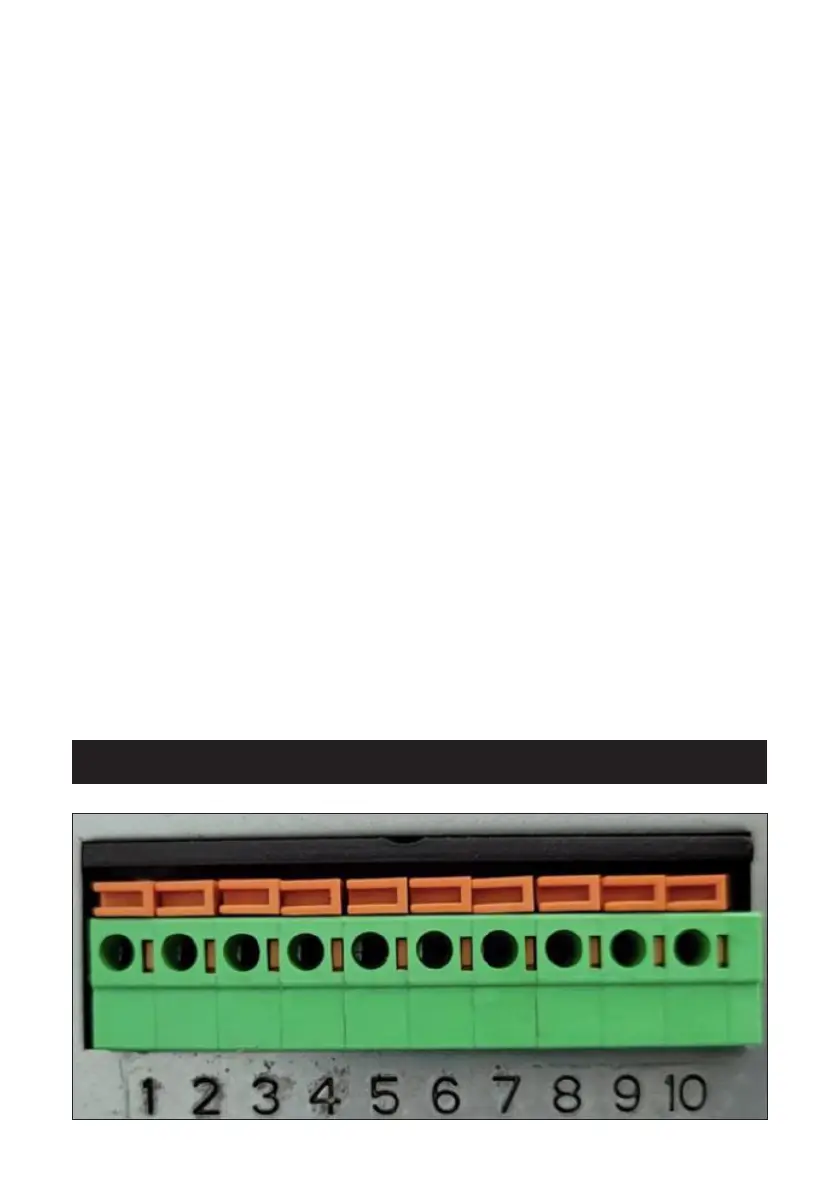
Connecting a photocell:
These two terminals are a power supply for a photocell. Use a bridge (supplied
with the device) to connect and short-circuit these two terminals before
connecting the photocell.
When terminals 1 and 2 are connected to the connector, terminals 3 and 4
provide a voltage of 24 V.
When you have short-circuited terminals 1 and 2, you can connect the photocell
wires to terminals 3 and 4.
Terminals 1, 2, 3 and 4 may ONLY be used for connecting a photocell.
• Connection of terminals 1 and 2: short circuit of connections to photocell.
• Terminals 3 and 4: power supply for photocell with two wires.
You can connect up to 2 wired switches:
• Terminals 5 and 6: manual switch connection.
• Terminals 7 and 8: manual switch connection.
Connecting a backup battery:
• Terminals 9 and 10: used to connect a 24 V backup battery.
• Terminal 9 is used for the negative pole of the backup battery (-).
• Terminal 10 is used for the positive pole of the backup battery (+).
Maintenance and inspection


 To Next Page
 Loading...