tap
tap
Tap
Tap
① Long press left/right earbuds for 12s under o state, the earbuds prompt
“Power On”, “Pairing”, “DuDuDuDu” in turn, the red light of earbuds steady
2.5s and then turn o, indicates the earbuds successfully restored to factory
setting.
② Place both earbuds back to the charging case, close the cover and take them
out after a short period, the earbuds will turn on, automatically pair into
binaural mode and re-search for pairing. (earnids red/blue light steady 2.5s,
then blue light ash every 0.5s)
Earbuds ResettingMengatur Ulang Earbuds
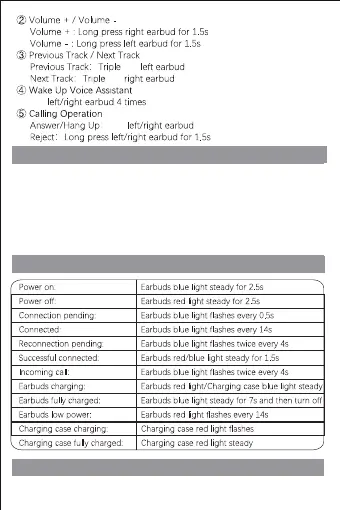
Indikator Lampu
Indikator Suara


 To Next Page