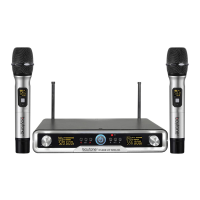
This document describes a professional wireless microphone system, specifically the Boytone BT-46UM model, designed for various audio applications. The system utilizes UHF (Ultra High Frequency) technology and features dual fixed channels, making it suitable for medium to small stages, karaoke halls, and home entertainment.
The core function of the BT-46UM system is to provide wireless audio transmission from two handheld microphones to a receiver, which then outputs the audio to an amplifier, mixer, or karaoke player. This wireless capability offers freedom of movement and reduces cable clutter, enhancing the user experience in dynamic performance or presentation environments.
Usage Features:
The system is designed for straightforward operation, with clear controls and indicators on both the receiver and the microphones.
Receiver:
The receiver unit features a front panel with several key controls and indicators:
- Power Switch: A simple button to turn the unit on or off.
- Display Panel: An LCD screen that provides essential information, including the active group, signal strength, frequency, and indicators for AF (Audio Frequency) and RF (Radio Frequency) signals. This allows users to monitor the system's status at a glance.
- Volume Control: Individual rotary knobs for adjusting the volume of each microphone channel, enabling precise audio mixing directly from the receiver.
- AF Indicator: Lights up to show the presence of an audio signal from the microphone.
- RF Indicator: Lights up to confirm that a radio frequency signal is being received from the microphone, indicating a successful wireless connection.
The rear panel of the receiver provides the necessary connections for integration into an audio setup:
- Antennas: Two external antennas are present to ensure stable and robust wireless signal reception.
- Balance Audio Output: XLR balanced output jacks for connecting to professional audio equipment, offering improved signal integrity over longer cable runs.
- Mix Out: A 6.3mm (1/4") unbalanced output jack, typically used for connecting to karaoke mixers, players, or power amplifiers. This provides a combined audio signal from both microphones.
- DC Input Jack: A 12V DC input for the power adapter, ensuring the receiver receives the correct power supply.
Transmitters (Handheld Microphones):
The handheld microphones are designed for comfortable use and incorporate several features for effective operation:
- LCD Screen: A display that shows the current frequency, battery status, and other relevant information, allowing users to monitor the microphone's operational state.
- Power Switch: A multi-function button that turns the microphone on or off. It requires a press for 2-3 seconds to activate and another 2-3 seconds to deactivate, preventing accidental power changes during use.
- LED Indicator: A light that illuminates when the microphone is powered on and flashes to indicate low battery, providing a visual alert for battery replacement.
- Battery Compartment: Located at the bottom of the microphone, accessible by unscrewing the handle cover. It holds two AA batteries.
- Audio Input Interface: The microphone's capsule, which captures sound.
Installation and Connection:
Setting up the BT-46UM system involves a few simple steps:
- Power Connection: Connect the receiver to a 12V 1000mA DC power adapter and plug it into a power outlet. Ensure the power adapter's voltage matches local specifications.
- Audio Output Connection: Connect the receiver's audio output to an amplifier, mixer, or karaoke player. Users can choose between the 1/4" unbalanced MIX output (using a 1/4" to 1/4" cable) or the XLR balanced outputs (using XLR to XLR or XLR to 1/4" cables) depending on their audio equipment.
- Microphone Battery Installation: Unscrew the handle cover of each microphone (counter-clockwise) and insert two AA batteries, ensuring correct polarity (positive and negative ends aligned with the microphone's markings). Then, screw the handle cover back on.
Maintenance Features:
The manual emphasizes the importance of proper care and troubleshooting to ensure the longevity and optimal performance of the wireless microphone system.
General Care:
- Packaging Retention: Users are advised to keep the original packaging for potential re-shipping needs.
- Voltage Compatibility: Before operation, it's crucial to verify that the local voltage matches the receiver's operating voltage to prevent damage.
- No Self-Dismantling: Users should not attempt to dismantle the machine for internal repairs. Any issues requiring internal servicing should be handled by an authorized distributor or service center.
- Power Disconnection: When the system is not in use for an extended period, the power plug should be disconnected from the receiver.
- Battery Management: Only rechargeable batteries should be recharged. Non-rechargeable batteries should be replaced when depleted.
Cleaning:
- Power Disconnection: Always disconnect the power supply before cleaning or repairing the machine.
- Cleaning Method: The machine can be cleaned with a soft cloth dampened with water. After cleaning, it should be dried with a dry cloth and allowed to air dry for approximately 15 minutes.
- Chemical Avoidance: Volatile gasoline, thinners, or other harsh chemicals should not be used for cleaning, as they can damage the surface of the device.
Troubleshooting:
The manual provides a comprehensive troubleshooting guide to help users resolve common operational issues without needing professional assistance. This includes solutions for problems such as:
- No Sound/No Lights on Receiver: Checks for power button status, DC power adapter connection, and proper seating of the adapter.
- No Sound/Lights On on Microphone: Verifies if the transmitter is within range, microphone switch is on/off/mute, microphone volume is adjusted, and batteries are correctly installed. It also suggests adjusting antenna angle and ensuring the receiver is connected to an audio input.
- Distorted Sound/Feedback: Recommends separating microphones, replacing low batteries, reducing microphone volume, and moving the receiver away from other electrical equipment to minimize interference.
- Batteries: Advises replacing batteries if they are faulty or depleted.
By following these guidelines, users can effectively operate, maintain, and troubleshoot their Boytone BT-46UM wireless microphone system, ensuring a reliable and enjoyable audio experience.

 Need help?
 General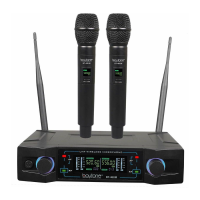

 To Next Page