Display Reference
49
Replacing the Battery
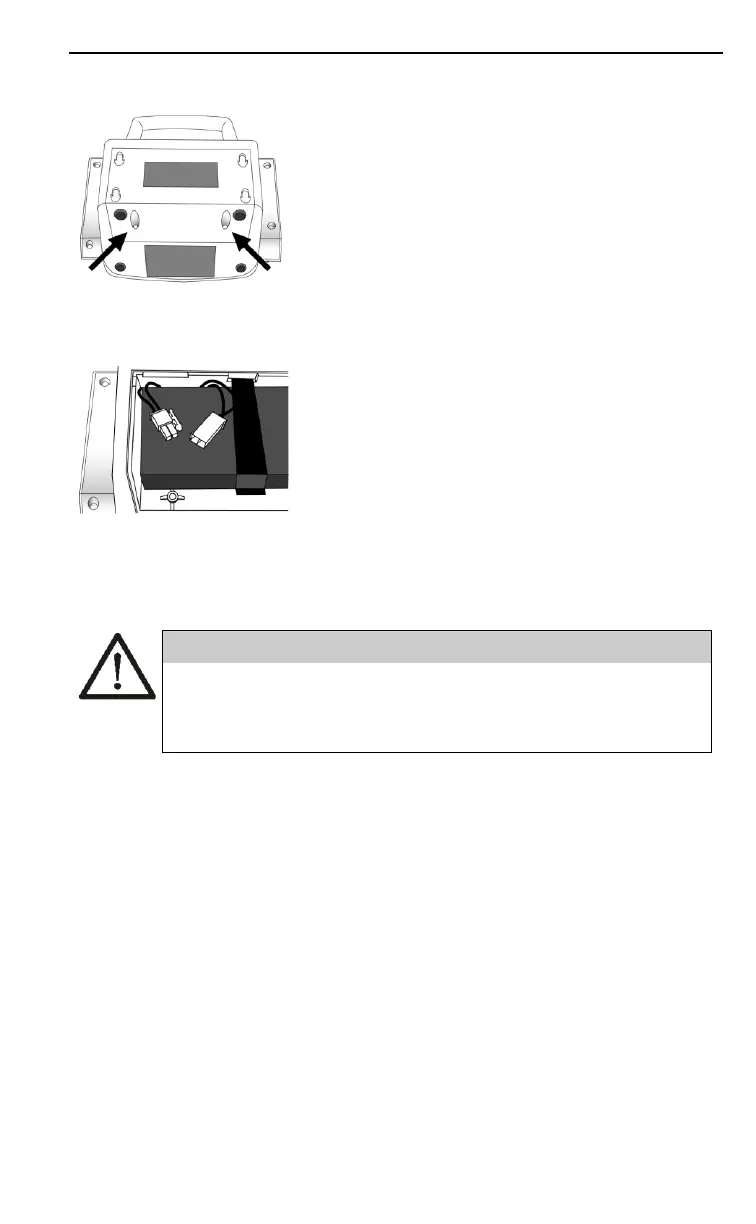
1. Open the battery door at the back of
the BpTRU. Use a Phillips
screwdriver (provided) to remove
both screws.
2. Disconnect the battery wiring
harness and remove the battery. Do
not use a metal tool. Do not pull on
the wires.
3. Insert the new battery. Join the two
battery connectors. The connectors
only fit one way.
4. Close the battery door and secure it
with the 2 screws.
5. Dispose of the battery safely. Refer to
“Storage and Disposal
Requirements” on page 54.
Do not use a metal tool to install or remove a battery.
The terminals may short and lead to an electrical
safety hazard.
Functional Assessment of the BpTRU
When you turn on the BpTRU all displays will
illuminate, showing “888,” and the buzzer will sound for
a few seconds. If the displays or buzzer do not activate
the BpTRU may not be working properly. Consult the
Troubleshooting section.
If you are concerned about the accuracy of the pressure
measurements obtained with the BpTRU, use the BP
Zero Calibration and BP Reference Gauge Calibration
checks to verify the pressure measurement accuracy. See
“Technical Modes of Operation” on page 70.


 To Next Page