BpTRU Operator’s Manual
72
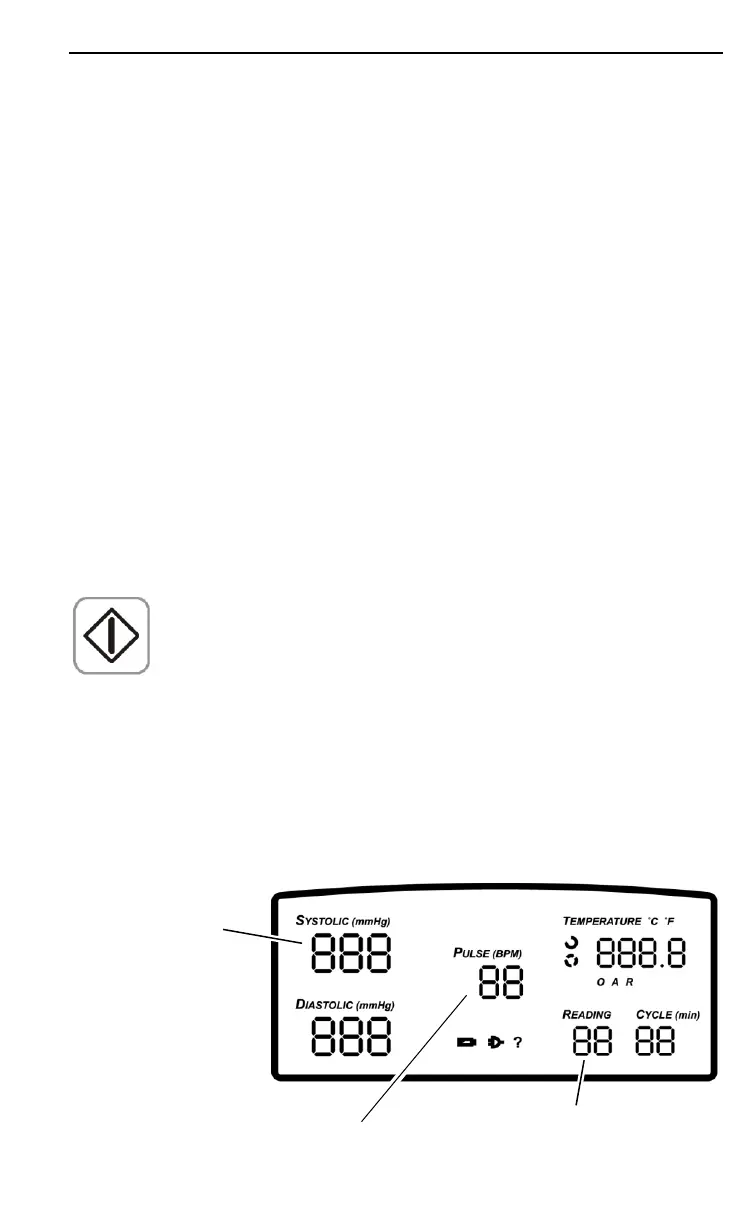
After approximately five seconds, the applied pressure is
displayed in whole mmHg in the Pulse display and in
hundredths of mmHg in the Reading display.
A properly calibrated monitor reads “0” in the Pulse
display and less than “10” in the Reading display.
Return to normal operation by powering the BpTRU off
and then on again.
BP Reference Gauge Calibration Check
The BP Reference Gauge Calibration Check is a feature
that allows you to compare the accuracy of the BpTRU’s
pressure transducer against a reference pressure gauge
of known accuracy. (An electronic pressure gauge is
recommended, but a mercury or aneroid gauge is
acceptable.)
1. Turn the BpTRU off using the power switch.
2. Disconnect the coiled tubing from the BpTRU.
3. To select the BP Reference Gauge Calibration Check
mode, hold BP Start while turning the BpTRU on.
4. Release BP Start. The monitor now performs an
automatic zero-offset calibration.
BP Reference Gauge Calibration Check mode is indicated
by the software version being displayed on the Systolic
display. The applied pressure is displayed in whole
mmHg in the Pulse display and in hundredths of mmHg
in the Reading display, as shown below:
Firmware
Revision
Pressure
(1/100
ths
)
Pressure
Units


 To Next Page