BpTRU Operator’s Manual
74
Temperature Celsius/Fahrenheit Mode (BPM300)
The BpTRU can be configured to display temperature
units in either Celsius or Fahrenheit. The default display
unit is Celsius, but the unit can be toggled as follows.
1. Turn the BpTRU off using the power switch.
2. To toggle temperature display units, hold Mode while
turning the BpTRU on again.
Repeating this toggles the BpTRU to the previous state.
When a temperature probe is attached, the selected units
(°C or °F) are illuminated on the BpTRU display.
Temperature Calibration Check (BPM300)
The Temperature Calibration Check allows a comparison
of the accuracy of the BpTRU’s temperature measurement
circuitry to a reference thermometer of known accuracy.
(A precision electronic thermometer is recommended, but
a mercury thermometer will work as well.)
1. Attach a temperature probe.
2. Turn the BpTRU off using the power switch.
3. To select the Temperature Calibration Check mode,
hold BP Start while turning the BpTRU on.
4. Release BP Start.
(Temperature Calibration Check mode is indicated by the
software version being displayed in the Systolic display).
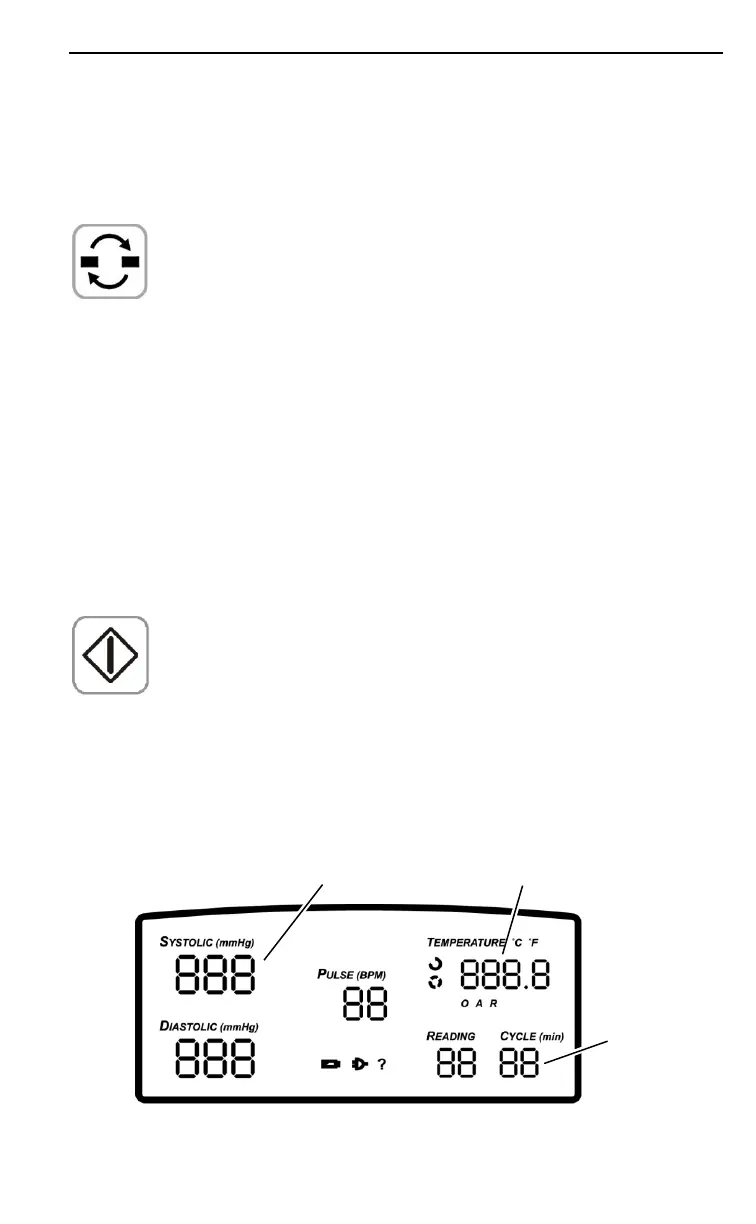
The probe temperature is displayed (in °C or °F) as whole
degrees in the Temperature display, and hundredths of a
degree in the Cycle display, as shown below:
Firmware
Revision
Degrees
(1/100
ths
)


 To Next Page