EasyManua.ls Logo

bq Aquaris E5s - Page 6

bq Aquaris E5s
10 pages
Print Icon
To Next Page IconTo Next Page
To Previous Page IconTo Previous Page
Loading...
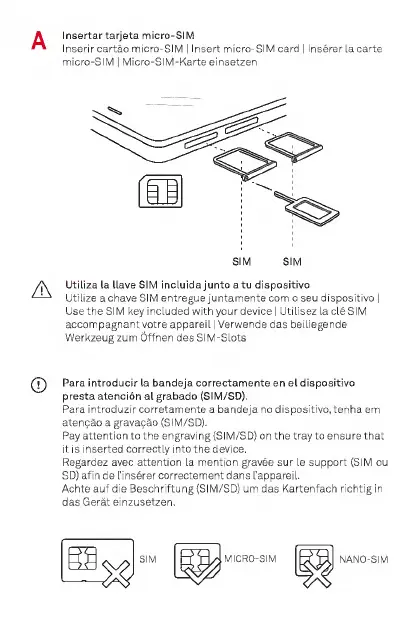
A
Insertartarjeta
micro-SIM
Inserir
cartao
micro-SIM
|
Insert
micro-SIM
card
I
Inserer
la
carte
micro-SIM
|
Micro-SIM-Karte
einsetzen
Utiliza
la
Have
SiM
incluida
junto
a
tu
dispositivo
Utilize
a
chave
SIM
entregue
juntamente
com
o
seu
dispositivo
|
Use
the
SIM
key
included
with
your
device
I
Utilisez
la
cle
SIM
accompagnant
votre
appareil
|
Verwende
das
beiliegende
Werkzeugzum
Offnen
des
SIM-Slots
(J)
Para
introducir
la
bandeja
correctamente
en
el
dispositivo
presta
atencion
al
grabado
(SIM/SD).
Para
introduzir
corretamente
a
bandeja
no
dispositivo,
tenha
em
atengao
a
gravagao
(SIM/SD).
Pay
attention
to
the
engraving
(SIM/SD)
on
the
tray
to
ensure
that
it
is
inserted
correctly
into
the
device,
Regardez
avec
attention
la
mention
gravee
sur
le
support
(SIM
ou
SD)
afin
de
I’inserer
correctement
dans
I’appareil.
Achte
auf
die
Beschriftung
(SIM/SD)
um
das
Kartenfach
richtig
in
das
Gerat
einzusetzen.
MICRO-SIM
NANO-SIM

Related product manuals