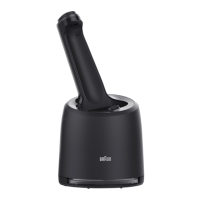
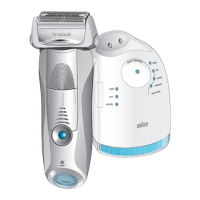
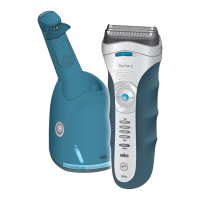
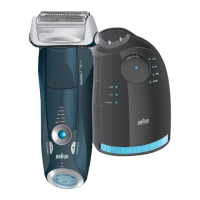
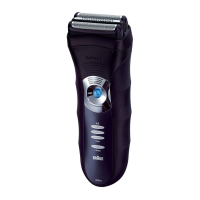
This document describes the Braun Cleaning Station, an alcohol-based cleaning system designed for use with Braun Series 8 and Series 9 Pro shavers. The cleaning station provides an automated solution for charging, cleaning, and lubricating the shaver, ensuring optimal performance and hygiene.
Function Description
The Braun Cleaning Station serves multiple functions to maintain your shaver:
- Charging: The station includes shaver charging contacts that align with the shaver to provide power. When the shaver is placed in the station, it automatically begins charging. The cleaning station display indicates the charging status.
- Cleaning: The primary function of the station is to clean the shaver head using a specialized alcohol-based cleaning fluid. The system offers different cleaning programs, indicated by the "Cleaning programs" display, which may include short/economical, normal, and intensive cleaning options, depending on the model. The cleaning process is initiated by pressing the "Start button."
- Lubrication: The alcohol cleaning fluid also contains lubricating agents that help maintain the shaver's cutting performance.
- Drying: After cleaning, the station facilitates drying of the shaver head.
Usage Features
The cleaning station is designed for ease of use with several intuitive features:
- Compatibility: The cleaning station is compatible with Braun Series 9 Pro (Type 5792, 5793) and Series 8 (Type 5794, 5795) shavers.
- Setup: To set up the cleaning station, connect the power supply to the power socket on the back of the unit. Ensure the cleaning station is placed on a flat, stable, and non-slippery surface to prevent fluid leakage.
- Cartridge Installation: To install a new cleaning cartridge, press the "Release button" to uplift the housing of the cleaning station. Remove the cap from the new cleaning cartridge and slide it into the station from the back until it clicks into place. Then, lower the housing until it closes completely.
- Shaver Placement: Before placing the shaver in the cleaning station, ensure it is dry and free from any foam, gel, or soap residue. Release the multi-head lock switch on the shaver to unlock the head. Gently push the shaver backward into the station, ensuring the shaver's contacts align securely with the station-to-shaver contacts. A "beep" sound confirms proper contact, and charging will begin automatically.
- Initiating Cleaning: If cleaning is required (indicated by the cleaning reminder icon on the shaver or the cleaning station display), press the "Start button" on the cleaning station. The display will show the selected cleaning program and the status light will illuminate.
- Shaver Removal: To remove the shaver after charging and/or cleaning, hold the cleaning station with one hand and tilt the shaver slightly forward to lift it out. The shaver is then ready for immediate use.
- Display Indicators: The cleaning station features a display with several indicators:
- Low level of cleaning fluid: This lamp illuminates when the cleaning fluid level is low, indicating that the cleaning cartridge needs to be replaced.
- Status light: This light provides general operational status.
- Cleaning programs: These lamps indicate the selected cleaning program (short/economical, normal, intensive). Not all models may feature all program indicators.
Maintenance Features
Regular maintenance of the cleaning station primarily involves replacing the cleaning cartridge:
- Cartridge Replacement: The cleaning fluid in the cartridge contains alcohol, which evaporates over time. It is recommended to replace the cartridge approximately every 8 weeks, even if not used daily, to ensure effective cleaning. The "Low level of cleaning fluid" indicator will light up when replacement is needed.
- Disposal of Used Cartridges: When disposing of a used cartridge, close its openings with the lid from the new cartridge. Used cartridges contain contaminated cleaning solution. Dispose of them according to local household waste or hazardous waste programs.
- Safety Precautions for Cartridges:
- Never refill the cleaning cartridge with other liquids or water. Only use original Braun refill cartridges.
- The cleaning cartridge contains highly flammable liquid (ethanol or isopropanol). Keep it away from sources of ignition, direct sunlight, and do not store it over a radiator.
- Avoid contact of the cleaning fluid with eyes. If swallowed or if it gets into eyes, seek medical attention immediately.
- If cleaning fluid spills, wipe it up immediately, as it can cause discoloration on leather products, flooring, or marble.
- Cleaning cartridges are considered "dangerous goods" for air travel and are prohibited from transport in aircraft.
- General Care: Do not place the cleaning station on glass surfaces, slippery surfaces, or near heating appliances. Avoid tilting, moving suddenly, or transporting the cleaning station when a cartridge is installed to prevent spills.
- Power Supply: Always use the Braun power supply type D492 provided with your shaver. Do not exchange or tamper with any part of the appliance or power supply. Keep them dry. Do not use if the appliance or power supply is damaged.
- Children and Supervision: The appliance can be used by children aged 8 years and above and persons with reduced physical, sensory, or mental capabilities if they have been given supervision or instruction concerning safe use and understand the hazards. Children should not play with the appliance, and cleaning and user maintenance should not be performed by children without supervision.

 Need help?
 General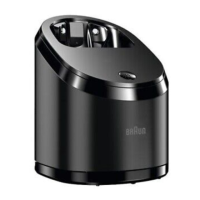

 To Next Page