AEROSPACE
CHRONOMETER
AEROSPACE
CHRONOMETER
AEROSPACE
CHRONOMETER
AEROSPACE
CHRONOMETER
AEROSPACE
CHRONOMETER
AEROSPACE
CHRONOMETER
AEROSPACE
CHRONOMETER
AEROSPACE
CHRONOMETER
AEROSPACE
CHRONOMETER
AEROSPACE
CHRONOMETER
AEROSPACE
CHRONOMETER
AEROSPACE
CHRONOMETER
AEROSPACE
CHRONOMETER
AEROSPACE
CHRONOMETER
AEROSPACE
CHRONOMETER
AEROSPACE
CHRONOMETER
AEROSPACE
CHRONOMETER
AEROSPACE
CHRONOMETER
AEROSPACE
CHRONOMETER
CONFIG
MM:DD:YY
DAY
HH:MM:SS
TM 24H
HH:MM:SS
MON DD
HH:MM:SS
TZ 24H
HH:MM:
AL1 OFF
MM:SS:ZZ
CHR SP
MM:SS:ZZ
CHR LP
HH:MM:SS
TIMER
HANDS
DD:MM:YY
DAY
HH:MM:SS
TM AM/PM
HH:MM:SS
YYYY
HH:MM:
AL1 ON
L X
LIGHT
MM DD
DAY
HH:MM:SS
WK WW
XX SEC
LIGHT
DD MM
DAY
AEROSPACE
CHRONOMETER
HH:MM:SS
TZ AM/PM
AEROSPACE
CHRONOMETER
HH:MM:AM/PM
AL1 OFF
AEROSPACE
CHRONOMETER
HH:MM:AM/PM
AL1 ON
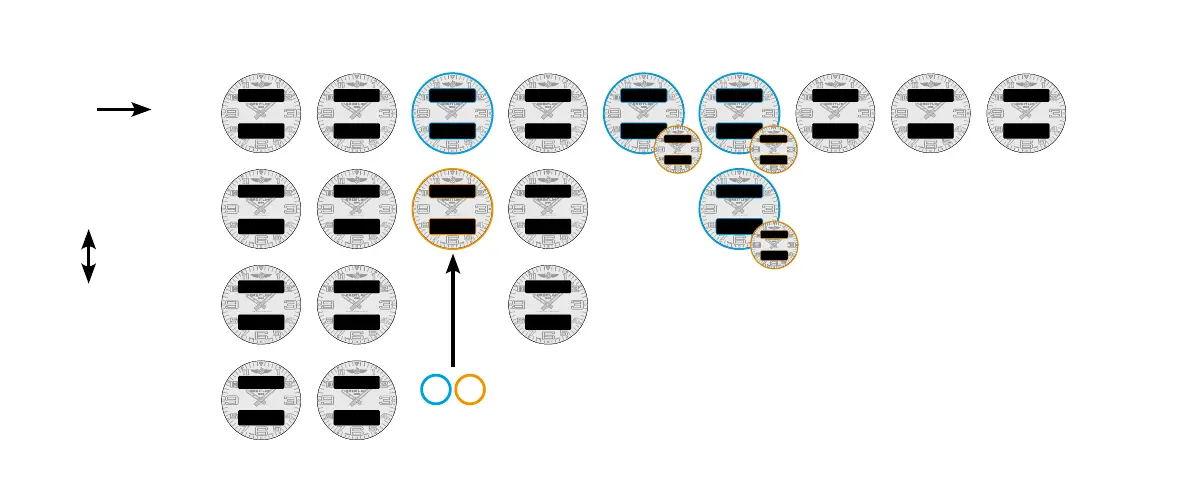
DISPLAY
OVERVIEW
PRESS B to switch
in-between
the functions
PRESS A OR C to switch
in-between the dials
CONFIGURATION DATE
PRIMARY
TIME DISPLAY
SECONDARY
TIME DISPLAY
TIME ZONE ALARM
For the Alarm only :
• PRESS A to activate or
deactivate the alarm,
• Pressing C to switch between
alarm 1 and alarm 2.
Depending on context :
X for a number
HH for hours / MM for minutes / SS for seconds / ZZ for 100
th
of seconds
DAY for day / MON for month / DD for date / MM for month /
YY or YYYY for year / WK of WW for week
Depending on the PRIMARY TIME DISPLAY selected,
other functions displaying a time will either be shown with in
AM/PM or 24 H format as a result, such as TIME ZONE or ALARM
The format can only be adapted on the PRIMARY TIME DISPLAY screen.
SPLIT-TIME
CHRONOGRAPH
LAP-TIME
CHRONOGRAPH
TIMER













 To Next Page