AEROSPACE
CHRONOMETER
AEROSPACE
CHRONOMETER
AEROSPACE
CHRONOMETER
AEROSPACE
CHRONOMETER
AEROSPACE
CHRONOMETER
AEROSPACE
CHRONOMETER
AEROSPACE
CHRONOMETER
AEROSPACE
CHRONOMETER
AEROSPACE
CHRONOMETER
AEROSPACE
CHRONOMETER
AEROSPACE
CHRONOMETER
AEROSPACE
CHRONOMETER
AEROSPACE
CHRONOMETER
AEROSPACE
CHRONOMETER
AEROSPACE
CHRONOMETER
AEROSPACE
CHRONOMETER
AEROSPACE
CHRONOMETER
AEROSPACE
CHRONOMETER
AEROSPACE
CHRONOMETER
CONFIG
MM:DD:YY
DAY
HH:MM:SS
TM 24H
HH:MM:SS
MON DD
HH:MM:SS
TZ 24H
HH:MM:
AL1 OFF
MM:SS:ZZ
CHR SP
MM:SS:ZZ
CHR LP
HH:MM:SS
TIMER
HANDS
DD:MM:YY
DAY
HH:MM:SS
TM AM/PM
HH:MM:SS
YYYY
HH:MM:
AL1 ON
L X
LIGHT
MM DD
DAY
HH:MM:SS
WK WW
XX SEC
LIGHT
DD MM
DAY
AEROSPACE
CHRONOMETER
HH:MM:SS
TZ AM/PM
AEROSPACE
CHRONOMETER
HH:MM:AM/PM
AL1 OFF
AEROSPACE
CHRONOMETER
HH:MM:AM/PM
AL1 ON
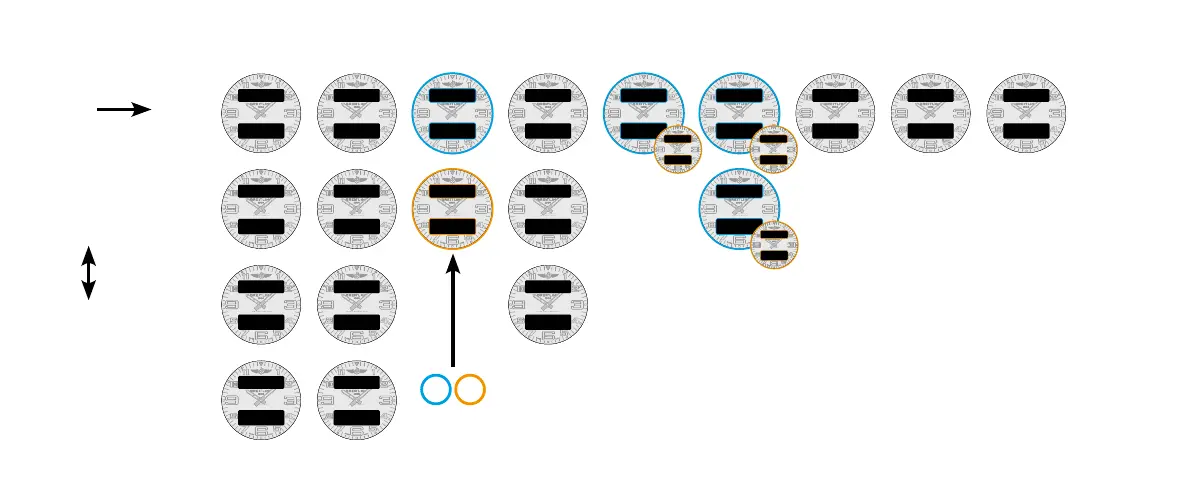
PANORAMICA
DISPLAY
PREMERE B per
passare da una
funzione all’altra
PREMERE A o C per pas-
sare da un quadrante
all’altro
CONFIGURAZIONE DATA
DISPLAY ORARIO
PRINCIPALE
DISPLAY ORARIO
SECONDARIO
FUSO ORARIO SVEGLIA
Solo per la sveglia :
• premere A consente di attivare o
disattivare la sveglia;
• premere C consente di passare
dalla sveglia 1 alla sveglia 2.
In base al contesto :
X per un numero
HH per ore / MM per minuti / SS per secondi / ZZ per centesimi di secondo
DAY per il giorno / MON per il mese / DD per la data / MM per il mese /
YY oppure YYYY per l’anno / WK o WW per la settimana
In base al DISPLAY ORARIO PRINCIPALE selezionato, le altre funzioni
che indicano un orario risulteranno indicate nel formato
AM/PM oppure 24 h, ad esempio il FUSO ORARIO oppure la SVEGLIA.
Il formato può essere adattato soltanto sul DISPLAY ORARIO PRINCIPALE.
CRONOGRAFO CON
TEMPO INTERMEDIO
CRONOGRAFO CON
TEMPO DI GIRO
TIMER












 To Next Page