EasyManua.ls Logo

Bretford CORE 10S - User Manual

Bretford CORE 10S
3 pages
Print Icon
To Next Page IconTo Next Page
Loading...
1
USER GUIDE
STORE & CHARGE | CHGCAB10-CK
CORE
10S CABINET
TECHNICAL SPECIFICATIONS
CAPACITY
10 Devices
COMPATIBILITY
Chromebook screen sizes up to 13.3” (thickness less than 1”)
Tablet screen sizes up to 13.3” (thickness less than 1” with case)
UNIT DIMENSIONS
20.5”W x 17”D x 18”H
SLOT DIMENSIONS
0.875”W x 12”D x 9.25”H
WEIGHT WITHOUT DEVICES
48 lbs.
WARRANTY
12-years, 1-year on electrical
CONSTRUCTION
Steel constructed case with plastic molded slots.
SHIPPING
Ships fully assembled.
CAUTION
• Productisforindooruseonly
• Usercanonlyconnect10devicesatonetime
• Turnpowerswitchoffbeforepluggingindevices
• Turnpowerswitchoffbeforeunpluggingthecabinet
• Donotplugthecabinetiniftheswitchorpower
cordhasbeendamaged
Question and Answer IconNeed help?

Do you have a question about the Bretford CORE 10S and is the answer not in the manual?

Overview

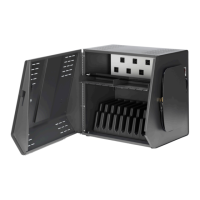
The Bretford CORE™ 10S Cabinet is a compact and secure storage and charging solution designed for educational and professional environments. This cabinet is specifically engineered to store and charge up to 10 mobile devices, such as Chromebooks and tablets, with screen sizes up to 13.3 inches. Its robust construction and thoughtful design ensure both the safety of the devices and ease of use for the operator.

Function Description:

The primary function of the CORE™ 10S Cabinet is to provide a centralized location for storing, securing, and charging multiple mobile devices simultaneously. It helps maintain an organized and efficient learning or working environment by keeping devices charged and ready for use. The cabinet is designed for indoor use and can be placed on a desktop/countertop or mounted to a wall, offering flexible deployment options. It integrates a power management system that allows users to plug in device adapters, ensuring all connected devices receive power. The inclusion of a user-programmable combination padlock enhances security, protecting valuable electronic equipment from theft or unauthorized access.

Important Technical Specifications:

  • Capacity: The cabinet can accommodate 10 devices.
  • Compatibility: It is compatible with Chromebooks and tablets with screen sizes up to 13.3 inches. Devices should have a thickness of less than 1 inch (for Chromebooks) or less than 1 inch with a case (for tablets).
  • Unit Dimensions: The cabinet measures 20.5 inches in width (W), 17 inches in depth (D), and 18 inches in height (H).
  • Slot Dimensions: Each device slot has dimensions of 0.875 inches in width (W), 12 inches in depth (D), and 9.25 inches in height (H).
  • Weight Without Devices: The cabinet itself weighs 48 lbs.
  • Construction: The case is constructed from steel, providing durability and security, while the device slots are made from plastic molding to protect devices from scratches.
  • Warranty: The cabinet comes with a 12-year warranty on the structural components and a 1-year warranty on the electrical components.
  • Shipping: The unit ships fully assembled, simplifying initial setup.
  • Mounting Support: When wall-mounted, the plate is designed to support the cabinet and ten mobile devices, with a maximum weight of devices not to exceed 40 lbs. The mounting method must be able to support up to 220 lbs. (100 kg.) in total.

Usage Features:

  • Power Switch: A clearly labeled power switch, located on the right-hand side of the cabinet, controls the electrical supply to the charging outlets. Users are advised to turn off the power switch before plugging in or unplugging devices or the cabinet itself.
  • AC Outlet Access - Adapter Storage: The cabinet features an area for AC outlets where device power adapters can be plugged in. Velcro straps are provided to help manage and secure brick-type power adapters, keeping the interior tidy and preventing cable clutter.
  • Device Storage: Devices are stored in individual slots. Associated power cables can be threaded through dedicated slots in the AC access door, ensuring neat and organized charging.
  • Flywheel Handle/Lock: The cabinet incorporates a unique Flywheel Handle/Lock mechanism. When the shackle is not inserted, this mechanism functions as a handle to open and close the cabinet door.
  • Shackle Insertion: To secure the cabinet, the lock shackle is inserted into its opening at a slight angle and pushed firmly. Once inserted, the cam disengages, allowing the Flywheel Handle/Lock to spin freely without engaging the locking cam, thereby preventing the door from being opened.
  • Lock Programming: The included padlock is user-programmable. To set a custom combination:
    1. Open the padlock using the default combination "0000."
    2. Insert the programming key and turn it 90 degrees.
    3. Set the desired new combination.
    4. Remove the programming key.
  • Desktop/Countertop Attachment: For added stability and security, the cabinet can be fastened to a desktop or countertop. Two internal holes in the bottom front of the cabinet serve as guides for drilling pilot holes into the mounting surface. Appropriate length screws (customer supplied) with washers are then used to secure the cabinet. Users are cautioned not to overtighten the screws.
  • Wall Mounting: The cabinet can also be wall-mounted using a dedicated mounting plate (provided). The plate should be securely attached to the wall using suitable hardware capable of supporting the total weight. The cabinet then slides into the lip of the wall-mounted plate. To prevent the cabinet from being lifted off the plate, two screws (provided) are inserted through holes in the back of the cabinet and fastened securely. Once the front door is locked, these screws become inaccessible, preventing removal of the cabinet from the wall.

Maintenance Features:

  • Construction: The steel construction ensures long-term durability and resistance to wear and tear in demanding environments.
  • Cable Management: The integrated velcro straps for adapter storage and cable routing slots help maintain an organized interior, reducing the risk of cable damage and simplifying maintenance.
  • User-Replaceable Lock: The combination padlock is a separate component, suggesting it could be replaced if necessary, although specific instructions for replacement are not detailed in the provided manual.
  • Shipping: The fact that it ships fully assembled minimizes the need for initial assembly and potential maintenance issues related to improper setup.

Important Cautions:

  • The product is strictly for indoor use.
  • Only 10 devices should be connected at one time.
  • Always turn the power switch off before plugging in or unplugging devices.
  • Always turn the power switch off before plugging in or unplugging the cabinet from the wall outlet.
  • Do not plug in the cabinet if the power switch or power cord is damaged.
  • For wall mounting, it is recommended to use a qualified professional for installation to ensure proper mounting and avoid voiding the warranty.
  • Do not place anything on top of the cabinet.
  • Only use the mounting plate provided with the product for wall installation.
  • Bretford will not be liable for improper use or installation of its products.

Bretford CORE 10S Specifications

General IconGeneral
BrandBretford
ModelCORE 10S
CategoryBattery Charger
LanguageEnglish