Need help?
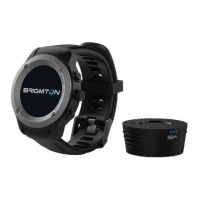
Do you have a question about the Brigmton BWATCH-BT5-B-N and is the answer not in the manual?
Identifies physical components like buttons, speaker, mic, SIM slot, and charging contacts.
Instructions for powering on/off, waking the screen, and changing time display modes.
How to access the app interface by swiping and use quick access shortcuts.
How to configure the watch face and select different visual themes.
Guide on downloading, installing, and configuring the Fundo application for enhanced features.
Steps to activate and pair the watch with a smartphone via Bluetooth.
Features for calls, SMS, contacts, and receiving phone notifications.
Includes music playback, remote camera, anti-loss alerts, and QR code app info.
Monitors steps, distance, sleep, sedentary habits, heart rate, and cardiogram.
Details compliance with EMC directives and product specifications.
 General
| Model | BWATCH-BT5-B-N |
|---|---|
| Type | Smartwatch |
| Resolution | 240 x 240 pixels |
| Battery Life | Up to 7 days |
| Water Resistance | IP67 |
| Connectivity | Bluetooth 4.0 |
| Compatibility | Android, iOS |
| Display | 1.3 inch |
| Sensors | Heart Rate, Pedometer |
| Weight | 50g |


 To Next Page