50 Icon, Foothill Ranch, CA 92610-3000 USA
email: info@hamptonproducts.com
www.hamptonproducts.com • 1-800-562-5625
Made in China
Brink's trademark & copyright
work are used with permission.
©2019 Hampton Products International Corp.
999-09033_7006_REVB_08/19
TOOLS REQUIRED:
Screwdriver, Power Drill, 3/16” Drill Bit
WHAT'S INCLUDED:
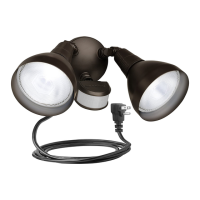
A - Light Fixture D - Mounting Screws (2)C - Fixture Mounting PlateB - 5' Heavy Duty Outdoor Cord E - Wall Anchors (2) F - 180º Motion Sensor
SERIES 7006
CORDED 180º MOTION SECURITY LIGHT
Congratulations on your purchase of a Brink’s™ LED Portable Security Lighting xture with Motion Detection. You have purchased a safe, dependable, easy-to-install security lighting system. You can use this xture at home for outdoor lighting applications.
INSTALLATION INSTRUCTIONS
1. Attach Fixture Mounting Plate (C) at desired location using two Mounting Screws (D). - FIGURE 1
NOTE: Depending on mounting surface of choice, it may be necessary to drill pilot holes with power drill to ease
installation of mounting screws.
2. Place Security Light Fixture (A) onto Fixture Mounting Plate (C). - FIGURE 2
3. Plug xture into grounded outlet.
MOTION SENSOR CONTROLS
Observe the two controls on the bottom of the sensor, the SENS (sensitivity) control and the TIME (duration) control.
• SENS (sensitivity) - Set the sensitivity of the motion sensor. Turn the dial clockwise to increase the sensitivity
(maximum range is 35’ or 10m). Turn the dial counterclockwise to decrease the sensitivity. The sensitivity should be set
at maximum, however, the sensitivity may need to be set lower to avoid false triggering. - FIGURE 4
• TIME (duration) - Sets how long the light will stay on after motion is detected (between 5 seconds to 8 minutes). Turn
dial counterclockwise to decrease the time duration. Turn clockwise to increase the time duration. - FIGURE 5
NOTE: Turning the dial to the full counterclockwise position will deactivate the photocell. This will allow the motion sensor to
active during the day.
SETTING THE MOTION SENSOR CONTROLS
SETTING UP OR MAKING ADJUSTMENTS TO THE MOTION SENSOR
1. Turn the power OFF to the oodlight.
2. Aim the motion sensor to the approximate center of the desired detection range. Caution: Do not aim the sensor above the horizon as
direct sunlight may damage the sensor.
3. Turn the “TIME” (duration) dial counterclockwise until the dial stops.
4. Turn the “SENS” (sensitivity) dial to the full clockwise rotation.
5. Turn power ON to the oodlight.
6. Set the range and sensitivity of the motion sensor.
a. Have a person move around at the furthest distance of the desired detection area (maximum range is 35’ or 10m).
b. If the “SENS” dial is at the maximum clockwise rotation and the light still has not turned on, it may be necessary to re-aim the
motion sensor or the desired detection area may be too great.
c. When the lights do turn ON, have the person stand still until the lights turn OFF. Once the lights are OFF, have the person move
conrm the settings.
d. To reduce false triggering due to small animals or large plants in the vicinity, turn the “SENS” dial counterclockwise to decrease
the sensitivity.
7. Turn the “TIME” dial clockwise to increase the time the light stays ON (up to 8 minutes) after motion is detected. NOTE: When making
this adjustment during the day, once you have turned the TIME dial from the full counterclockwise position, the light will remain on for
the set duration and then turn OFF. Once the light is OFF, it will not turn ON again until motion is detected at night. To adjust the TIME
duration during the day…
a. Turn the “TIME” dial to the full counterclockwise position and pass your hand in front of the motion sensor to activate the light.
b. Once the light is ON, turn the “TIME” dial to set the time duration and note how long the light remains ON.
c. Repeat the above two steps until the desired time duration is achieved.
MANUAL OVERRIDE FEATURE
If the security oodlight is connected to an outlet controlled by a wall switch, the Manual Override Feature is available. The Manual
Override Feature allows the unit to be turned ON or OFF manually during the night, bypassing the motion sensor.
MANUAL OPERATION
To manually turn the oodlight ON, turn the wall switch OFF and then ON again immediately within 2 seconds. The oodlights will turn ON
and remain ON until the wall switch is turned OFF. If the wall switch was previously turned OFF for a period of time, turn the wall switch
ON for at least 5 seconds, and then use the OFF- ON procedure above to turn the oodlight ON manually. To manually turn the oodlight
OFF, simply turn the wall switch OFF. The unit will not activate as long as the wall switch is in the OFF position.
RESETTING TO AUTOMATIC OPERATION
To return the security oodlight to automatic operation, turn the wall switch OFF for at least 5 seconds and then turn the switch back ON.
The security oodlight will come ON for the time duration set, and then turn OFF. The oodlight will now activate according to the settings
on the motion sensor. Leave the wall switch in the ON position to operate the oodlight in automatic mode.
TROUBLESHOOTING
If this xture fails to operate properly, check to make sure:
• The line voltage to the outlet is correct.
• The cord is fully engaged into the outlet
QUESTIONS: For further assistance or more information, please call 1-800-562-5625, 8am – 5pm (Pacic Time), Monday through Friday.
FIXTURE SHOULD BE MOUNTED ON A WALL AT LEAST 8 FEET ABOVE THE GROUND FOR OPTIMAL PERFORMANCE.
LIMITED LIFETIME WARRANTY – This product is warranted to be free from defects in material and workmanship for life of product. If a defect occurs, call 1-800-562-5625 for instructions on how to have defective product repaired
or replaced free of charge. LIMITATIONS - This warranty only covers Brink’s assembled lighting products and accessories and is not extended to other components, Lamp Bulb(s), or equipment used on the product. Warranty extends
to original purchaser of product. Receipt or other approved proof of purchase required for warranty service. NOT LIABLE FOR INCIDENTAL, INDIRECT, OR CONSEQUENTIAL DAMAGES. Some states do not allow the exclusion or
limitation of incidental or consequential damages, so the above limitation or exclusion may not apply to you. This warranty gives you specic legal rights, and you may also have other rights which vary from state to state. NOT
COVERED - Product failure not relating to faulty material or workmanship, corrosion of brass components, reimbursement for installation or unauthorized service.
C
D
E
G
FIGURE 2
FIGURE 1
FIGURE 4
MIN MAX
FIGURE 5
MIN MAX
IMPORTANT SAFETY INFORMATION
THIS PRODUCT MUST BE INSTALLED IN ACCORDANCE WITH ALL APPLICABLE INSTALLATION CODES. THE LAMP AND FIXTURE CAN GET HOT DURING USE. TURN OFF THE POWER AND ALLOW THE FIXTURE TO COOL DOWN FOR AT LEAST
20 MINUTES PRIOR TO WORKING ON THE UNIT. WARNING: To reduce the risk of FIRE, ELECTRIC SHOCK, EXPOSURE TO EXCESSIVE UV RADIATION, AND/OR INJURY TO PERSONS:
• Before installing this xture, be sure to check with local ordinances regarding approved outdoor lighting. This xture style may not be allowed in some areas.
• This xture is for outdoor use only.
• This xture is for WALL MOUNTING only.
• This xture is to be connected to a 120 volt, 60 Hz power source. Connecting to a different power source may create a hazard and will void the warranty.
• This xture is suitable for wet locations.
• Ground Fault Circuit Interrupter (GFCI) protection is to be provided on the circuit(s) or outlet(s) to be used for the wet location portable luminaires.
Receptacles are available having built-in GFCI protection and are able to be used for this measure of safety.
• Do not touch hot lens, guard, or enclosure.
• Do not look directly at lighted lamp.
• Do not remain in light if skin feels warm.
• Do not attempt to open the xture housing. There are no serviceable parts inside.
• Always use safety precautions. Safety glasses and gloves should be worn during installation.
• Motion Sensor performance may be affected by temperature.
SAVE THESE INSTRUCTIONS
PRIOR TO INSTALLATION
READ ALL INSTRUCTIONS.
WARNING: When using outdoor use portable luminaires, basic safety precautions should always be followed to reduce the risk of re, electric shock, and personal injury, including the
following . .
SAVE THESE INSTRUCTIONS
a) Use only three-wire outdoor extension cords that have three-prong grounding plugs and grounding receptacles that accept the appliance’s plug.
b) Ground Fault Circuit Interrupter (GFCI) protection is to be provided on the circuit(s) or outlet(s) to be used for the wet location portable luminaire. Receptacles are available having built-in
GFCI protection and are able to be used for this measure of safety.
c) Use only with an extension cord for outdoor use, such as an extension cord of cord type SEW, SEOW, SEOOW, SOW, SOOW, STW, STOW, STOOW, SJEW, SJEOW, SJEOOW, SJW, SJOW, SJOOW,
SJTW, SJTOW, or SJTOOW.
Fixture Base
THIS PRODUCT MUST BE INSTALLED IN ACCORDANCE WITH THE APPLICABLE INSTALLATION CODES BY A PERSON FAMILIAR WITH THE CONSTRUCTION AND OPERATION OF THE PRODUCT AND THE HAZARDS INVOLVED.
CAUTION: HOT SURFACE. DO NOT USE NEAR OR AROUND FLAMMABLE/COMBUSTIBLE MATERIALS OR LIQUIDS.
WARNING: FIXTURE MUST BE PLUGGED INTO A GROUNDED, OUTDOOR RATED OUTLET THAT MEETS LOCAL, STATE, AND NATIONAL SAFETY CODES. IF YOU ARE NOT FAMILIAR WITH THE SAFETY RATING OF YOUR OUTLET,
IT IS RECOMMENDED THAT YOU SECURE THE SERVICES OF A WELL QUALIFIED ELECTRICIAN WHO CAN ASSURE THE OUTLET MEETS THE LOCAL, STATE, AND NATIONAL SAFETY REGULATIONS REQUIRED.
RISK OF FIRE. UNPLUG FIXTURE TO CHANGE LAMP. DO NOT TOUCH THE LAMP. DO NOT OPERATE WITHOUT COMPLETE LAMP ENCLOSURE IN PLACE, WITH A MISSING OR DAMAGED GUARD, LAMP CONTAINMENT BARRIER,
UV FILTER OR LENS. DO NOT PLACE LAMP WHERE THE OVERHEAD SURFACE IS CLOSER THAN 2 INCHES FROM THE PORTABLE LUMINAIRE.
A

 Need help?
 General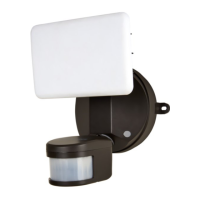

 To Next Page