INSERT
INSERT
i INSERT
ii SNAP
gap at TOP gap at BOTTOM
CORD ANCHOR - SLIDE
TIGHTEN
release tension
ADJUSTABLE
ANCHORS
ADJUSTABLE
ANCHORS
CORD ANCHOR - SLIDE
TIGHTEN
ADJUST
increase tension
release tension
increase tension
Before fitting Handlebar
Cover, ensure the
cords are not twisted or
tangled
Align Cords
on individual
rollers
Align all
Cords on end
rollers
Align all
Cords on end
rollers
INSTSCREEN | Rev | |3 C Feb 2020 8
C.
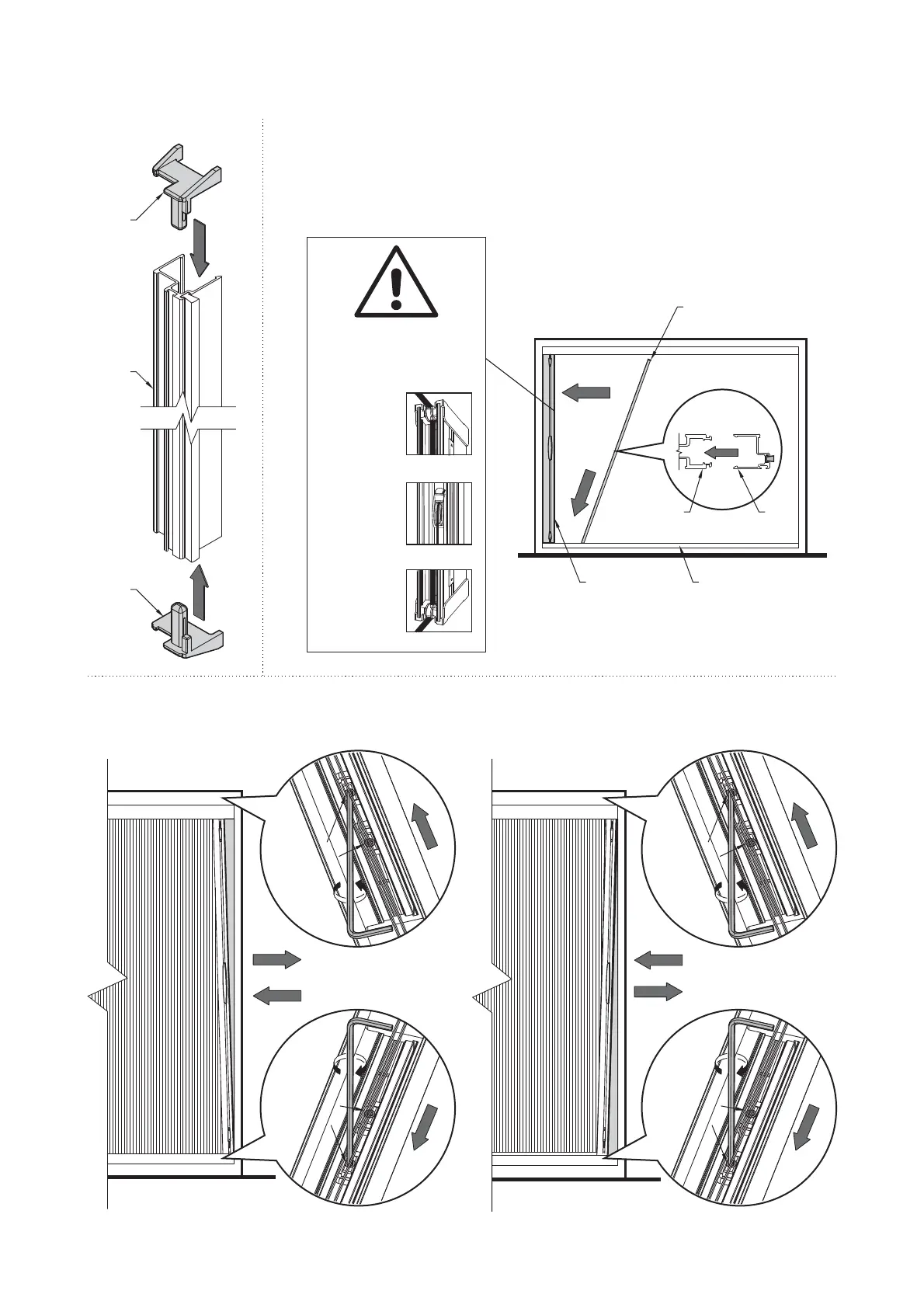
11. Fitting the Handlebar Cover
Operate the screen before installing the handlebar cover to confirm smooth operation.
Once fitted, check the operation, and it should be as smooth as Step 9
Ensure sticker is completely
removed after checking
WS-PK-T
TOP
PACKING
BLOCK
WS-PK-B
BOTTOM
PACKING
BLOCK
WS-HDCEXP
HANDLEBAR
COVER
RSC
CHANNEL
WS-HDCEXP
HANDLEBAR
COVER
WS-HDCEXP
HANDLEBAR
COVER
HANDLEBAR
ii SNAP
SCREEN
ASSEMBLY
12. Handlebar Adjustment
ADJUSTABLE
ANCHORS
CORD ANCHOR - SLIDE
ADJUST
TIGHTEN
ADJUSTABLE
ANCHORS
ADJUSTABLE
ANCHORS
ADJUSTABLE
ANCHORS
ADJUST
ADJUSTABLE
ANCHORS
ADJUSTABLE
ANCHORS
ADJUSTABLE
ANCHORS
CORD ANCHOR - SLIDE
ADJUST
TIGHTEN
ADJUSTABLE
ANCHORS
ADJUSTABLE
ANCHORS
ADJUSTABLE
ANCHORS
WS-HD EXCP
HANDLEBAR
COVER
WS-HD EXCP
HANDLEBAR
COVER


 To Next Page
 Loading...