The BRM 630 S is an elevator emergency communication set designed to ensure bilateral communication in elevators, adhering to standards 81-28 and 81-70. It also provides tracking for breakdowns, revisions, and other recognized systems.
Function Description:
The BRM 630 S functions as an "Emergency Communication System" equipped with robust software support. It facilitates communication between the elevator cabin, pit bottom, and engine room, and can connect to a central monitoring system (BRMCLOUD) for advanced tracking and alarm management. The system is designed to meet EN 81-70 requirements for light systems, with optional relay outputs for button connections. It is also prepared for an interphone system, requiring only a receiver to be connected.
Important Technical Specifications:
- Power Input: The main module accepts 24 VDC for power supply and 12 VDC for battery connection.
- Communication: Utilizes GSM for call and SMS capabilities, requiring a SIM card. It supports 2G features.
- Signal Strength: RSSI (Received Signal Strength Indication) is displayed, with values ranging from 1 to 31.
- Battery Monitoring: Automatically checks battery status and provides warnings. It also charges the connected battery.
- Intercom Talk Time: 20 minutes.
- Alarm Call Attempts: If the intercom device doesn't respond within 15 seconds, it initiates phone calls to registered numbers.
- Filter Inputs: Includes inputs for "ENERJİ" (Energy), "KAPI" (Door), "MOTOR" (Motor), "DIŞKAPI" (Exterior Door), "REVİZYON" (Revision), and "SERVİS DIŞI" (Out of Service). It also has two general-purpose "GİRİŞ" (Input) terminals.
- RS 485 A and CANBUS: Available for devices with special software, requiring contact with BRM technical service for connection.
- Modules: Consists of a Main Module (Engine Room), Cab Top Module, Pit Bottom Module, and In-Cab Module. An Interconnect Module may be required for certain In-Cab Module types.
Usage Features:
- Easy Installation and Use: Designed for straightforward installation and operation.
- Advanced Filter Function: Filters out unnecessary faults, reducing false alarms to the communication center or emergency personnel.
- Automatic Test Messages: Terminals send a test message to the BRMCLOUD system every three days (adjustable time) and check line functionality every 90 seconds.
- Simultaneous Operator Use: Various operators can use the system's software simultaneously.
- Warning System: Warns users in specific cases.
- Comprehensive Alarm Management: Manages test alarms, inspections, emergency calls, and technical alarms.
- License-Free Software: The BRM CLOUD software system operates without license fees, in line with 81-28 standards.
- Reportable and Trackable: The BRM-630 S is reportable and can be tracked via computer, cellphone, or tablet, with enhanced communication abilities.
- Online Operability Check: Software and hardware integration allow distributors to check elevator operability or alarm situations online.
- SMS and Call Notifications: Sends SMS to up to 5 pre-designated cell phone numbers in case of danger, maintenance, etc., and calls these numbers sequentially until a connection is made.
- Intercom System: Allows communication between the engine room and the cabin. When the alarm button is pressed for 8 seconds, the intercom in the engine room is automatically searched.
- SIM Card Usage: Requires a SIM card (smallest size, NANO SIM) for call and SMS functions. The first registered phone number must be a GSM number.
- Password Protection: Factory default password is "123456" and can be changed.
- Information Entry: Allows entry of phone numbers (up to 5), address (up to 100 characters, English alphabet only), and company name (up to 100 characters, English alphabet only) via SMS commands.
- Language Options: Menu language can be changed via SMS command ("Dil"), with options from 0 to 9 (e.g., 0: Turkish, 1: English, 2: German).
- Exterior Door Filter: Exterior doors can be activated ("1") or deactivated ("0") in the filter via SMS command ("DisKapi").
- Test Mode: The device can be switched to test mode by pressing the alarm termination button on the main module for 10 seconds, or by pressing the in-cab alarm button for 20 seconds after cabin doors are closed (adjustable via BRM CLOUD). In test mode, calls can be made, and information like telephone numbers, battery level, sound level, IMEI, and filter status can be read.
- Alarm Mode: Pressing the in-cab alarm button for a maximum of 3 seconds switches to alarm mode and initiates a call via SIM. Pressing for 8 seconds initiates an intercom call.
Maintenance Features:
- Battery Status Check: Automatically checks battery status and provides warnings. It also ensures the correct charging of the connected battery.
- Alarm Termination: Alarms can be terminated in three ways:
- Via BRM Main Module: Pressing the alarm termination button on the main module for 3 seconds.
- Via BRM CLOUD: The call center can send an alarm termination command to the BRM main module via the cloud after a rescue operation.
- Automatically: If the BRM main module does not terminate the alarm within 4 hours, it checks the filters and ends the alarm if no alarm condition is present.
- Software Version Check: By pushing the test button, users can view the software versions of the main module, cab top, and pit bottom modules.
Installation Precautions:
- Install in easily accessible places, away from water and moisture.
- Ensure the 24 VDC power supply is exactly 24 V to prevent device damage.
- Connect battery terminals carefully, checking (+) and (-) ends to avoid damage from reverse connection.
- External door control is required for semi-automatic doors; contact BRM technical service for assistance.
- If an interconnect module is needed for the In-Cab Module, contact BRM Technical Support.

 Need help?
 General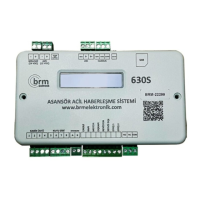

 To Next Page