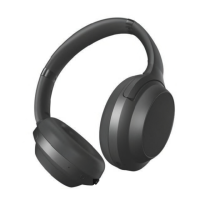
The Brookstone Airphones are an RF wireless headphone system designed for home audio use, offering a convenient way to listen to audio from various sources without the constraints of wires. The system includes a pair of RF wireless headphones, a charging base that doubles as a transmitter, and necessary cables for connectivity.
Function Description:
The primary function of the Brookstone Airphones is to provide wireless audio listening. The charging base acts as a transmitter, connecting to audio sources like TVs, soundbars, or other audio equipment via RCA, 3.5mm stereo, or S/PDIF optical cables. It then wirelessly transmits the audio signal to the headphones, allowing the user to move freely within a range of approximately 100 feet from the base. The headphones feature on-device controls for power, volume adjustment, and muting. The system also supports audio passthrough, enabling the charging base to relay the audio signal to another audio device (like a soundbar) while simultaneously transmitting to the headphones.
Important Technical Specifications:
- Connectivity: RF wireless technology for headphone-to-base communication.
- Audio Inputs (Charging Base):
- RCA (L/R)
- 3.5mm Stereo IN
- Optical IN (S/PDIF) - supports 96kHz/24bit
- Audio Outputs (Charging Base):
- Optical OUT (S/PDIF) for passthrough
- Power (Charging Base): Micro USB port, 5V/1000mA
- Wireless Range: Approximately 100 feet under ideal conditions.
- Battery Type (Headphones): Non-removable Lithium-Polymer battery.
- Charging: Via USB charger connected to the charging base.
- Automatic Power Off (Headphones): After 5 minutes of inactivity.
Usage Features:
Charging:
- Charging Base Power: Connect the supplied USB charger to the charging base's USB port and plug it into a wall outlet.
- Headphone Charging: Place the headphones on the charging base. Both the headphone and charging base LED indicators will light red during charging. Once fully charged, both LED indicators will turn off.
- Low Battery Indication: Loss of sound quality indicates that the headphones require charging.
Connecting the Charging Base to an Audio Source:
- RCA/3.5mm Audio Cable:
- Connect the white and red RCA plugs of the supplied cable to the L and R audio out ports on your TV.
- Connect the 3.5mm stereo plug to the "Stereo IN" 3.5mm audio jack on the charging base.
- Note: Ensure cables are connected to audio output ports on the TV, not input. A 3.5mm/3.5mm audio cable (not included) can also be used to connect from a TV's 3.5mm output to the charging base's 3.5mm stereo input.
- S/PDIF Optical Cable for Digital Audio:
- For TVs with an S/PDIF optical output, connect one end of the included optical cable to the TV's connection panel.
- Connect the other end of the optical cable to the "Optical IN" port on the charging base.
- Troubleshooting No Sound (Optical):
- Ensure home theater/stereo system is set to the appropriate audio output and the optical cable is securely connected.
- Go to the TV's "SOUND" or "SPEAKERS" menu and select "EXTERNAL SPEAKERS" or "AUDIO SYSTEM." Some TVs require internal speakers to be turned off.
- Set the "DIGITAL AUDIO OUT" setting on the TV to "PCM."
- Audio Passthrough:
- If a soundbar or other audio equipment is already connected to your TV, the charging base's "Optical OUT" can be used to passthrough the audio signal to that equipment.
- Note: When an audio source is connected to the charging base's "Stereo IN," the optical ports will not function.
Headphone Operation:
- Power On: Press and HOLD the power button (about 2 seconds) until the headphone's LED indicator turns blue.
- Power Off: Press and HOLD the power button (about 2 seconds) until the headphone's LED indicator flashes blue and turns off.
- Automatic Power Off: If the headphones are powered on and placed on the charging base, they will automatically power off.
- Wireless Connection: After powering on, the headphones will wirelessly connect to the charging base (5-10 seconds). The charging base's LED indicator will light solid blue, and the headphones will beep three times, with their LED indicator flashing blue.
- Volume Control: Use the "+" or "–" buttons on the headphones to adjust volume. A max volume tone will be heard when the headphone's volume controller reaches its maximum.
- Mute: Press the "Mute" button to mute the sound; press again to restore sound.
- Pairing Button (Charging Base): If no sound is heard from the connected device, press and HOLD the "Pairing Button" on the charging base for 3 seconds.
Maintenance Features:
- Battery Recycling: The device contains a non-removable Lithium-Polymer battery that must be recycled or disposed of properly. Users are advised to contact their local waste management office for information on battery recycling or disposal. The product carries the RBRC (Rechargeable Battery Recycling Corporation) seal and the BC symbol, indicating compliance with California CEC and energy efficiency for battery charging.
- Product Disposal: The crossed-out wheeled bin symbol signifies that the product should not be discarded as household waste but delivered to an appropriate collection facility for recycling, helping protect natural resources and human health.

 Need help?
 General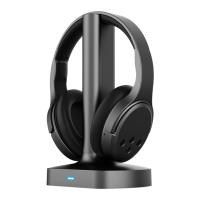

 To Next Page