KE-430D, BE-438D
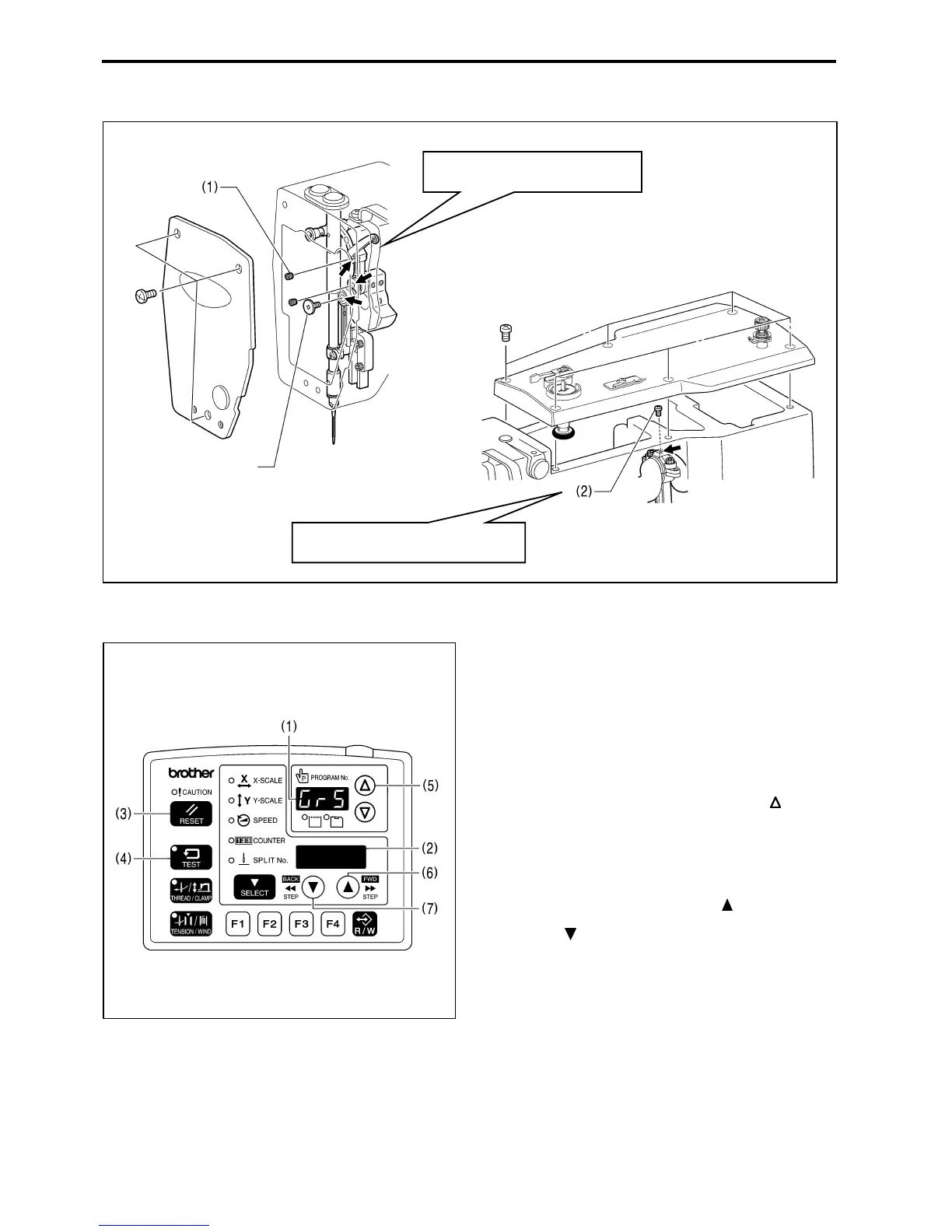
1. Grease application locations
2. Resetting the grease up counter
Once the grease has been applied, follow the procedure
below to reset the cumulative number of stitches between
grease applications.
1. Turn on the power switch. "GrE" and "AS.UP" will flash
in the program No. display (1) and the menu display (2)
and the buzzer will sound.
2. Press the RESET key (3). The program No. display (1)
and the menu display (2) will return to their normal
displays.
3. While pressing the TEST key (4), press the
key (5).
"GrS" will appear in the program No. display (1), and the
cumulative number of stitches until greasing is required
will appear in the menu display (2) in units of 100,000
stitches.
(The number of stitches will be displayed in all seven
digits of the program No. display (1) and menu display
(2) in units of 100 stitches while the
key (6) is being
pressed.)
4. Press the
key (7). The cumulative number of stitches
will be reset to "0000".
5. Press and hold the RESET key (3) for 2 seconds or
more. (This completes the reset procedure.)
6. When you press the TEST key (4), the displays will
return to their normal displays.
Turn the machine pulley until the
screw



 To Next Page
 Loading...





