2. FUNCTION SETTINGS
2-7. Clearing saved data (Initialization)
Incorrect setting of data from sources such as memory switches can cause the sewing machine to operate incorrecUy.
If
this
h
f
II
th d b I th d d t th .
h"
t I ti
appens, you can o
ow
e proce ure
e ow to initialize
esave
ata
tore
urn
e
sewmq mac
1ne
o norma opera on.
1
2
3
4
12
Parameter No. Setting items
1
____
_[(~-~]__
___
_
fl~~~!l..9
_<!1!
_C!Q9J~9_n_~~
~~~l}g_
P!9..9r:.C!ITI~
1~<?!:1}
.P-~9~_1!1_
!:'~·-
?9_q
_C!Q~~~t
_________
-
...
Clearing individual programs from program No. 200 and after
2
[
MEM]
Initializing memory switches.
3
[ ALL]
Clearing
or
initializing all setting data (added sewing programs, memory switch
settings, user programs and
cycle programs)
4 [ USE] Clearing user programs and cycle programs.
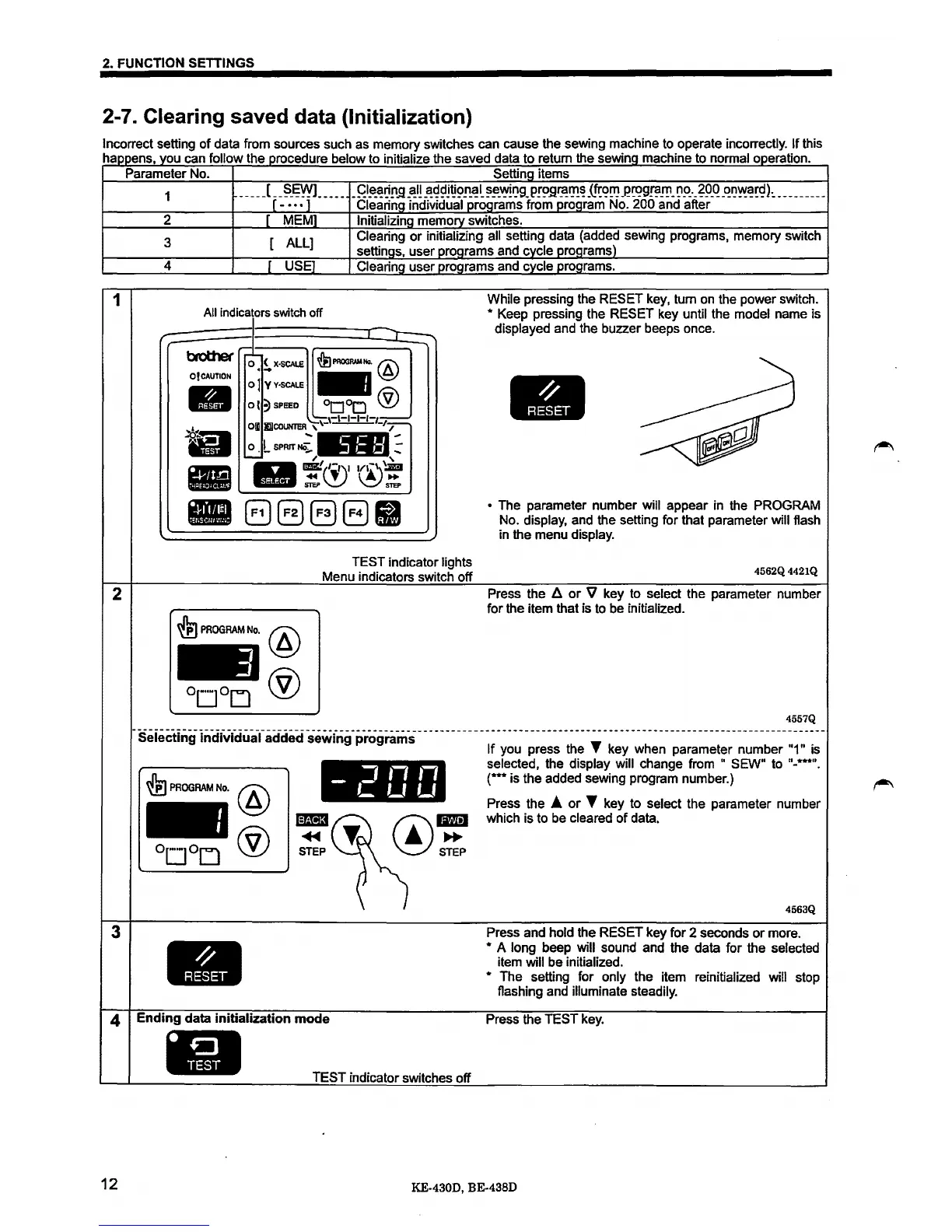
All indicators switch
off
J
While pressing the RESET key, tum
on
the power switch.
* Keep pressing the RESET key until the model name is
displayed and the buzzer beeps once.
r
brothef
O!CAUTION
-
••
•
-
-
J
)"-----._
~
r'-
&PPOORIMNo.@
0 (
X·SCAI.E
...
oJ
Y
Y·SCAI.E
-
ot
?)
SPEED
0
000
®
Ofll
-.1\-1-1-1-1-r:---
I!IICOUNTER
\\-
---
-I_,-
,_.-
0 • L
SPRIT
NO;.
::
~
~
'
1111!®'®!
8888U
TEST indicator lights
Menu indicators switch off
~
PROGRAM
No.
@
®
• The parameter number will appear in the PROGRAM
No.
display, and the setting for that parameter will flash
in the menu
display.
4562Q4421Q
Press the
/i
or
V key to select the parameter number
for the item that is to be initialized.
4557Q
-seieC:t:i.i9inctividuafaC:idedsewfr19_P_ro9rams-------------------------------------------------------------------------
lt
you press the T key when parameter number "1" is
~
PROGRAM
No.
@
®
IB3
~
STEP
-
J''''
L
Lf
Lf
Ending
data
initialization
mode
•
TEST indicator switches off
selected, the display will change from " SEW" to "-***".
(***is
the added sewing program number.)
Press the
A
or
T key to select the parameter number
which is to be
cleared
of
data.
4563Q
Press and hold the RESET key for 2 seconds
or
more.
* A long beep will sound and the data for the selected
item will be initialized.
*
The setting for only the item reinitialized will stop
flashing and
illuminate steadily.
Press the TEST key.
KE-430D, BE-438D



 To Next Page
 Loading...





