3. INSTALLATION
25
KE-430F, BE-438F
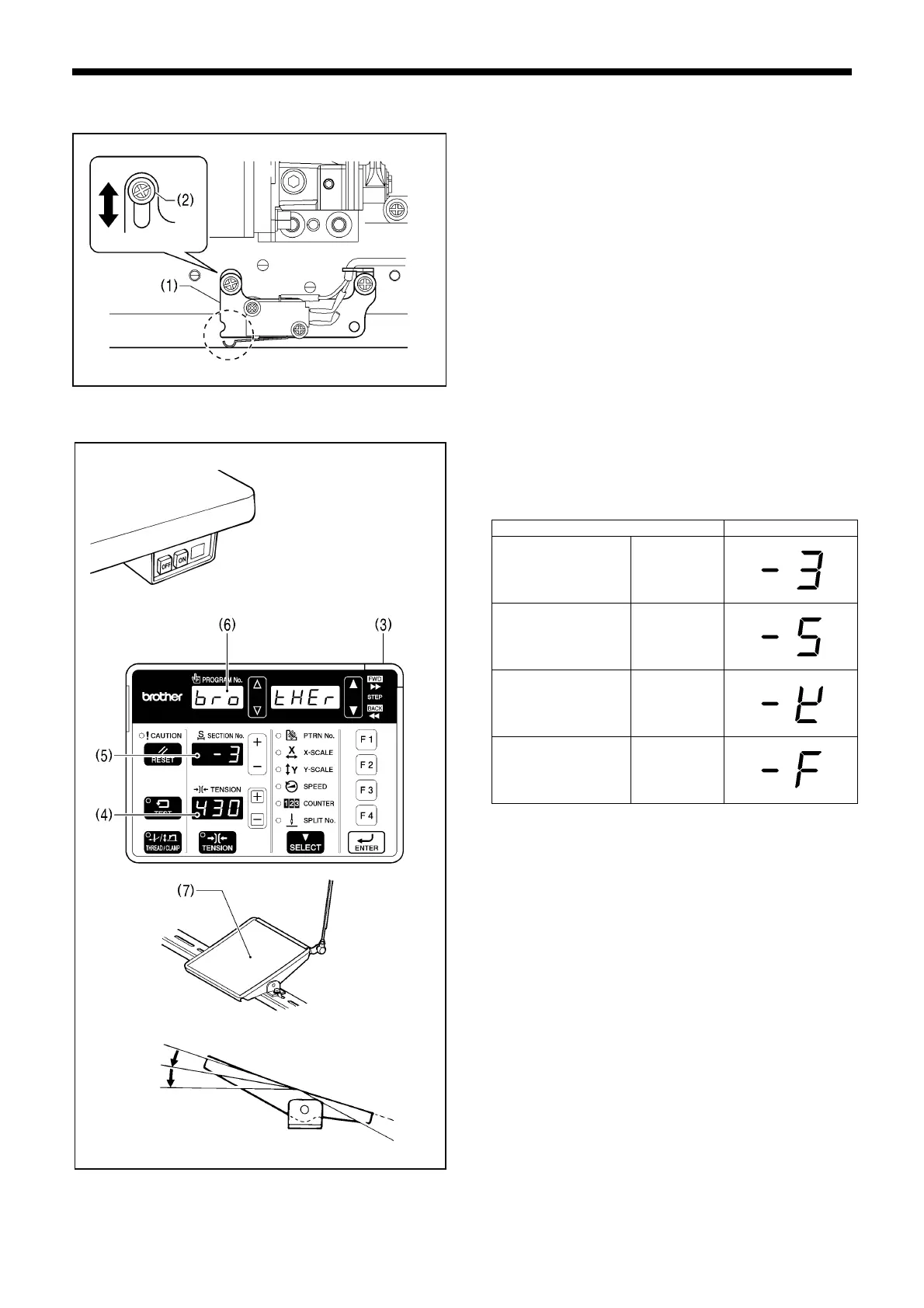
3-14. Checking the machine head switch
1. Turn on the power switch.
2. Check that no error numbers appear on the operation panel.
<If error [E050], [E051] or [E055] is displayed>
If the machine head switch (1) is not turned on, error [E050],
[E051] or [E055] will occur.
Use the screw (2) to adjust the installation position of the
machine head switch as shown in the illustration.
3-15. Starting up
1. Turn on the power switch.
The POWER indicator (3) will illuminate, and the model
name will appear in the tension value display (4) and the
specifications will appear in the section No. display (5).
Specifications Display
Medium-weight
materials
[ - 03]
Heavy-weight
materials
[ - 05]
Knitted materials [ - 0K]
Foundation
garments
[ - 0F]
After this, the program number will flash in the program No.
display (6).
2. Depress the foot switch (7) to the 2nd step.
The feed mechanism will move to the home position and the
work clamp / button clamp will rise.
2295B
4421Q
2346B
2339B
2nd step



 To Next Page
 Loading...


