3. INSTALLATION
7
KE-436C
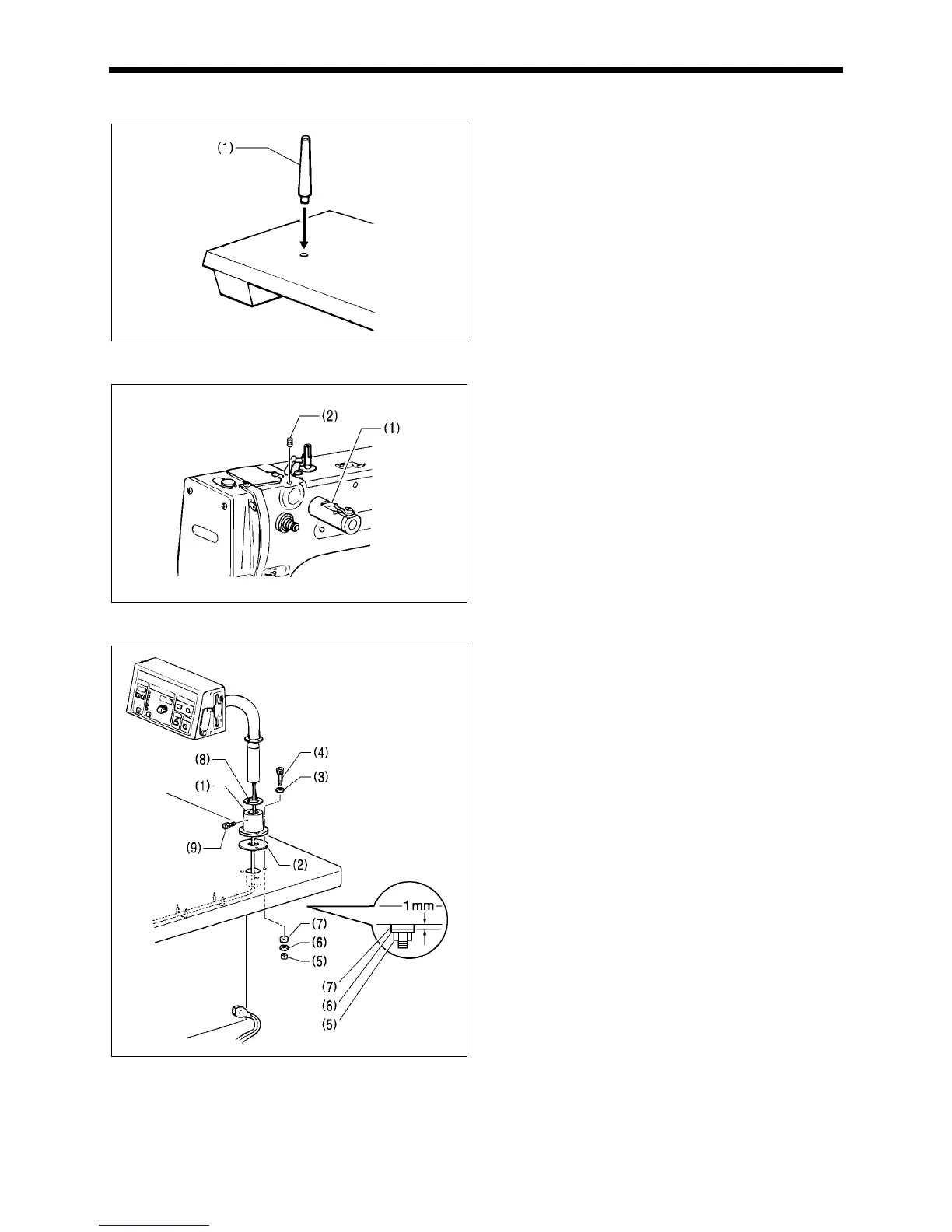
3-8. Installing the head rest
Tap the head rest (1) into the table hole.
Note:
Tap the head rest securely into the table hole.
3-9. Installing the liquid cooling tank, optional
1. Remove the rubber plug, and then push the liquid cooling
tank (1).
2. Tighten it with the set screw (2).
3-10. Installing the operation panel
1. Assemble the operation panel stand (1) and cushion A
(2). Then insert the bolts (4) together with the washers (3)
into the three holes from above, and then tighten the nuts
(5), washers (6) and cushion B (7) from below to secure
the assembly.
Note:
Tighten until the thickness of cushion B (7) becomes
about 1 mm.
2. Pass the cords of the control panel assembly through the
hole in the operation panel stand (1).
3. Attach the rubber sheet (8) to the hole in the operation
panel stand (1) and then secure it with the bolt (9).
4. Insert the cord into the control box through the hole at the
side of the box. Refer to “3-13. Connecting the cords” for
details on connecting the cord.
5. Secure the cord with the staples (in five places).
2497Q
2498Q
2673Q



 To Next Page
 Loading...




