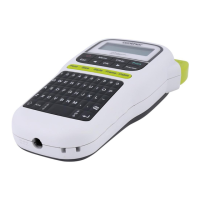
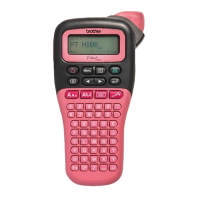
Entering Symbols
• See the table of symbols included in this guide.
• To cancel an operation, press .
• *1 When you select symbols, up to seven
recently used symbols are added to History.
• If you selected History, you cannot select a
category.
• You can also select from the basic and
pictograph categories by pressing the shortcut
keys listed in this guide.
Basic
Pictograph
OTHER
*1 Visit support.brother.com
for the latest
information about recommended batteries.
If the cutter blade becomes blunt after repetitive use
and the tape cannot be cut cleanly, turn around the
cutter board as shown in the illustration 1.
If you still have difficulty, replace the blunt cutter
blade with a new cutter unit (stock no. TC-4) by
obtaining one from an authorised Brother dealer.
Replacing the Cutter Unit
1. Pull out the two sections of the cutter unit
(green) in the direction of the arrows shown in
the illustration 2.
2. Install the new cutter unit. Push it in until it
locks into place.
Symbol Key
/
[History
*1
/Basic/Pictograph]
/
Select category
/
Select a symbol
Punctuation
Space
key
Units
Mathematics Fractions
Brackets
Roman
Numerals
Arrows Shapes
Emojis
Space
key
Events
Music Kitchen
Clothes Food & Bev
Travel Crafts
Sports Baby
Animals School
Decorative Home Office
Astrology Audio Visual
Holiday
Specifications
Dimensions:
(W x D x H)
Approx. 109(W) mm X 202(D) mm X
55(H) mm
Weight: Approx. 400 g
(without batteries and tape cassette)
Power supply: Six AAA alkaline batteries (LR03)
Six AAA Ni-MH batteries (HR03)
*1
Optional AC adapter (AD-24ES)
Tape cassette: Brother P-touch TZe tape widths:
3.5 mm, 6 mm, 9 mm, 12 mm
Ribbon cassette: Brother P-touch TZe ribbon widths:
12 mm
Accessories
Tape
Cassettes:
Visit the Brother Solutions Center at
support.brother.com
for the latest
information about consumables
AC Adapter: AD-24ES
Cutter Unit: TC-4 (replacement)
WARNING
Do not touch the cutter blade directly with your
fingers.



 To Next Page
 Loading...