Advanced Opreation
Layout & Editing
107
Layout & Editing
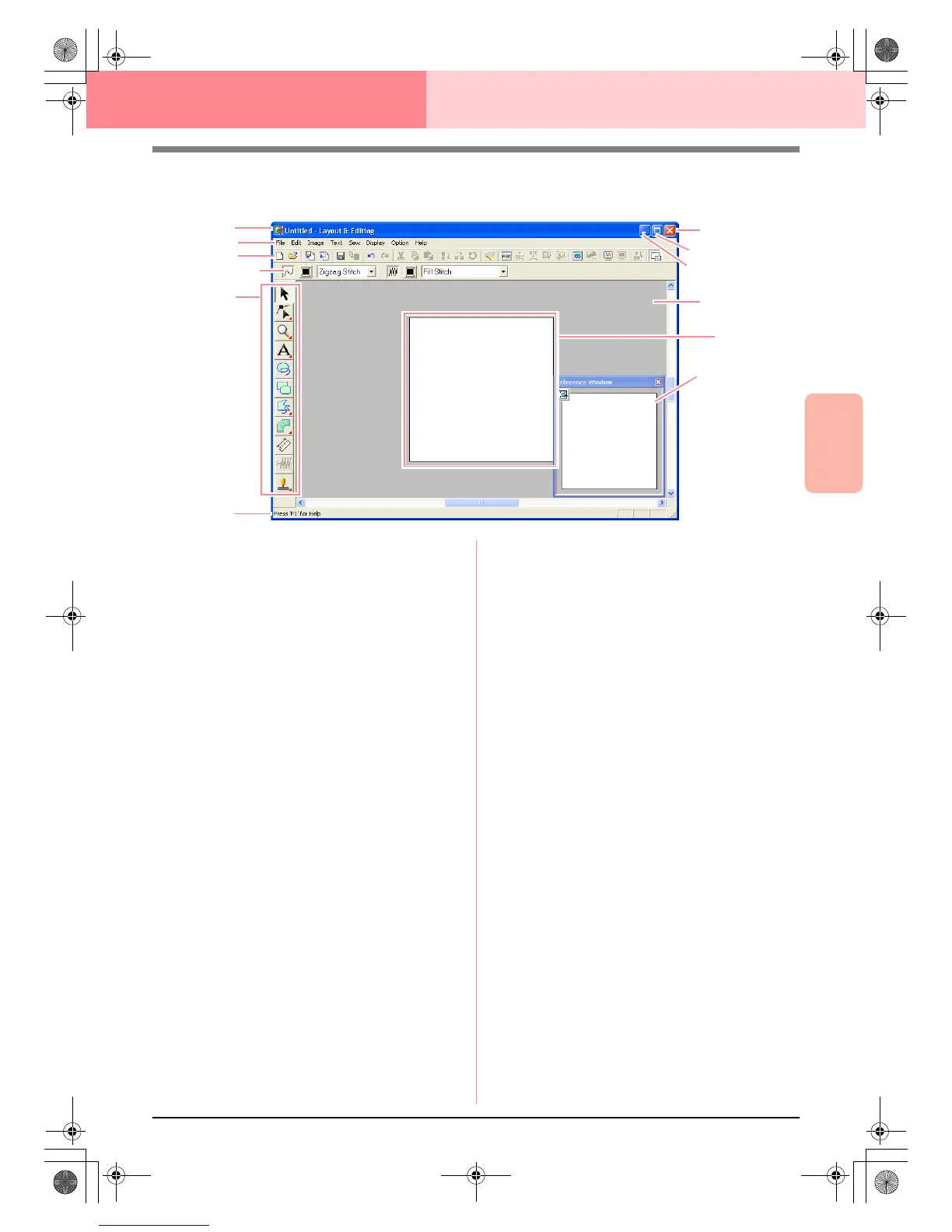
Main Window
1 Title bar
2 Menu bar
Provides access to the functions.
3 Toolbar
Provides shortcuts for the menu commands.
4 Sewing Attributes bar
Sets the sewing attributes (color and sew type)
of lines and regions in the pattern.
5 Tool Box
Used to create, select and edit patterns.
6 Status bar
Provides helpful information.
7 Reference Window
Displays all patterns in the work area, giving you
an overview while you work on a detailed area.
(For more details, refer to “Viewing Patterns in
the Reference Window” on page 193.)
8 Design Page
The actual part of the work area that can be
saved and sewn.
9 Work area
0 Minimize button
A Maximize button
B Close button
2
8
3
4
5
6
A
0
9
1
B
7
PeDesignV6Eng.book Page 107 Thursday, July 8, 2004 11:59 AM



 To Next Page
 Loading...


