Printing Using a Computer (P-touch Editor)
8
2
Printing from a Computer 2
Available Applications 2
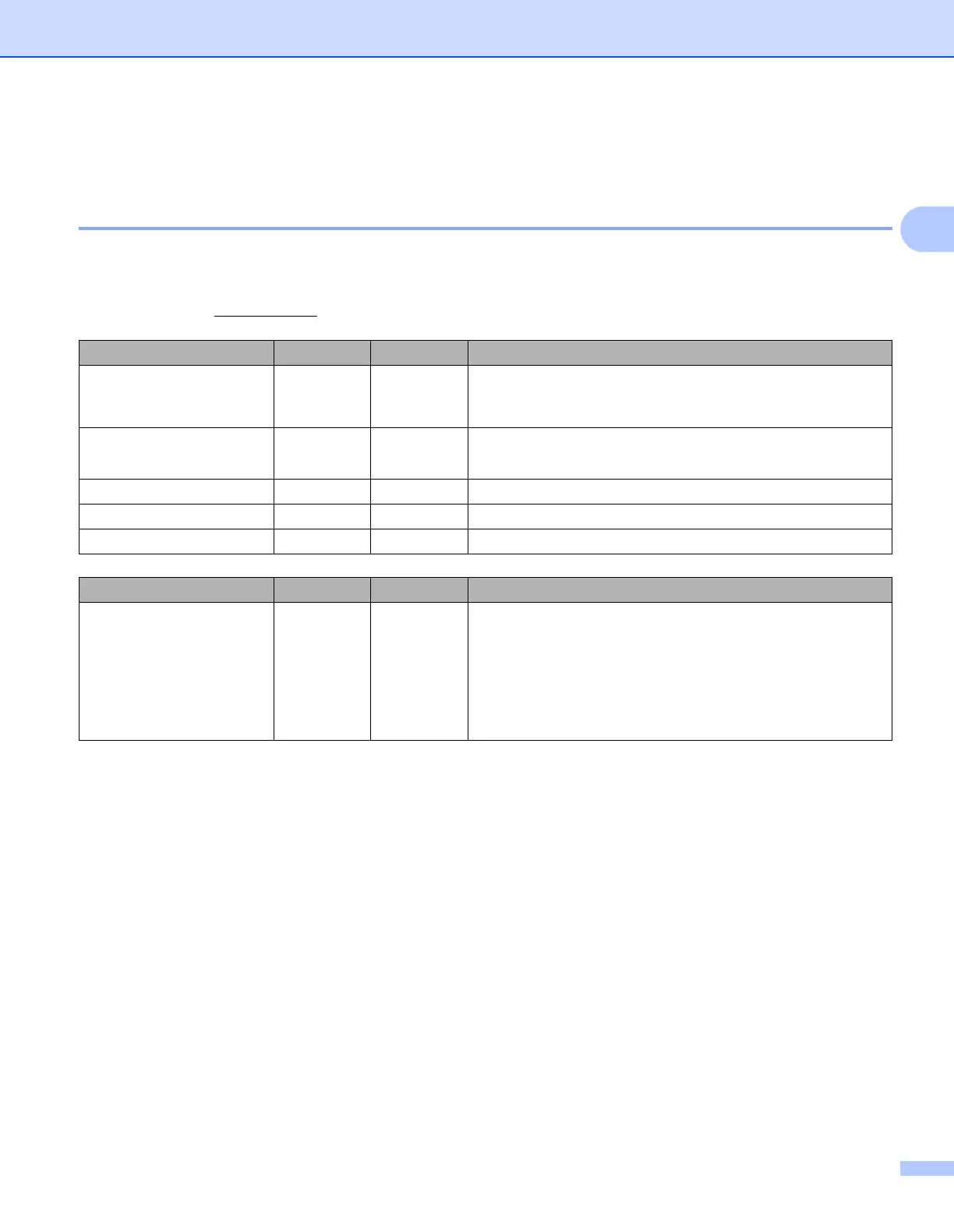
To use the printer effectively, a number of applications and functions are available.
You must install the printer driver to use these applications.
Visit our website (install.brother
) and download the installer for the applications and printer driver.
Application Windows Mac Features
P-touch Editor rr
Designs and prints custom labels with built-in drawing tools,
text using different fonts and styles, imported graphic images
and barcodes.
P-touch Library r
Manages and prints P-touch Editor templates.
This application is installed with P-touch Editor.
P-touch Update Software rrUpdates software to the latest version.
P-touch Address Book r Prints address labels by using an address database.
Printer Setting Tool rrSpecifies the printer's device settings from a computer.
Function Windows Mac Features
Distributed printing r
When printing a large number of labels, printing can be
distributed among multiple printers.
Because printing is performed at the same time, the total
printing time can be reduced.
For more information, see Distributed Printing (Windows
®
only) on page 25.



 To Next Page
 Loading...










