This document describes the Browning Recon Force Elite HP5 Trail Camera (Model BTC-7E-HP5), a device designed for scouting game and outdoor monitoring. The camera is built with high-quality workmanship and materials, aiming to provide users with an effective tool for field observation.
Function Description
The Browning Recon Force Elite HP5 Trail Camera is a versatile outdoor camera capable of capturing still images and video clips of wildlife. It operates in various modes, including "Trail Cam" for motion-activated pictures, "Video" for motion-activated video clips, and "Timelapse Plus" for scheduled daytime images combined with motion-activated pictures. The camera is designed to function both day and night, utilizing infrared LEDs for night illumination. It records sound automatically with video clips.
Usage Features
- Easy Setup: The camera features a quick start guide for straightforward setup. Users insert 8 AA alkaline batteries and an SD card, then power on the device. The programming screen is accessed via the MODE button to set the time and date. After a 30-second delay, the camera is ready to capture images.
- SD Card Compatibility: The camera supports standard class 10 or higher SD cards ranging from 8-32 GB, and higher capacity SDXC cards from 64-512GB. Browning branded, Sandisk, or Kingston branded cards are recommended for optimal performance.
- Battery Installation: The device uses 8 AA Alkaline, Lithium, or Rechargeable batteries. A battery eject button facilitates easy removal and installation of the battery tray. For best results, Browning branded, Energizer, or Duracell batteries are recommended.
- Main Screen Display: The main screen provides real-time information, including the camera operation mode (Trail Cam, Video, Timelapse Plus), number of pictures/videos taken, estimated remaining pictures/videos on the SD card, resolution, multi-shot count, camera delay countdown, and battery life percentage. A live image from the camera is displayed, aiding in field positioning. An external battery indicator changes to "EXT" when an external power source is connected.
- Time and Date Setting: The time and date can be easily set through the CAMERA SETUP menu, allowing users to adjust month, day, year, hour, and AM/PM using arrow keys and the ENTER button.
- Operation Modes:
- Trail Cam: This is the default mode, capturing still pictures of game both day and night. It is ideal for monitoring trails and feeding areas.
- Timelapse Plus: This mode captures timelapse images during the day at user-defined frequencies (5, 10, 20, 30 seconds, or 1, 2, 5, 10, 30, 60 minutes). Additionally, it takes motion-activated pictures day and night, ensuring no activity is missed. Timelapse duration can be set to "ALL DAY" (sunrise to sunset) or specific hours (1, 2, 3, or 4 hours after sunrise and prior to sunset). The camera automatically adjusts to day length for hourly modes.
- Video: This mode records Full HD video clips of game during both daytime and nighttime.
- Photo Quality: Users can select from various photo resolutions: LOW 4 MP, MEDIUM 8 MP, HIGH 12 MP, and ULTRA 24 MP.
- Video Length: Video clip lengths can be set to 5, 10, 20, 30 seconds, 1 minute, or 2 minutes. Night videos are limited to a maximum of 20 seconds to conserve battery power.
- Photo Delay: This setting controls the "timeout" period between taking still pictures or videos, with options ranging from 1, 5, 10, 20, 30 seconds, to 1, 5, 10, 30, 60 minutes.
- Multi Shot Modes: The camera can be configured to take multiple shots per trigger event.
- SINGLE: Takes 1 picture when triggered.
- MULTI SHOT: Takes 2-8 pictures, spaced 3 seconds apart (e.g., "4-SHOT STANDARD" takes 4 pictures).
- RAPID FIRE: Captures 2-8 images with only 0.3 seconds between pictures, offering options like 2, 3, 4, 5, 6, 7, or 8 RAPID FIRE shots.
- Temperature Units: The temperature displayed on the picture's info bar can be set to Fahrenheit or Celsius.
- Camera Naming: Users can add a custom name to the camera using capital letters (A-Z), numbers (0-9), or a blank space.
- Image Data Strip: An information bar printed at the bottom of each photo displays temperature, moon phase, date, time, and camera ID. This feature can be toggled on or off.
- Motion Test: This feature helps aim the camera. When activated, a red LED on the front of the camera flashes when motion is detected. It's important to turn this function OFF before leaving the camera in the field.
- Motion Detection Range: The motion detection distance can be adjusted to either 60ft (NORMAL RANGE) or 100ft (LONG RANGE).
- Battery Type Selection: To ensure accurate battery level readings, the camera can be configured for Alkaline, Lithium, or Rechargeable battery types.
- Trigger Speed: The camera's trigger speed can be set to NORMAL (0.7 seconds) or FAST (0.1 seconds). NORMAL is recommended for areas where game moves slowly, like feeding areas, while FAST is suitable for monitoring trails.
- IR Flash Range: The IR LED power for night photos can be adjusted based on specific needs:
- Economy: Most economical power setting, ideal for wooded areas or when game is within 70 ft.
- Long Range: Perfect for open areas or when game may be out to distances of 130 ft.
- Fast Motion: Ideal for areas where game is moving quickly.
- Smart IR Video: This feature allows daytime video clips to continue recording as long as motion is detected, up to a maximum of 5 minutes.
- SD Management: When enabled, this feature automatically erases the oldest pictures or videos when the SD card becomes full, allowing continuous recording without manual card swaps. If disabled, the camera stops recording when the card is full until images are deleted or the card is changed.
- Language Selection: The programming menu supports English as the default language.
- Capture Timer: Users can set specific start and stop times for the camera to capture pictures or videos (e.g., 7 pm to 5 am for night photos only). The default setting is 24 hours.
- HDR Function: The High Dynamic Range (HDR) function enhances the illumination of night pictures, particularly in scenes with limited game movement.
- Image Retrieval: Images can be reviewed on a home computer by inserting the SD card into a desktop or laptop. A folder named DCIM will appear, containing a subfolder called 100_BTCF where pictures are stored.
- Timelapse Viewer: For playback of TIMELAPSE FILES, users need to install the Browning Buck Watch Timelapse Viewer software, available for download from the Browning Trail Cameras website under the Customer Service tab. This software is compatible with PCs running Windows XP or later.
- Field Installation: The camera is recommended to be mounted approximately 3 feet off the ground using the included 6' tree strap. For optimal positioning, the Browning Trail Camera Tree Mount (sold separately) offers a locking gimbal. The camera also features built-in security cable loops for use with a locking steel cable or 5/16" Python™ cable lock (not included).
Maintenance Features
- Delete All: This function erases all images on the SD card and reformats it. It is recommended to use this feature and reformat the SD card each time it is installed in the camera.
- Default Settings: An option to return the camera to its factory default settings is available.
- Firmware Upgrade: The camera's firmware can be upgraded. Updates, if available, are posted on the Browning Trail Cameras website under the Customer Service tab.
- Warranty: The camera comes with a one-year limited warranty covering defects in workmanship and materials under normal use. The warranty does not cover damage from neglect, abuse, water submersion, battery leakage, improper storage, unauthorized modifications/repairs, cracked/broken outer cases from excessive impact/heat/mishandling, or damage caused by wild animals.
- Customer Service: Browning Trail Camera offers toll-free customer service (1.888.618.4496) and email support (info@browningtrailcams.com) for operational questions, setup assistance, and warranty service. Representatives are available Monday through Friday from 9 am to 5 pm CST.

 Need help?
 General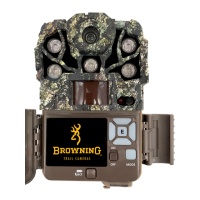

 To Next Page