226
SSeettttiinnggss
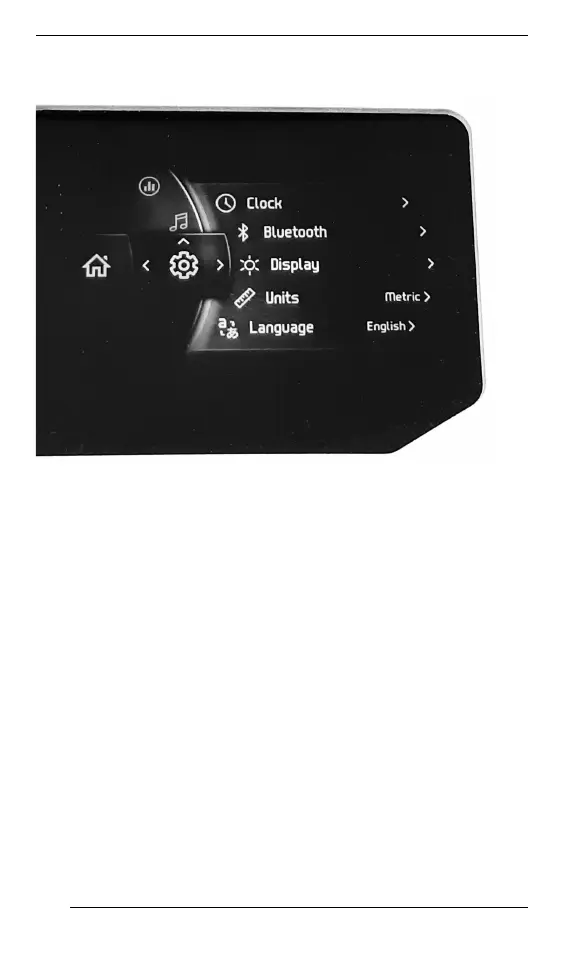
The Settings menu is to:
– Adjust clock
– Pair Bluetooth devices
– Phone
– Rider headset
– Passenger headset
– Adjust the display (brightness and Mode (AUTO/DAY/NIGHT)
– Adjust the units (Imperial/Metric)
– Set the language
– Get information about firmware version and device regulatory
compliance
– Show vehicle fault codes.
PPaaiirriinngg yyoouurr SSmmaarrttpphhoonnee VViiaa BBlluueettooootthh
OOnn tthhee VVeehhiiccllee
1. Short press the rroottaarryy ccoonnttrrooll kknnoobb to access menu.
2. Go to “Settings” and move the knob RRIIGGHHTT.
3. Select “Bluetooth” and move the knob RRIIGGHHTT.
4. Select “Phone” and move the knob RRIIGGHHTT.
5. Select “Add Phone” and press the knob RRIIGGHHTT.
GAUGE – LARGE PANORAMIC 7.8” WIDE LCD DISPLAY





 To Next Page