230
2. Navigation: Access all the navigation features of the app such as
route planning, turn-by-turn navigation, friends location, offline nav-
igation, and more. You can access thousands of snowmobile trails
across North America and Europe on the map.
3. BRP Connect: See the list of compatible apps that can be used on
the vehicle's display. You can also access from there the Vehicle
Connection Guide to help you connect your phone to your vehicle's
display.
4. FAQ: This link takes you to answers of common questions asked
by riders like you. An internet connection is required.
5. Rides: Easily access your planned and completed rides made with
the Navigation features of the BRP GO! app.
6. Store: This link takes you to the online store of your vehicle. An in-
ternet connection is required.
7. Settings: Manage your profile and your account settings.
MMeessssaaggeess iinn MMuullttiiffuunnccttiioonn GGaauuggee
Important information about vehicle condition is displayed on the multi-
function gauge. When starting the engine, always look at the gauge
for any indicator lamps or special messages.
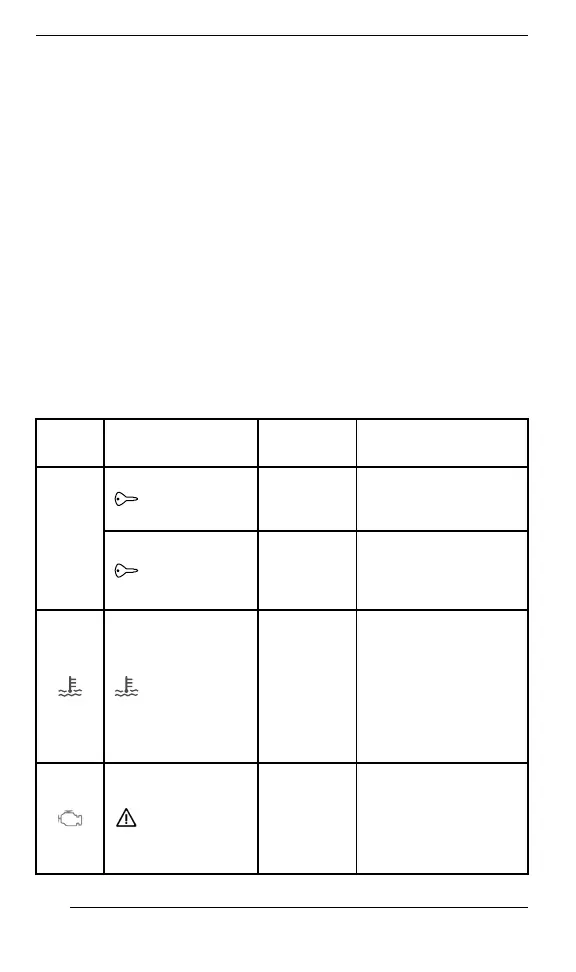
IIccoonn
MMEESSSSAAGGEE//
WWAARRNNIINNGG
CCAAUUSSEE WWHHAATT TTOO DDOO
NA
BAD KEY
Defective
key
Contact an
authorized BRP
snowmobile dealer.
WRONG
KEY
Wrong key
Use the right key for
the vehicle or contact
an authorized BRP
snowmobile dealer.
HIGH
ENGINE
TEMPERA
TURE
Engine is
overheat
ing
– Stop and wait for
engine to cool off.
– Check for leaks.
– Check coolant
level
and adjust (see
Maintenance
procedures
).
LIMP HOME
MODE
Important
engine
manage
ment
compo
nent
* Have the vehicle
transported to the
nearest authorized
BRP snowmobile
dealer.
GAUGE – LARGE PANORAMIC 7.8” WIDE LCD DISPLAY


 To Next Page