2. CONTROLS
2.1. FRONT PANEL
Manual niter Selector
Selected Filter
POWER ON:
770366
Input Selectivity
Range
Filter Control Mode Output
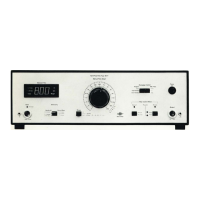
Ftg.2.1. Front panel controls of the Type 1618
Power On
Power is on with the switch in the up position. Warm-up time is ap-
proximately five seconds.
MANUAL FILTER SELECTOR: A rotary switch that selects the filters and weighting networks when
operating in the "Manual" control mode. The filter selected is shown
on the frequency scale.
SELECTED FILTER: A digital display that shows the centre frequency of the selected filter.
The display also indicates the bandwidth chosen, and whether a linear
or weighted response has been selected.
INPUT:
SELECTIVITY:
Standard B & K coaxial socket, fitting JP 0101 Plugs, paralleled by a
BNC socket on the rear panel. There is an input "Overload" lamp, and
a separate ground terminal. The maximum input voltage is 5V, and
the impedance is 1 MO in parallel with 100 pF.
A three-position switch that selects the bandwidth of the filters, and
the centre frequency step length for full-octave scanning. Functions
are as follows:
Upper position: third-octave bandwidth with scanning in third-octave
steps.
Middle position: full-octave bandwidth with scanning in third-octave
steps, with overlapping.
9


 To Next Page
 Loading...