ON OFF
2.4G RF
M
W
S
1
S
2 3 4
W
M
ON OFF
2.4G RF
W
M
ON OFF
2.4G RF
ON OFF
2.4G RF
M
W
S
1
S
2 3 4
ON OFF
2.4G RF
M
W
S
1
S
2 3 4
2.4G RF
ON OFF
M
S
1
S
2 3 4
RC05RF/
RC05RFB
RC04RF/
RC04RFB
RC03RF/
RC03RFB
WR01RF WR02RFRC02RF/
RC02RFB
RC01RF/
RC01RFB
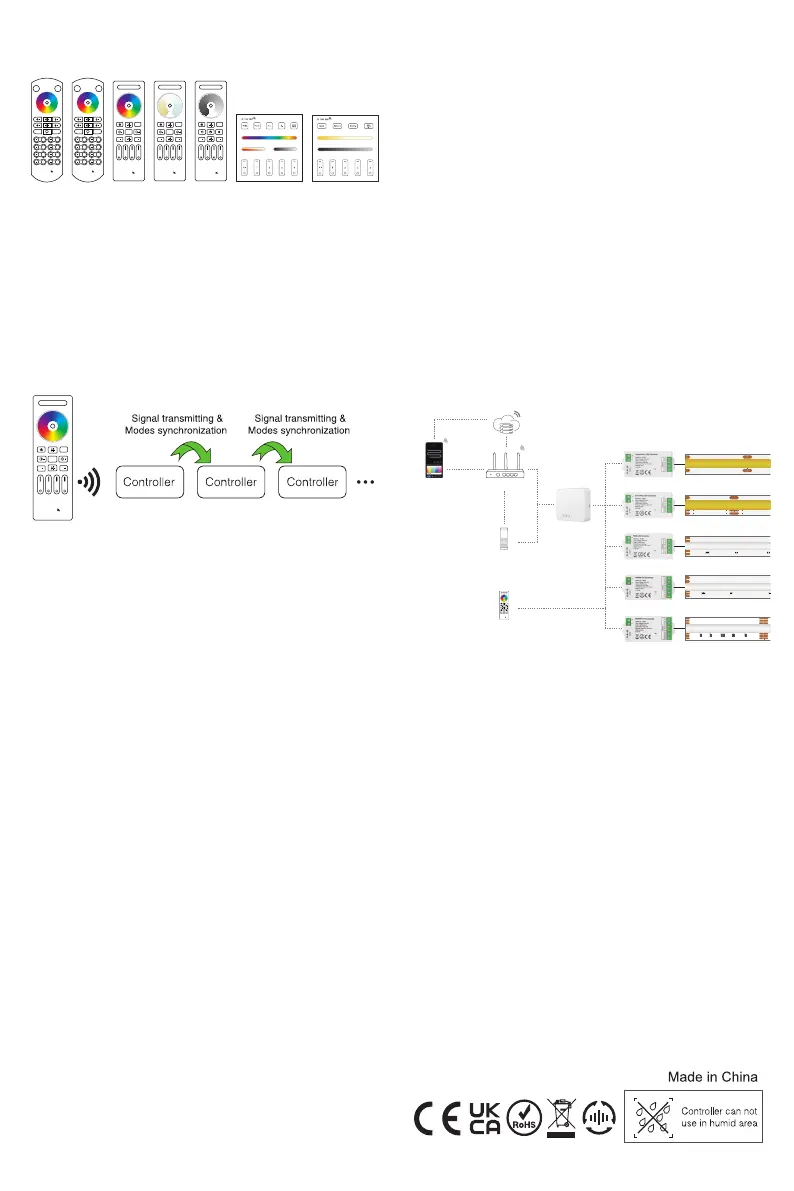
3. Compatible Remote Controller
Compatible with these remote controls (Purchased separately).
5. Mode synchronization
Different controllers can work synchronously when they are
started at different times, controlled by the same remote, under
same dynamic mode and with same speed.
6. PWM Frequency Switching
Power on the lights for over 10 seconds, Long press the Linked
remote Zone ON button for 10 seconds, When the lights blink 3
times, switch to low frequency.
Switch to Low Frequency:
Power on the lights for over 10 seconds, Long press the linked
remote Zone ON button for 10 seconds, When the lights blink 10
times, switch to high frequency.
Switch to High Frequency:
Application to switch PWM frequency: to avoid the noise when
using different power supply.
Use RC01RFB RC02RFB RC03RFB RC04RFB RC05RFB
WR01RF WR02RF RF Remote to switch the frequency.
The default frequency is high frequency.
When users switch the low frequency, it may cause the lights
flickering.
1.
2.
3.
4.
Note:
7. Do Not Disturb
What is Do Not Disturb: When the power is off and then on again,
the LED light will stay off.
Application:
Widely use on the area where there is power failure frequently
to save energy.
When you go outside for long time, Do Not Disturb function can
avoid short circuits during this period.
1.
2.
Set up Do Not Disturb:
When the LED strip ON and not under dynamic mode, long press
paired remote S+ button for 5 seconds, when the white lights
blink once, set up the Do not disturb successfully.
1.
2.
Note:
Do not Disturb will be available after you use the RF Remote to
turn off the LED light.
After Do Not Disturb is applied, if you want to light up LED light,
you need to switch the light on/off 2 times within 5 seconds by
using the paired RF remote.
1.
2.
3.
Note:
After deleting the Do Not Disturb function, you need to use the
RF Remote to turn off/on the LED light.
The default mode for the device is without Do not Disturb.
Please use RC01RF-RC05RF WR01RF WR02RF RF remote
to set up or delete Do Not Disturb.
Delete Do Not Disturb:
When the LED light ON and not under dynamic mode, long press
paired remote S- button for 5 seconds, when the white lights blink
3 times, delete the Do not disturb successfully.
8. GW01W Gateway Usage
(GW01W gateway is not included in the packaging and needs to
be purchased separately)
Single Color LED Strip
C01RF
C02RF
C03RF
C04RF
C05RF
CCT LED Strip
RGB LED Strip
RGBW LED Strip
RGB CCT LED Strip
Wi-Fi Router
TuyaSmart APP
SmartLife APP
RC01RFB-RC05RFB
WR01RF WR02RF
2.4GHz
2.4GHz
3G/4G/5G
Tuya Cloud
Controller input voltage depends
on the LED strip
Google Home
/Alexa
GW01W
Gateway
WiFi
WiFi
WiFi
+ DC12V
–
+ DC12V
–
+
–
12V+
C
W
12V+
C
W
12V+
C
W
+DC24V
GRB
-
B
-
R
R B G
-
G
+24V
G
R
R B
B
W
W C R B G
C-
B-
R-
G-
C-
B-
R-
G-
ON OFF
2.4G RF
M
W
S
1
S
2 3 4
4. Signal transmitting
One strip controller can transmit the signals from the remote
control to another controller within 30m, as long as there is a strip
controller within 30m,the remote control distance can be limitless.
9. Attention
Please check whether the input voltage of the constant voltage
power supply is in accordance with the controller, and please
check the connection of both the cathode and anode.
The working Voltage is DC5~24V,the controller will be broken if
the voltage is higher than 24V.
Non-professional user cannot dismantle the controller directly,
otherwise, it may cause fire and electric shock.
The working temperature(Ta) is-25~40℃; Do not use the
device to direct sunlight, moist and other high temperature
area.
Please do not use controller around the mental area and high
magnetic field, otherwise, it will badly affect the control
distance.
When the device load to 12A,wire diameter must be over
1.5mm².
When the device load over 10A, the connecting cable must be
shorter than 40cm long from DC port to LED strip.
contact@btf-lighting.com Welcome to consult
1.
2.
3.
4.
5.
6.
7.
8.


 To Previous Page
 Loading...