11
BÜCHI Vacuum Controller B-720 5 Operation
5.3 Detailed description of the various functions
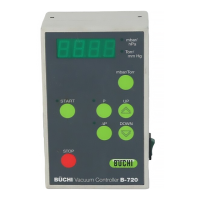
Action Display Function
Switch on «On» switch 957 • Displays actual system pressure
the unit (current system pressure) • Ventilation valve open
• Cooling water valve open for approx. 5 min., but can be closed
by pressing the «STOP» key
Set desired «P» Press e.g. 147 • Displays the desired pressure which can be varied with the
pressure (desired pressure) «UP» and «DOWN» keys (0– 1400 mbar)
• If no entry is made within 3 sec., the displayed value will be
saved automatically and the display will return to its initial state
• The desired value can be changed at any time
Hysteresis «욼P» H 10 • Displays the hysteresis key which can be varied with «UP»
and «DOWN» keys (1–100 mbar and A)
HA • Automatic hysteresis, i.e. 30 mbar at 1000 mbar, infinitely
reducible to 1mbar at 2 mbar pressure
• If no entry is made within 3 sec., the displayed value will be
saved automatically and the display will return to its initial state
Destillation «START» 957 • System is evacuated to the preselected desired value and is
controlled there within the set hysteresis
147 • LED «START» lights up
(current system pressure) • Cooling water valve opens
Stop «STOP» 957 • Aborts the control function
(current system pressure) • System is ventilated (ventilation valve remains open)
• The cooling water valve remains open for approximately 5 min.
• Press «STOP» twice and the cooling water will switch off
immediately
Table 4: Description of the Functions
The numbers used in the following examples were chosen at
random and serve only to explain the functions.


 To Next Page