16
BÜCHI Vacuum Controller B-720
6.4 Function check
The following parameters must be checked after every service
intervention:
• Switch on the B-720
• Display shows 8888 (1 sec.)
• Display shows the software function A 1.1 (1 sec.)
• Display shows the current atmospheric pressure
• The valve is triggered audibly
• The cooling water valve is open
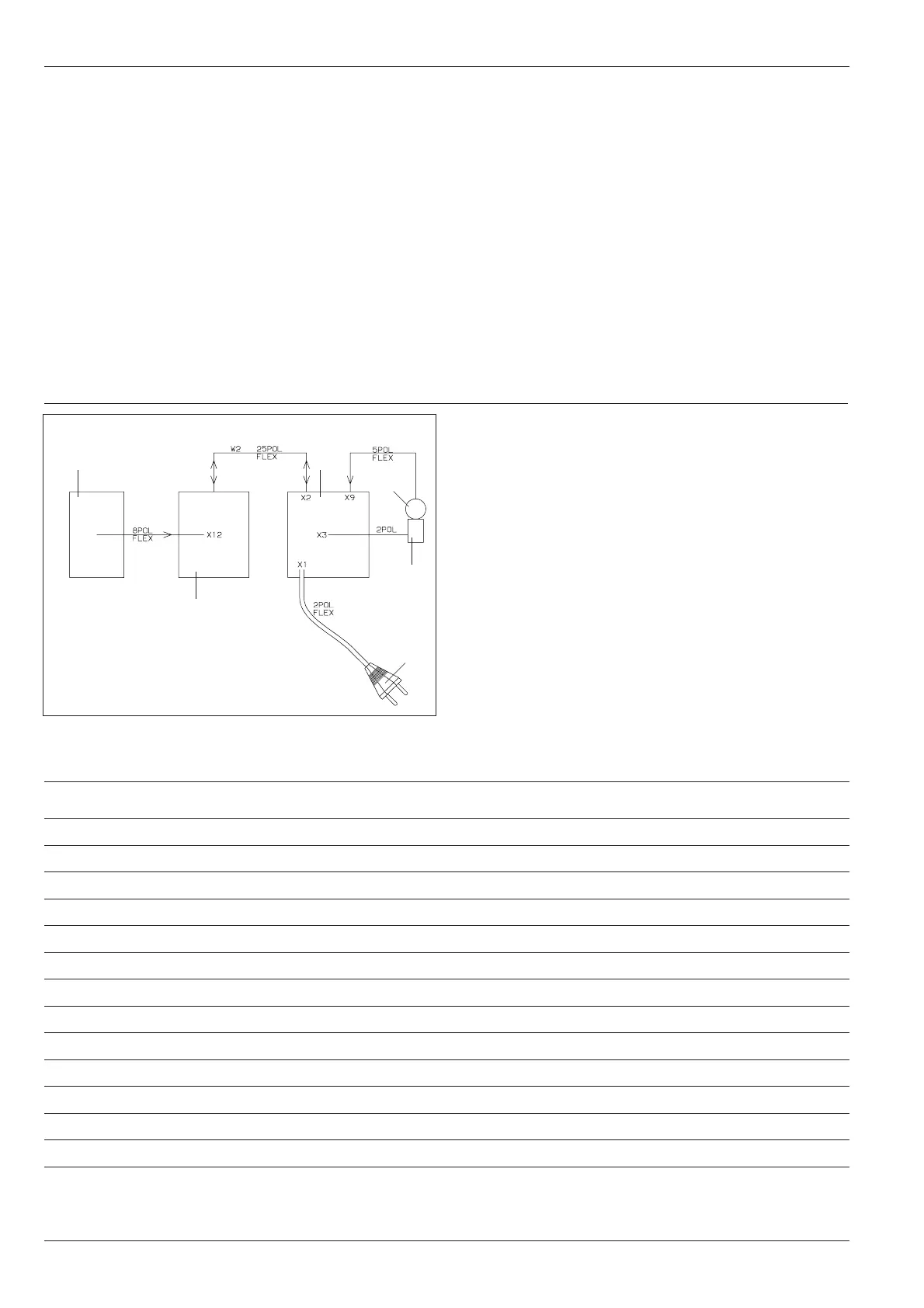
6.5 Block diagram of the B-720
Membrane keypad
CPU print
Power print
Euro power plug
Ceramic pressure sensor
Ventilation valve
6 Maintenance
Figure 13: Block diagram of the B-720
Malfunction Possible cause Remedy
Valve opens and closes at high rate System has a leak Check all sealing points
Hysteresis too small Select higher hysteresis value
Valve does not open or close Valve does not close Dirty coil
Wrong flow direction
Valve not inserted in the proper position
No display Defective fuse Replace fuse
Check power plug and insert
Error code E--3 Pressure sensor is defective Replace pressure sensor
Error code E--4 Pressure differential too small during calibration Increase pressure differential
sensor defective Replace pressure sensor
Error code E--7 Pressure sensor not calibrated Call service center
Error code E-10 Hardware error Call service center
Table 8: Malfunction
6.6 Troubleshooting


 To Next Page