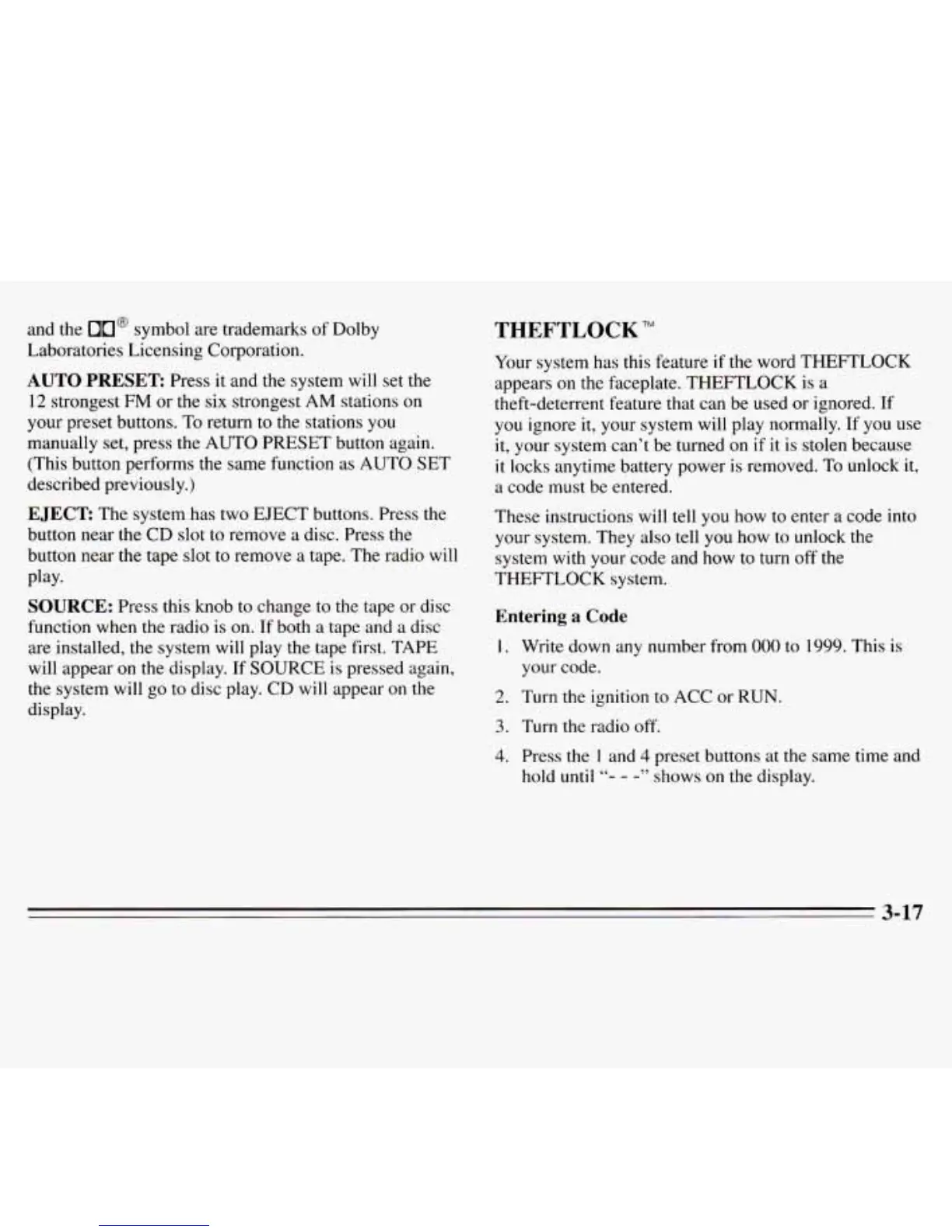
and the
On@
symbol are trademarks
of
Dolby
Laboratories Licensing Corporation.
AUTO
PRESET
Press it and the system
will
set
the
12 strongest
FM
or the six strongest
AM
stations
on
your preset buttons.
To
return to the stations
you
manually set, press the
AUTO
PRESET button again.
(This button performs the same function as AUTO SET
described previously.)
EJECT:
The system has two EJECT buttons. Press the
button near the CD slot to remove a disc. Press the
button near the tape slot to remove a tape. The radio will
Play*
SOURCE:
Press this knob to change to the tape or disc
function when
the
radio is on. If both a tape and a disc
are installed, the system will play the tape first. TAPE
will appear
on
the display. If
SOURCE
is pressed again,
the
system
will
go
to disc play. CD will appear on the
display.
THEFTLOCK
TM
Your system has this feature if the word THEFTLOCK
appears on the faceplate. THEFTLOCK is a
theft-deterrent feature that can be used or ignored. If
you ignore it, your system will play normally. If you use
it,
your system can’t be turned on
if
it is stolen because
it
locks
anytime battery power is removed. To unlock it,
a code must be entered.
These instructions will tell you how to
enter
a code into
your system. They also tell you how to unlock the
system with your code and how to turn off the
THEFTLOCK system.
Entering
a
Code
I.
Write down any number from
000
to 1999. This is
your code.
2. Turn the ignition to ACC or
RUN.
3.
Turn the radio off.
4.
Press the
1
and
4
preset buttons at
the
same time and
hold
until
“-
-
-”
shows on the display.
3-17








 To Next Page