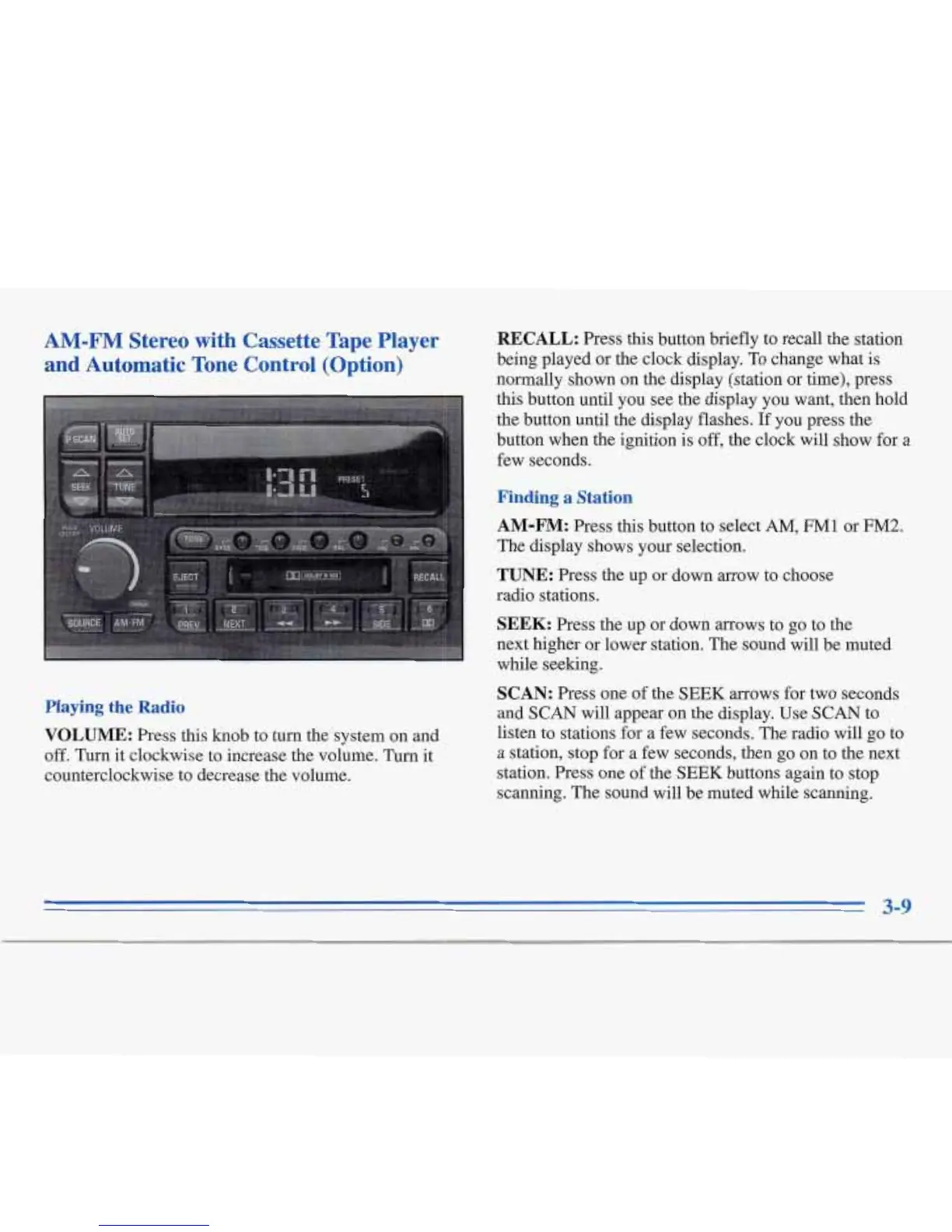
AM-FM Stereo with Cassette Tape Player
and Automatic Tone Control (Option)
Playing
the
Radio
VOLUME:
Press this knob to turn the system on and
off.
Turn it clockwise to increase the volume. Turn it
counterclockwise to decrease the volume.
RECALL:
Press this button briefly to recall the station
being played or the clock display.
To
change what is
normally shown on the display (station or time), press
this button until you see the display you want, then hold
the button until the display flashes. If you press the
button when
the
ignition is
off,
the clock will show for
a
few seconds.
Finding a Station
AM-FM:
Press this button to select
AM,
FMl
or
FM2.
The display shows your selection.
TUNE:
Press the up or down arrow to choose
radio stations.
SEEK:
Press the up or down arrows to go to the
next higher or lower station. The sound will be muted
while seeking.
SCAN:
Press one of
the
SEEK
arrows for two seconds
and
SCAN
will appear
on
the display. Use
SCAN
to
listen to stations for a few seconds.
The
radio will go to
a station, stop for a few seconds, then
go
on to the next
station. Press one of the
SEEK
buttons again to stop
scanning. The sound will be muted while scanning.









 To Next Page