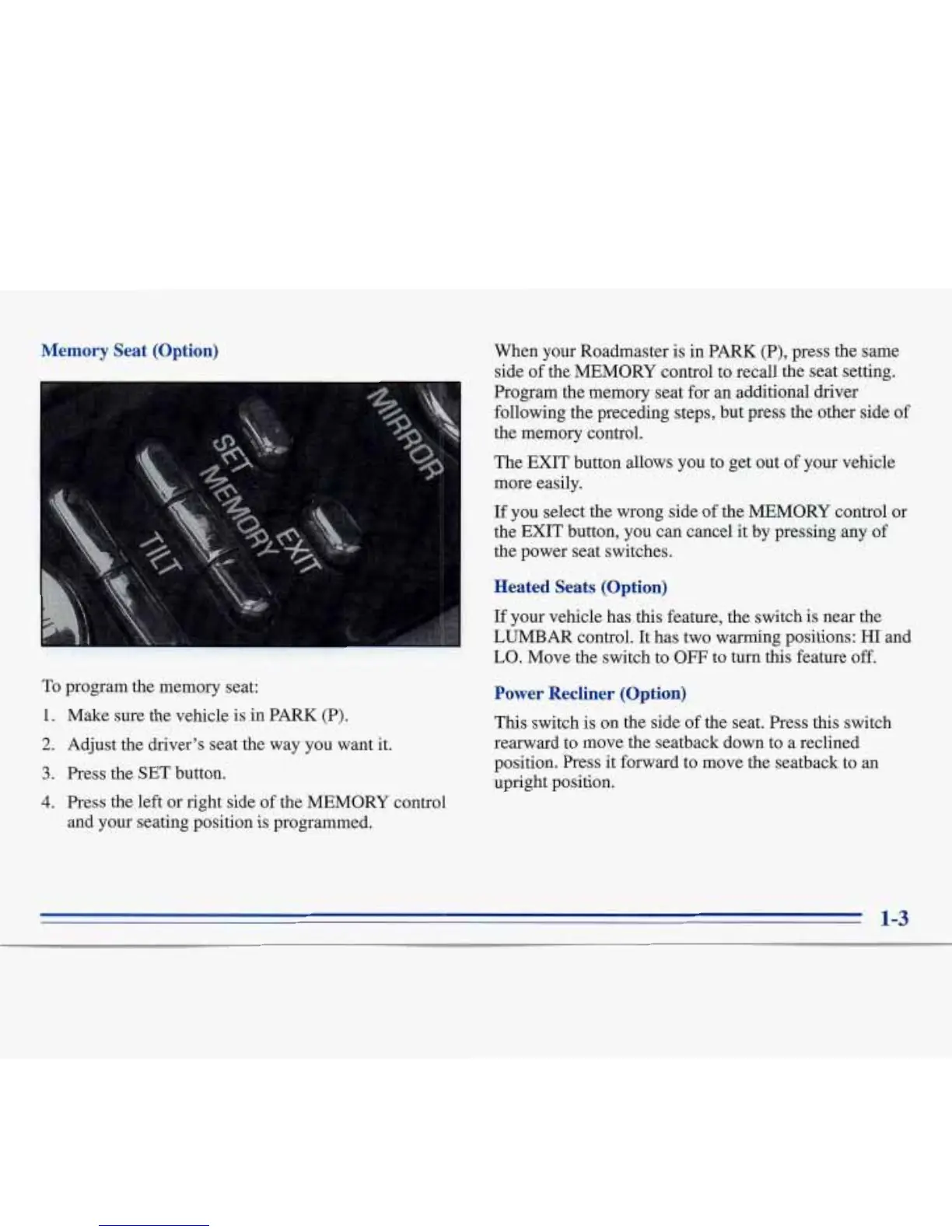
Memory Seat (Option)
To
program the memory seat:
1.
2.
3.
4.
Make sure the vehicle is in PARK (P).
Adjust the driver’s seat the way you want it.
Press the SET button.
Press
the
left
or right side of the MEMORY control
and your seating position is programmed.
When your Roadmaster is in PARK
(P),
press the
same
side of the MEMORY control to recall the seat setting.
Program the memory seat for an additional driver
following the preceding steps, but press the other side of
the memory control.
The EXIT button allows you to get out
of
your vehicle
more easily.
If
you select the wrong side of the MEMORY control or
the EXIT button, you can cancel it by pressing any of
the power seat switches.
Heated Seats (Option)
If
your vehicle has this feature, the switch is near the
LUMBAR control.
It
has two warming positions: HI and
LO.
Move the switch to
OFF
to turn this feature
off.
Power Recliner (Option)
This switch is on the side of the seat. Press this switch
rearward to move the seatback down to a reclined
position. Press it forward to move the seatback to an
upright position.
1-3






 To Next Page