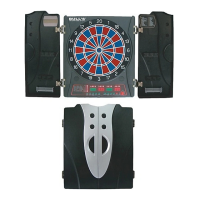
The Universum Intro Electronic Dart Game is a computerized dartboard designed for easy and enjoyable game playing, suitable for both beginners and advanced players. It offers a wide range of games and options, supporting up to 8 players simultaneously.
The device is an electronic dartboard with a computerized scoring system. Players throw soft-tip darts at the board, and the system automatically tracks scores, manages game rules, and displays player information. It includes various game modes and options, allowing for diverse playing experiences. The dartboard is designed to be mounted on a wall and powered by an AC to 5V DC adapter.
-
G01: 301 (and variations 501, 601, etc., 25/50 Bull):
- Objective: Deduct score from a starting total (e.g., 301) to reach exactly 0.
- Winner: First player to reach exactly 0.
- Bust: Exceeding the score needed to reach zero results in a "bust," and the score reverts to what it was before the turn.
- Options:
- SiO (Single In + Single Out): All LED lights off. Scoring begins and ends with any number hit.
- diO (Double In + Single Out): DI LED light on. Scoring begins when a number in the double's ring or Double Bull's Eye is hit.
- SdO (Single In + Double Out): DO LED light on. Player finishes with a hit on a number in the double's ring or Double Bull's Eye to reach exactly zero. "1" is a bust.
- diS (Double In + Double Out): Both DI and DO LED lights on. Scoring begins and ends with a double's ring or Double Bull's Eye hit to reach exactly zero.
-
G02: 301 LEAGUE (and variations):
- Objective: Similar to 301, but teams play against each other. Odd-numbered players form one team, even-numbered players form another.
- Winner: First team to reach exactly 0.
- Team Members: Options for 2-C, 3-C, 4-C (players per team) or Cyb (1 player vs. computer).
-
G03: COUNT UP (and variations):
- Objective: Be the first to reach or exceed a preset score (e.g., 100, 200, ... 900).
- Winner: First player to reach or go over the set points.
-
G04: ROUND THE CLOCK (and variations):
- Objective: Hit numbers in strict order (1, 2, 3... up to 5, 10, 15, or 20).
- Winner: First player to reach the final score.
- Variations: Different options for whether single, double, or triple shots are valid for the last number.
-
G05: SHANGHAI (and variations):
- Objective: Score from 1 through 20 and then the bull's-eye, throwing one dart for each number.
- Winner: Player with the highest score.
- Scoring: Single X 1, Double X 2, Triple X 3.
- Variations: Start from segment 1, 5, 10, or 15.
-
G06: HIGH-SCORE (and variations):
- Objective: Rack up the most points within a set number of rounds (e.g., 3 to 14 rounds, each with 3 darts).
- Scoring: Doubles count as 2X, triples as 3X.
- Cricket Display: Counts rounds played.
-
G07: KILLER (and variations):
- Objective: Select a number, become a "killer" by hitting your own number, then "kill" opponents by hitting their assigned numbers until they lose all "lives."
- Selection: Throw a dart to select your number ("SEL" displayed). No two players can have the same number.
- Killer Qualification: Hit your own number. For more difficult play, hit the double or triple of your number.
- Losing Qualification: If a killer hits their own number again, they lose killer qualification and one "life."
- Winner: Last player remaining alive.
- Cricket Display: Counts lives remaining.
- Options: Vary number of lives (e.g., 3, 5, 21) and shoot area (Single, Double, Triple).
-
G08: SHOOT OUT (and variations):
- Objective: Hit randomly displayed scores to earn marks.
- Winner: First player to hit a set number of marks (e.g., 3 to 21).
- Penalty: If a player doesn't hit the target within 10 seconds, it automatically changes to another score and counts as a wrong hit.
-
G09: 9 LIVES (and variations):
- Objective: Hit target numbers (1 through 20 and bull's-eye) in sequence, one dart per round.
- Penalty: Lose a life if all 3 darts miss.
- Winner: Last player remaining alive.
- Cricket Display: Counts lives remaining.
- Options: Vary number of lives (e.g., 3 to 9).
-
G10: CRICKET (and variations):
- Objective: "Close" numbers 15-20 and bull's-eye by hitting them 3 times. Once closed, further hits score points.
- Opening/Closing: Hit a number 3 times to "open" it for scoring. Once all players hit a number 3 times, it's "closed" and no longer scores.
- Winner: Player who first "closes" all numbers and has equal or greater scores. If tied, the first to close wins. If a player closes all numbers but is behind on points, scoring continues on "open" numbers until another player closes or the player with most points wins.
- Cricket Sign: One time (slash), Two times (X), Open (circle with X), Close (filled circle).
- Options: C00 (any order), C20 (20 first), C25 (bull's-eye first).
-
G11: NO SCORE CRICKET (and variations):
- Objective: Similar to Cricket, but no score is made.
- Winner: First player to "close" all points.
- Options: 000 (any order), 020 (20 first), 025 (bull's-eye first).
-
G12: CUT THROAT CRICKET (and variations):
- Objective: Similar to Cricket, but points are added to opponents' totals.
- Winner: Player who first "closes" all segments with the fewest scores.
- Options: 00C (any order), 20C (20 first), 25C (bull's-eye first).
-
G13: KILLER CRICKET (and variations):
- Objective: Similar to No Score Cricket, but when you "close" a number and opponents haven't, you can eliminate their marking by hitting the same number again.
- Winner: Player who "closed" all points.
- Options: H00 (any order), H20 (20 first), H25 (bull's-eye first).
-
G14: SCRAM CRICKET (25/50 Bull):
- Objective: Two rounds. Player 1 "closes" 15-20 and bull's-eye while Player 2 scores on "open" numbers. Then roles reverse.
- Winner: Player with the highest score after both rounds.
-
G15: LOW PITCH CRICKET (and variations):
- Objective: Similar to Cricket, but target numbers are changed from "15 to 20 and bull's-eye" to "1 to 6 and bull's-eye."
- Options: E00 (any order), E20 (6 first), E25 (bull's-eye first).
-
G16: ENGLISH CRICKET (25/50 Bull):
- Objective: 2 players only, two rounds. Player 1 targets bull's-eye (outer bull 1 mark, inner bull 2 marks, others 0). Player 2 scores points, but only if total of 3 darts is over 40.
- Winner: Player with the most points after Player 1 accumulates 9 marks, then roles reverse, and Player 2 accumulates 9 marks.
- Cricket Display: Counts marks scored.
-
G17: DOUBLES ONLY CRICKET (and variations):
- Objective: Similar to Cricket, but a double of each designated cricket number must be hit to "open" it.
- Scoring: Once opened, doubles, triples, and singles of that number count.
- Options: L00 (any order), L20 (20 first), L25 (bull's-eye first).
-
G18: COLOR (and variations):
- Objective: Player 1 throws a dart to determine their color (e.g., #20 color or #1 color). Odd players get Player 1's color, even players get the other. Hit your color target to add to your score.
- Penalty: Hitting an opponent's color does not count. Bull's-eye counts.
- Winner: First player to reach a preset final score (e.g., 100, 200, ... 500).
-
G19: BONUS COLOR (and variations):
- Objective: Similar to Color, but if you hit an opponent's color, all opponents in that color get points added to their score.
-
G20: CORRECTIONAL COLOR (and variations):
- Objective: Similar to Color, but if you hit an opponent's color, those points are deducted from your total score.
-
G21: NO SCORE COLOR (and variations):
- Objective: Similar to Color. Hit your color target to make 1 mark.
- Penalty: If you hit an opponent's color, one mark is removed, and you lose your turn. Bull's-eye counts.
- Winner: Only player with marks remaining.
- Cricket Display: Counts marks scored.
- Options: 003, 004, ... 007 (represent 3, 4, ... 7 points as total points).
-
G22: FREE DART COLOR (and variations):
- Objective: Similar to Color. Hit your color target for the highest possible score.
- Penalty: Hitting an opponent's color does not count. Bull's-eye counts.
- Winner: Player with the highest total points after all darts are thrown.
- Cricket Display: Counts darts remaining.
- Options: 005, 010, 015, 020 (represent 5, 10, 15, 20 darts).
-
G23: OVERS (and variations):
- Objective: Throw 3 darts. If your score is less than the previous player's score, you lose one life.
- Winner: Last surviving player.
- Cricket Display: Counts lives remaining.
- Options: O03-O21 (represent 3 to 21 lives).
-
G24: UNDERS (and variations):
- Objective: Similar to Overs, but the record score is the lowest score for each turn.
- Missed Dart: Counted as 60 by pressing the Miss button.
- Options: U03-U21 (represent 3 to 21 lives).
-
G25: HALVE-IT (25/50 Bull):
- Objective: Score as many points as possible on designated numbers across 12 rounds (3 darts each).
- Penalty: If all 3 darts miss the designated target area, total score is cut in half.
- Winner: Highest score at the end.
- Player Score Display: Shows designated number for each round.
-
G26: BIG-6 (and variations):
- Objective: Player 1 must hit a single 6 to "save" their life. The next dart thrown determines the opponent's target. If Player 1 fails to hit the current target within 2 darts, they lose the chance to determine Player 2's target, and Player 2 gets a random target.
- Targets: Singles, doubles, and triples are separate targets.
- Strategy: Force opponents to lose lives by selecting tough targets (e.g., "double bull's eye," "triple 20").
- Winner: Last player with a life left.
- Cricket Display: Shows lives remaining.
- Options: b03-b21 (represent 3 to 21 lives).
-
G27: FORTY-ONE (25/50 Bull):
- Objective: Start by shooting for 20, then 19, 18, 17, 16, 15, bull's-eye, and then total 41 points. Accumulate scores.
- Scoring: Doubles are 2X, triples are 3X.
- Winner: Player with the most points.
-
G28: BINGO (and variations):
- Objective: Hit a particular sequence of segments displayed automatically.
- Scoring: Single segment counts as one time, double as two times, triple as three times. Hit a number segment three times to enter the next segment.
- Winner: First player to finish the sequence.
- Options: 132, 141, 168, 189 (different sequences).
-
G29: DOUBLE DOWN (25/50 Bull):
- Objective: Start with a base score of 40. Score by hitting the active segment of the current round (e.g., 15, then 16, etc.).
- Penalty: If no segment is hit, the player's score is cut in half.
- Winner: Player with the highest score.
-
G30: 21 POINTS (and variations):
- Objective: Get the most marks.
- Marks: Earned by getting exactly 21 points within 3 darts, or having the highest points up to 21 (if no one gets 21).
- Bust: Score over 21 points results in a "bust" and no mark.
- Cricket Display: Counts rounds remaining.
- Options: 005, 006, ... 011 (represent 5, 6, ... 11 rounds).
-
G31: NINE DART CENTURY (and variations):
- Objective: Score 100, 150, or 200 points within 9 darts (three turns) without going over, or get as close as possible.
- Penalty: Going over results in "Bust" and being out of the game. Darts outside scoring area reset score to zero. Bounced darts are not penalized.
- Scoring: Double segment is double points, triple is triple points.
- Winner: Player closest to the target score without going over.
- Cricket Display: Counts rounds remaining.
-
G32: FOOTBALL:
- Objective: Select a playfield by throwing a dart, then hit segments in a strict sequence (double segment, bull's-eye, opposite segments).
- Winner: First player to finish the sequence.
- Cricket Display: Indicates player status.
-
G33: SHOOTING I (25/50 Bull):
- Objective: Each player throws three darts.
- Winner: Player with the highest 3-dart total wins the round. First to win 7 rounds wins the game.
- Cricket Display: Shows rounds won.
-
G34: SHOOTING II (25/50 Bull):
- Objective: Similar to Shooting I, but only darts landing in single, double, or triple areas of 15, 16, 17, 18, 19, 20, and bull's-eye count.
- Winner: First to win 7 rounds.
- Cricket Display: Shows rounds won.
-
G35: SHOOTING III (25/50 Bull):
- Objective: Similar to Shooting I, but the game lasts seven rounds.
- Winner: First to win 4 rounds within 7 rounds, or the player who won the most rounds after 7 rounds.
- Cricket Display: Shows rounds won.
-
G36: SHOOTING IV (25/50 Bull):
- Objective: Similar to Shooting III, but only darts landing in single, double, or triple areas of 15, 16, 17, 18, 19, 20, and bull's-eye count.
- Winner: First to win 4 rounds within 7 rounds, or the player who won the most rounds after 7 rounds.
- Cricket Display: Shows rounds won.

 Need help?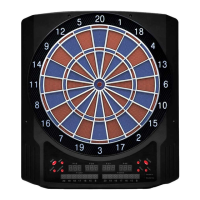

 To Next Page
 General