CAREFULLY READ THIS OPERATING MANUAL TO USE
AND ENJOY THIS UNIT PROPERLY.
KEEP THIS MANUAL FOR FURTHER REFERENCE.
BATTERY AND POWER
1. The Ultra+ features a rechargeable lithium-ion battery.
2. Charge your Ultra+'s battery using ONLY the included 15v 3a AC Adapter.
3. The LED indicator light will flash blue when charging and
will go solid once the charge cycle is complete.
4. Complete charge cycle will take 4-6 hours
5. Full battery will last up to 12 hours
6. For optimal battery performance, please charge your
Ultra+ for 4-6 hours before using it for the first time.
BLUETOOTH CONNECTION
1. Power on your Ultra+
2. Flashing "bLUE" on screen display means your Ultra+ is ready to pair to
a mobile device. Solid "bLUE" display means your Ultra+ has established
a connection.
3. Do a bluetooth scan and select "Ultra+"
4. Pair via Bluetooth
5. Once connection is established, you can control volume and
track using the paired mobile device, the Ultra+'s control panel
or the included remote control.
MODE CONTROL
6. Insert 3.5mm AUX cable into AUX input
(Unit automatically changes to AUX mode)
7. Insert Micro SD Card into TF slot
(Unit automatically changes to TF mode)
8. Insert USB drive into USB port (Unit automatically changes to TF Player mode)
9. TWS Mode - Link 2 Bumpboxx Ultra+’s together for a True Wireless Stereo Experience.
FUNCTION DESCRIPTION
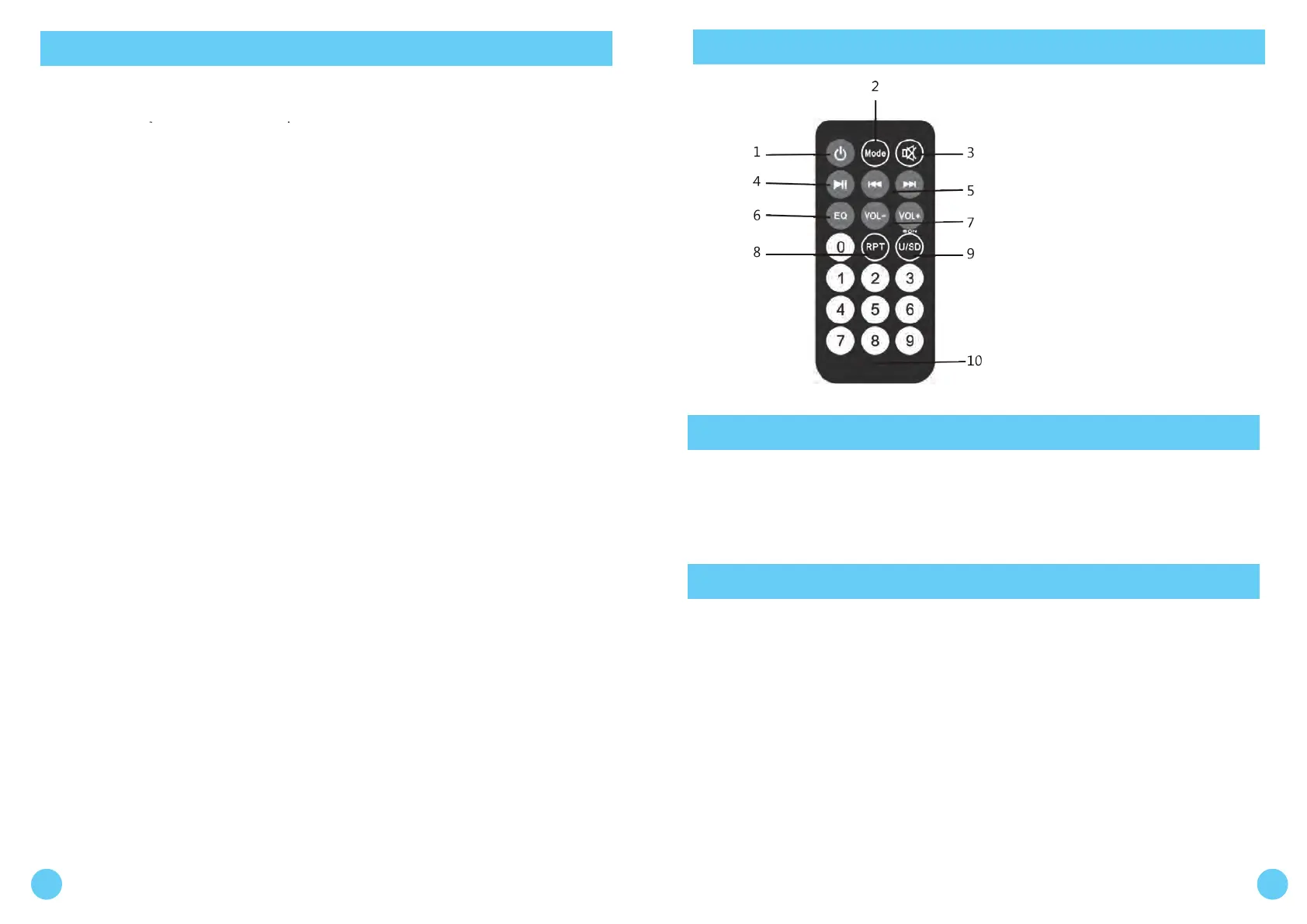
REMOTE CONTROL
1 2
1. Power
2. Mode
3. Mute
4. Play/Pause
5. Channel +/-
6. EQ
7. Volume +/-
8. Repeat
9. USB/SD
10. 0-9
BEST CARE AND INSTRUCTIONS
TWS PAIRING INSTRUCTIONS
• Once you’ve unpackaged the unit and it has finished its charging cycle
of roughly 2 full hours, it will allow your unit to function properly.
• It’s perfectly fine to power on the unit during this charging process.
1. Power on both Bumpboxx Ultra+ units. Both of your Bumpboxx Ultra+ display
screens will be flashing the word "bLUE" if unit's have open bluetooth connections,
if not please turn off Bluetooth on all previously paired cell phones within range
until you see both unit display's flashing the words "bLUE".
2. Hold the TWS (Pause/Play) button on your master unit (the one closest to your
device) for 5-10 seconds, you will see the letters "BT ST" on the display, then you
will hear a chime. This means you have successfully established your TWS connection.
(If this is unsuccessful, power down both devices, make sure all previously paired cell phones and
devices have turned off Bluetooth and start again. This time try using the other Bumpboxx
Ultra+ as the master.)
3. Just like you would normally do, find your Bumpboxx Ultra+ on the bluetooth
list on your phone and pair to it.
4. Crank up the volume and enjoy.


 To Previous Page
 Loading...