
 Need help?
Do you have a question about the Bunker Hill Security 58195 and is the answer not in the manual?
Symbols indicating hazardous situations leading to serious injury or death.
Symbols for minor injury hazards and non-personal injury practices.
Keep installation area clean, well-lit, and check for hidden utility lines.
Inspect for damaged parts, use identical replacements, and check assembly tightness.
Keep children away, dress properly, and use eye protection during setup.
Keep the light clean, inspect periodically, and repair damaged parts by a qualified technician.
Maintain proper footing, avoid overreaching, and do not operate under influence of alcohol/drugs.
Contains Li-Ion battery; must be recycled/disposed of properly. Do not open, crush, or incinerate.
Details the type and wattage of the lamp.
Details the voltage and capacity of the battery pack.
Place the solar panel in direct sunlight, ideally angled south.
Mount the light using screws or double-sided tape, checking for utility lines.
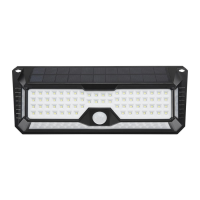
Identifies key components like Solar Panel, Lamp, Motion Sensor, and Power Switch.
Charge the battery for 3 days of full direct sunlight with the power switch OFF.
Describes how to turn the unit ON or OFF and its behavior.
Walk around the detection area to test the motion sensor and light activation.
Inspect unit for leaks, loose hardware, misalignment, or broken parts before each use.
Wipe external surfaces after use and keep the solar panel clean.
Steps to remove the battery from the lamp and proper disposal guidelines.
Solutions for power issues, motion sensor detection, and battery charging problems.
Addresses frequent changes in heat detection and relocating the motion sensor.
Solutions for heat sources, moving objects, and sudden temperature changes.
The Bunker Hill Security Ultra-Bright LED-Solar Peel & Stick Security Light is a solar-powered security device designed to provide illumination when motion is detected. This light is intended for outdoor use, leveraging solar energy to charge its internal battery, thereby offering a self-sufficient and energy-efficient security solution. Its "peel & stick" feature suggests an easy and non-invasive installation method, making it suitable for various surfaces without the need for extensive tools or wiring. The device incorporates an ultra-bright LED lamp, ensuring effective illumination of the monitored area.
The primary function of this security light is to detect motion and automatically activate its LED lamp to provide temporary illumination. This is achieved through an integrated motion sensor, which responds to infrared radiation emitted by people or animals. When motion is detected within its sensing range, the light turns on for a predetermined duration, typically 30 seconds, before turning off again if no further motion is detected. The device is powered by a rechargeable Li-Ion battery, which is continuously charged by an integrated solar panel during daylight hours. This solar charging mechanism allows the light to operate autonomously without requiring external power connections or frequent battery replacements. The light is designed to operate at night, remaining off during the day when there is sufficient natural light. A power switch is provided to turn the unit on or off, allowing for control over its operation. The "peel & stick" installation option, utilizing double-sided tape, offers a convenient alternative to traditional screw-based mounting, simplifying setup for users.
Before initial use, it is crucial to fully charge the internal battery. This involves turning the power switch to the "OFF" position and exposing the solar panel to full, direct sunlight for a minimum of three days. This initial charging period ensures the battery has sufficient capacity to power the light effectively. Once fully charged, the power switch can be set to "ON." The light will then automatically illuminate at night when motion is detected, indicating proper functionality.
Placement of the security light is critical for optimal performance. The integrated solar panel requires a location that receives at least 8 hours of full, direct sunlight daily. For users in the northern hemisphere, angling the solar panel slightly towards the South is recommended to maximize sun exposure. The device can be mounted using either screws or the provided double-sided tape. When using screws, it is essential to verify that the installation surface has no hidden utility lines to prevent serious injury from electric shock. For the peel & stick method, users should choose a desired location, apply the double-sided tape to the back surface, and then firmly press the light onto the surface, ensuring balance.
To test the light's functionality after charging, users can walk slowly around the detection area. The motion sensor should trigger the lamp to illuminate. If the light does not function as desired, users may need to relocate the unit or adjust its position to optimize motion detection and solar charging. The troubleshooting section of the manual provides guidance for common issues, such as the light not turning on, staying on continuously, or turning on and off intermittently. These issues often relate to the power switch setting, motion sensor detection, or insufficient battery charge.
The light's operation is straightforward: during the day, with sufficient natural light, the lamp remains off. At night, the motion sensor activates the lamp for 30 seconds upon detecting movement. This intermittent illumination helps conserve battery power while providing security lighting when needed.
Regular maintenance is essential to ensure the longevity and optimal performance of the Bunker Hill Security Light. Before each use, or periodically, users should inspect the general condition of the unit. This inspection should include checking for any signs of a leaking, swollen, or cracked battery, loose hardware, misalignment or binding of parts, cracked or broken components, or any other condition that might affect its safe operation. Any damaged or worn parts should be replaced or repaired immediately by a qualified technician. It is crucial not to use the security light if any switch does not operate properly.
Keeping the solar panel clean is a vital maintenance task. Dirt and debris can accumulate on the panel, reducing its efficiency in recharging the battery. Therefore, the solar panel should be kept free of obstructions to maintain optimum charging performance. After each use, or periodically, the external surfaces of the unit should be wiped with a clean cloth to remove any dust or grime.
The manual also provides instructions for battery removal and disposal, emphasizing the importance of proper handling due to the Li-Ion battery content. If the battery needs to be replaced or disposed of, the lamp should be turned off, and the screws on the back of the lamp assembly should be removed to access the battery. The battery should then be disconnected and removed from the lamp. It is critical to recycle or dispose of the Li-Ion battery properly and never to open, crush, heat it above 140°F, or incinerate it. Only identical replacement parts should be used for servicing to ensure safety and maintain warranty validity.
In case of abnormal noise or vibration, the problem should be corrected before further use to prevent serious injury or tool failure. For any technical questions or issues not covered in the manual, users are advised to contact customer support. The manual stresses that procedures not specifically explained should only be performed by a qualified technician.
 General
| Brand | Bunker Hill Security |
|---|---|
| SKU | 58195 |
| Category | Work Light |
| Light Source | LED |
| Power Source | Battery |
| Battery Type | Lithium-Ion |
| Number of Batteries | 1 |
| Included Accessories | USB Charging Cable |
| Color | Black |

 To Next Page