(*) The Microphone Box can be purchased separately if
not supplied with the TV. For more information contact
your local dealer or retail outlet where you bought your
TV.
•Connect your Microphone Box to your TV
•Use the Alexa Built-in option in the Settings>Sys-
tem>Voice Assistant menu
•Carry out first time installation on your TV. The setup
wizard will be displayed after the installation process is
completed
The wizard will guide you through the setup process.
Refer to the user manual of the Microphone Box for
detailed information.
Works With Alexa
You can control the functions of your TV with Alexa. In
order to do this, the setup process should be completed.
The setup can be carried out in the ways described below.
•Use the Works With Alexa option in the Settings>Sys-
tem>Voice Assistant menu
•Carry out first time installation on your TV. The setup
wizard will be displayed after the installation process is
completed
Setup process
The wizard will guide you through the setup process.
•If you carry out first time installation on your TV, the
Alexa setup wizard will be displayed after the installation
process is completed. On the first screen highlight Learn
More option and press OK. On the next screen you will
be informed about the feature. Highlight Start and press
OK to proceed.
•If you skip the setup wizard after the first time installation
you can use the Works With Alexa option in the
Settings>System>Voice Assistant menu to carry out
the setup later manually. On the first screen you will be
informed about the feature. Highlight Start and press
OK to proceed.
•An authentication code will be created and displayed
on the screen. Use your computer or any other device
with internet access to go to the internet address (URL)
shown on the screen. You will be directed to a page
where you can sign in to your Amazon account first, if
you are not already signed in. Then you will be directed
to a page where you can enter the authentication code
you see on the TV and link your TV to your Amazon
account.
•If the linking process was successful you will be asked
to determine a name for your TV, called ‘Friendly
Name’(FN). A ‘Friendly Name’ is a name that reminds
you of your TV, such as ‘Living Room TV’, ‘Kitchen TV’,
‘Dining Room TV’, etc. Choose an easy-to-say name.
You will say this name to tell Alexa which TV to control.
When you are done, highlight OK and press OK.
•Examples about the use of the feature will be displayed
on the next screen. Press OK to finish the setup.
•If you carried out the setup after the first time installation
you will return to the first screen of the setup wizard
when you press OK. In that case press Exit or highlight
Setup Later and press OK in order to exit the setup.
Once the setup is complete, you will be able to control
the functions of your TV with Alexa.
Note: Make sure that the devices are connected to the
internet.
Example Commands
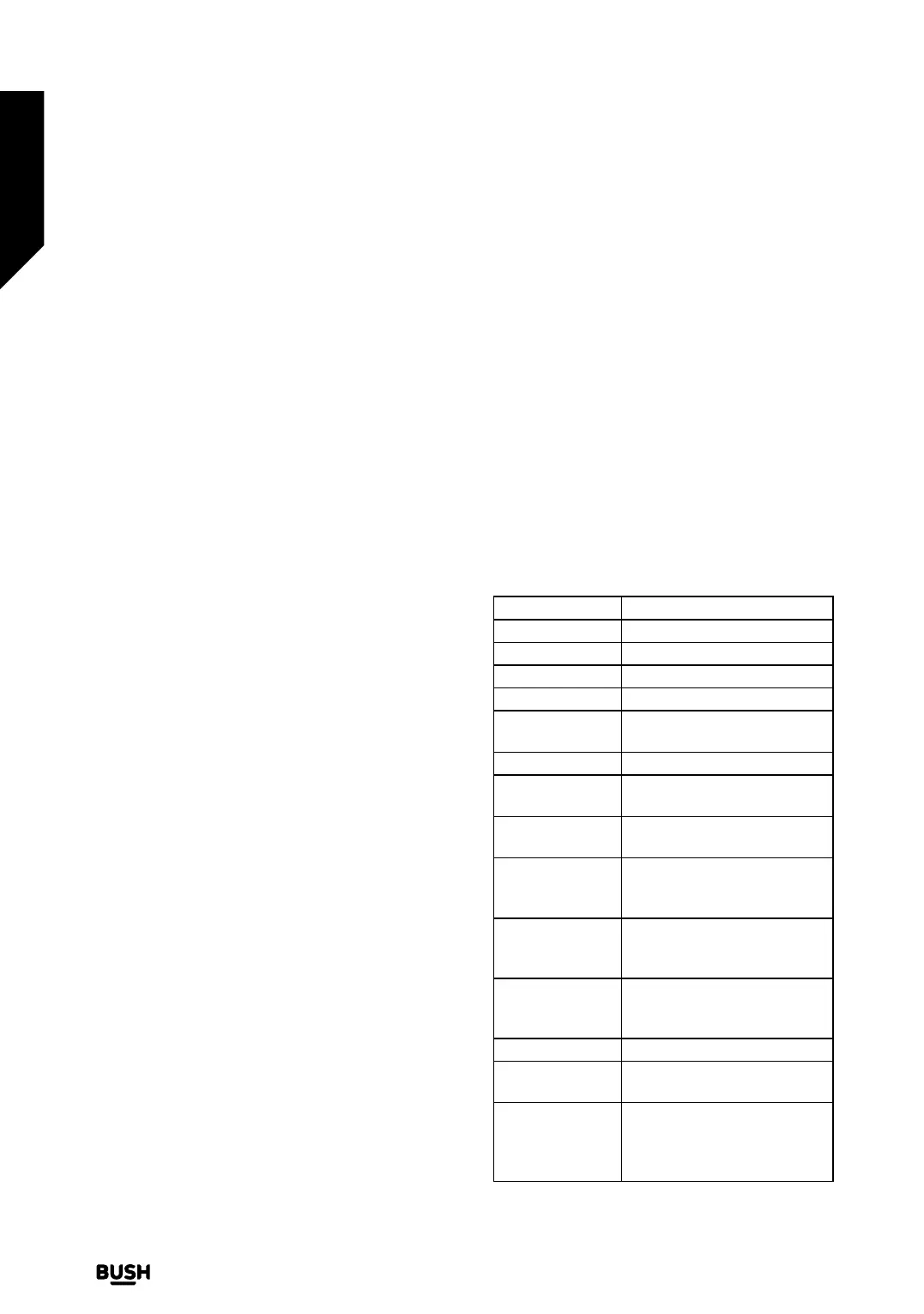
Here are some voice commands that you can use:
Command Function
Alexa, turn on ‘FN’ Powers on the TV
Alexa, turn o ‘FN’ Powers o the TV
Alexa, play ‘FN’ Starts media playback
Alexa, pause ‘FN’ Pauses media playback
Alexa, resume
‘FN’
Resumes media playback
Alexa, stop ‘FN’ Stops media playback
Alexa, fast forward
on ‘FN’
Advances media in fast forward
mode
Alexa, rewind on
‘FN’
Rewinds media
Alexa, set the
volume of ‘FN’
to 50
Sets the volume to the
specified level
Alexa, turn the
volume up on
‘FN’
Increases volume by 10 units
Alexa, turn the
volume down
on ‘FN’
Decreases volume by 10 units
Alexa, mute ‘FN’ Mutes sound
Alexa, unmute
‘FN’
Unmutes sound
Alexa, change
the input to
“input_name” on
‘FN’
The TV switches to the input
source with the specified
name (e.g. HDMI 1)
Advanced features
Getting the most from your TV
Advanced features
42
If you require any technical guidance or find that your TV is not operating as intended, a simple solution can often be found in the Troubleshooting section of these instructions,
or online at www.bush-support.co.uk. If you still require further assistance, call one of our experts on 0345 604 0105, a Bush enquiry line.



 To Next Page